Let’s Play with Letters and Sounds: Phonics Games for Home & School

Let’s Play with Letters and Sounds: Phonics Games for Home & School

Let’s Play with Letters and Sounds: Phonics Games for Home & School

Reading and vocabulary are two essential academic skills that every child should possess. Manier times parents fail to realize that good reading skills start with an understanding of phonics. If reading well is your goal then phonics is the foundation. However, in today’s day and age, the attention span of our children is reducing by the minute so, in order to teach young learners the basics of phonics, educators all across Dubai, UAE, GCC and the Middle East are using engaging online and offline games that encourage kids to start playing with letters and sound. Here are a few games that you can try in order to get your child familiar with phonics in a fun and interactive way.

Reading-Eggs_ Products

1. Fast Phonics By Reading Eggs

This is an online phonics program by the Reading Eggs that offers hundreds of interactive games that uses phonics instructions and boosts reading skills. The program has 20 levels where children get a chance to learn letter-sound recognition, spellings, blending etc. It is perfect for kids aged from 5 to 10 as it keeps them engaged and eager to improve at phonics in a creative way.

2. Anchor Charts

When it comes to phonics, it is a staple to use anchor charts with kids. Just hang them around the room so it is easier for them to memorise vowel blends, silent letters hard and soft C and G and much more. A wide variety of anchor carts are available online and can be easily downloaded

3. Beginning Sound Charts

When you combine visuals with audio lessons, their retention increases dramatically. This is exactly why it is a good idea to create beginning sound charts with your kids. You can either draw and create the chart yourself along with your children or downloaded printable versions from the internet and hang them around your room for daily revision.

4. Toss and Blend with Plastic Cups

No one ever says no to a game of ping-pong right? Now let’s convert this fun game into a phonics activity for young kids. Grab a stack of plastic cups and label them with different letter blends. Then ask the child to throw the ping-pong ball into any of the cups, whatever cup the ball falls into, the kid has to pronounce the letter blend. You can also convert this game into a fun competition among kids to keep them attentive.

5. Match Cups to make a word

If you have cups leftover from the last game, you can use them effectively to build a new phonics game. Write different consonants and vowels on each cup and ask the child to mix and match to create their own word. This is a fun way to work on sight words and encourages creative thinking among young learners.

6. Use Lock and Keys to learn phonics

Label keys with beginning sounds and locks with word endings. Then you can ask the child to match the right key with the right lock. This self-correcting activity not only refines their motor skills but also facilitates phonic learning.

7. Phonic Water balloon game

This is a fun activity to do in your backyard along with a group of young kids. Tape beginnings sounds to your wall or fence and then throw water balloons with ending words right at them. This way your child will not only learn new spellings and sounds but also have loads of fun outdoors. These are just a few games and activities that facilitate phonic learning and reading among children. Kids today are highly advanced and that calls for recognising new effective ways of studying. Try these unique activities with your children and watch them get more and more intrigued about phonics.

Contact us

Fill in your details below or send us an email on info@knowledge-hub.com

Mathletics Primary Program

Mathletics Primary Program

Mathletics Primary Program

Mathletics provides students with actual challenges to test their mathematical abilities and knowledge by combining intrinsic and extrinsic rewards with creative adventures.

Lesson Planning Made Easier

Mathletics simplifies class planning and saves time for teachers. To swiftly sketch out and deliver a lesson plan that addresses the requirements of all.

Mathematics is a subject that students should continue to develop and master throughout their academic careers, since it provides a solid basis for understanding how the world works and is a key ability for 21st-century learners.

Especially in the middle east and Dubai, the units of inquiry in the Primary Years Programme, students are exposed to mathematical themes in their everyday learning. This enables students to establish vital connections between the mathematical principles they’re learning and the real world they live in. Math is all around us, so kids must be able to grasp these abilities and concepts from an early age. It’s also critical that students feel encouraged while learning and that they’re taught to work through processes to arrive at a solution.

Children learn mathematical concepts such as data gathering and handling, space and shape, measurement, patterns, numbers, and functions in the Primary Year Program, which can be used to lay the groundwork for higher-level thinking in future years.

World-Math-Day-by-Mathletics

Primary Year Program, children in the Middle East & Dubai are then introduced to broader mathematical concepts that demand them to think critically about how they might be applied in a number of scenarios once these concepts have been understood.

Manipulatives or hands-on instruments and resources are frequently employed in the Primary Year Program to give younger pupils with a tangible depiction of mathematics. This is particularly beneficial for those who prefer practical learning than reading or memorizing. Teachers can also employ play as a method of learning, such as encouraging students to work in groups to set up a shop in class and figure out the best way to spend their money on the items they require. These manipulatives assist students in visualizing and making key connections in order to gain a better understanding.

It also teaches pupils how to apply mathematics outside of the classroom to real-life situations. It motivates kids to participate at home or while out doing activities, and it shows them that mathematics can be used to a wide range of situations

Putting Concepts and Techniques into Practice with Real-World Applications

In the Middle East & Dubai the most important aspect of the Primary Year Program mathematics curriculum is giving students opportunity to apply what they’ve learned in the classroom to real-life circumstances.

Students engage in engaging activities that allow them to create connections, apply what they’ve learned, and show off their work. Consider the following scenario:

  • Children produce and present interactive presentations in which they must demonstrate their conceptual comprehension while also being open to constructive comments from their classmates. This type of application and involvement will, in the end, prepare them to integrate creativity, critical thinking, and mathematics knowledge in the future.
  • Children will show off their work and explain how they did it to the rest of the class. This helps individuals improve their public speaking abilities while also teaching them to take constructive criticism about their work. It’s a fun pastime that helps them improve their math skills while also boosting their confidence.

Throughout their education, their critical thinking skills develop, and they learn how to apply their core knowledge in a variety of situations. This is a 21st-century skill that is in high demand all around the world and can be applied to any career or life situation.

Contact us

Fill in your details below or send us an email on info@knowledge-hub.com

Virtual Robotics Coding: Power Robots From Home

Virtual Robotics Coding: Power Robots From Home

Virtual Robotics Coding: Power Robots From Home

There is no doubt about the fact that coding is an essential skill that every 21st century student needs to learn. Even the school’s curriculum is remodeled to focus on STEAM (Science, Technology, Engineering, Arts, Math). To match the growing demands of parents to make coding as inclusive as teaching language or math, there are many after-school courses that are available & cater to young learners. But these classes are definitely not cheap, and many charge a tutoring fee of AED 315 per hour, which is quite steep.

A New Way Of Learning To Code

With changing times, children can now learn this vital life skill by undertaking virtual coding sessions. This is comparatively inexpensive, as there is no investment in hardware & the only requirement for the students is to have a laptop with good WiFi connectivity. So, with virtual coding, you can now code robots anywhere, at any time. Isn’t that cool! Enlisted below are a few good reasons to get started asap;

Robotify_banner

#1 Affordability

When you have to assemble a Robot physically, there are so many components required like; motors, sensors, and cameras, thereby making the overhead cost expensive. Virtual robots do not need any hardware devise but allow you to build the structure of the robot virtually instead, by using virtual components. Affordable solutions such as these, are sustainable in the long run and will enthuse more & more students to sign-up for coding.

#2 Self-Paced Learning

In the case of physical sessions, the teacher follows a syllabus and covers certain topics per session. Some fast-paced students are brilliant and can grasp the concepts quite well, but others struggle to be at the same place as other classmates. This impacts the self-esteem of the child and he may start finding these lessons to be very difficult & difficult & ultimately quit. However, when one opts for the same virtually, students can watch tutorial videos, coding practice activities, and level-up at their own pace, without feeling embarrassed. There is no teacher involved, and one can choose to watch the ‘concept video’ curated by experts, as many times as he likes. Self-aced learning creates a stress-free learning environment & students take ownership of their own achievements.

#3 Accessibility

A mere WiFi connection and laptop are all you need to get started with coding. There Is no need to travel far distances, and you can learn from the comfort of your home. This makes it absolutely convenient and reduces the heavy costs of signing up for expensive classes. A child sitting in Dubai can learn to code from a professor in the US. Therefore, international boundaries do not matter and it brings culturally diverse students on board.

Robotify_banner

#4 Gamified Learning Is Fun

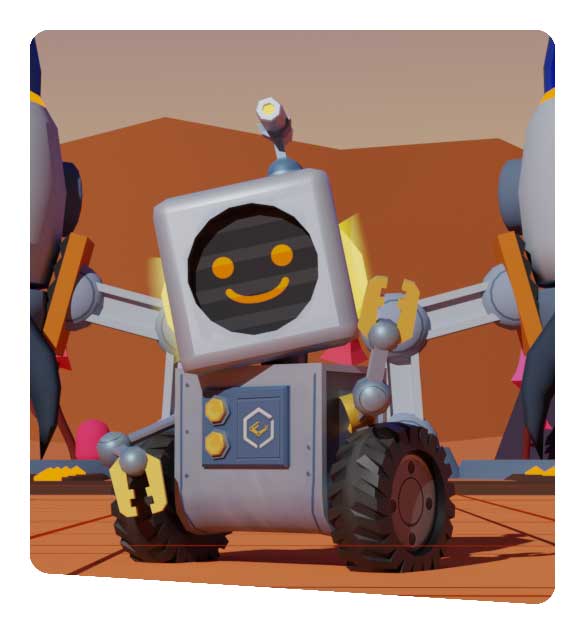
A virtual coding program is unlike pen & paper learning. Here students have the liberty to make Robots perform interesting tasks, which would otherwise not be possible even with physical coding. For example; making ‘Rover the Robot’ walk on Mars or asking ‘Austie’ to dive into the ocean & hunt for fossils. It’s pretty challenging & exciting, all in a game-like fashion, which makes learning so much more intriguing. Students can work with different levels & play a match-off with their classmates.

Robotify helps in enhancing creative thinking and problem-solving skills amongst students by offering easy coding lessons for all. Students can enjoy the thrill of coding, without the hassle of a hardware! There are over 800 coding activities to choose from and to keep your excitement going, the platform is available 24X7. Robotify’s popularity has grown over the years and 100+ countries, including enthusiastic learners from GCC in the Middle East, take advantage of Robotify.

Some of the Activates on Robotify include:

  • Axel’s Mars Adventure
  • Treasure Trove
  • Drone Park
  • GBR Tag and Track
  • Marine Biology Survey

Contact us

Fill in your details below or send us an email on info@knowledge-hub.com

Renewable Energy: The Only Sustainable Solution Worth Investing

Renewable Energy: The Only Sustainable Solution Worth Investing

Renewable Energy: The Only Sustainable Solution Worth Investing

Renewable energy is that which is available in the environment. For example; solar energy can be naturally generated by using solar panels to convert sun’s heat into energy. Wind energy is converted when the wind turbines rotate with the force of the wind which powers the generator to make electricity. And hydroelectric power is sourced when the force of water pushes the blades of turbines in water to move & produce electricity, which is carried through pipes. Through this blog, we aim to highlight the many advantages of renewable energy & why it makes sense to invest in these natural sources, rather than depend on fossil-fuels. As of 2020, only 19.8% of the total energy supply is generated through renewable sources, and there is so much more to explore, to increase this figure.

Renewable Energy Does Not Run Out of Supply

Renewable means always capable of being renewed and therefore never being exhausted. Hence by definition, renewable energy is that which will never run out. The wind will continue to blow and the sun will rise & shine as usual for perpetuity. This important characteristic trait makes it a sustainable and reliable source of energy to work with verses the fossil fuels which will eventually run out in decades to come.

Renewable Energy Doesn’t Generate Emission

Any source of renewable energy that you make use of has no adverse effects, as it doesn’t generate harmful emissions into the atmosphere. On the other hand, fossil fuels contribute to greenhouse gas emissions such as; carbon dioxide (CO2), methane and nitrous oxide that can have a negative impact on the climate and cause global warming. To run economies and cater to the ever-increasing population demands, industries such as- agriculture, transportation, electricity, and construction, are blamed to contribute to the release of harmful greenhouse gases and play havoc in the balance of nature on Mother Earth.

Renewable Energy Reduced Carbon Footprint

To put it in simple words, carbon footprint is the amount of greenhouses gases that we humans generate due to our own actions such as; travelling by car, excessive usage of AC or heating systems, wasting electricity, etc. The average carbon footprint that a person generates in the US was accounted to be as high as 16 tonnes. The aim is to lower carbon footprint and some of the ways to do so is by; going to a local supermarket by walking it up rather than taking the car, eating foods that are produced within your region to avoid waste associated with processing, shipping, and packaging, etc.

Cut Down on Water Usage

When it comes to converting non-renewable sources like coal & natural gas into energy, the process includes heating up huge gallons of water and creating steam to run turbines. As compared to that, the sun does not require water to generate electricity and neither does wind need wastage of water to generate energy. Also, hydropower is generated from the forceful current of water flowing downstream from rivers & dams and not by heating water & converting it into steam.

Reduces Costs

Renewable energy is not only good for the environment, but also friendly on your wallet. The sun, wind, and flowing water is free of cost and we do not have to pay any cost to replenish it. Also, the process by which these renewable sources are converted into energy, requires only one-time cost for set-up the upkeep & maintenance is comparatively inexpensive. As the demand & acceptance on ‘green energy’ increases, the cost of technology will also considerably drop & newer-cheaper inventions will come into existence. Our dependency on other coal will reduce greatly by shifting to renewable sources, and thus, it’s a clear win-win situation for consumers, suppliers, & government bodies.

Increase Independence of Economies

Recently we have witnessed the gruelling effects of raising oil prices, and how fuel for powering our cars & trucks are reaching sky-rocket rates. This is because of dominance & dependence of few countries such as – Russia, Middle East, and US, that are naturally blessed with oil. Therefore, there is no option but to rely on these oil producing giants. Renewable energy reduces oil imports and the pressure of having to pay exorbitant amounts to fulfil the requirements of the people. Renewable energy will reduce risk of energy crisis and contribute to a sustainable development.

bbs-3d-logo

Now that we know how important & urgent the need is to shift to renewable energy sources, why not make our children aware of this at an early age? Carolina’s Building Blocks of Science is bringing the importance of Energy Works, to classrooms all over the world, including Dubai, UAE and other GCC regions across the Middle East. The Energy Works module comes with a hands-on kit and all the essential supplies necessary to conduct experimentation to understand alternative, potential, and kinetic energy in systems powered by sun, wind, and water. So, are you ready to usher into an era of young Energy Savers!

Contact us

Fill in your details below or send us an email on info@knowledge-hub.com

Why Being a Mental Math Pro Is Beneficial In the Long Run?

Why Being a Mental Math Pro Is Beneficial In the Long Run?

Why Being a Mental Math Pro Is Beneficial In the Long Run

We must have heard stories of how accomplished and celebrated ‘Shakuntala Devi’ was for her astonishing ability to perform mental math problems and present answers even faster than it could be calculated on a calculator. Shakuntala was indeed a ‘Human Calculator’ and left a mark of legacy behind, which we proudly share with our children today!

What Is Mental Math?

Mental math is practicing math calculations & computing answers in your head, without the use of paper, a calculator, or computer. It is basically manipulating numbers in your mind and arriving at an answer verbally. Without even us realizing it, we do mental math calculations very often through the day. For example; calculating the amount of money as change you are to receive from the shopkeeper against the note you have given, is a good example of mental math function. Now that we are so dependent on our phones & iPads, that our kids have stopped exploring the power of their minds and instead rely on tools for doing even simple day-to-day calculations. However, we need to change this habit, as there are countless benefits to brain development of children who are able to practice math calculations mentally.

Making Children a Pro at Mental Math Can Help In:

#1 Boosting Brain Development

Being able to calculate & crunch numbers requires remembering formulae and applying them correctly in the appropriate situation. That requires good memory power & the ability to store information & retain it whenever required. Only when you use this superpower of mental application, will your brain power boost and it will benefit the child by being able to remember more & more details and concepts taught at school.

#2 Improves Concentration

The average concentration of a 13-year-old adolescent is only about 39 minutes. That means getting distracted is inevitable, especially when we have access to smart phones & social media, focusing on what is being taught in class takes a back seat. Mental math is a great tool for training the mind to focus on things that are important. Mental math is not just about getting the calculation right, it is a means to train the brain to filter out the chaos happening around us, and instead calmly draw more attention to more important tasks like; studying, becoming a better person, developing personality, and inculcating good habits.

#3 Enhances Confidence

As a beginner you would start by solving addition sums as simple as; 150 + 75 and be applauded for the right answer. With progress, the teacher increases the difficulty level of sums shot at the student. Now students are asked to mentally decipher; what is 3 (x-7), when x = 12? Getting to solve complex problems mentally, increases the confidence in oneself manifold. Confident individuals do well in life and they are not afraid of making mistakes, learning from them, & keep progressing in lives.

#4 Better Marks In Exams

A sharper mind, fetches better grades in exams! Students are able to perform well in most subjects, as their brain is now trained to withhold vast amounts of information and think quickly, thanks to constant practice of mental math activities. Not only with numbers, students are able to show good progress in other subjects, and overall push themselves to achieve excellence.

#5 Improves Mental Health

Science has proved that memory-based math activities stimulate a region within the brain called as dorsolateral prefrontal cortex which is linked to anxiety & depression. So, to keep that area of the mind active, it is vital to exercise or use it often. What better way to work your mind than to challenge It with calculations! Regular brain stimulation therefore leads to improvement in emotions and contributes to the child’s improved mental health.

Contact us

Fill in your details below or send us an email on info@knowledge-hub.com

Google Drive Is the Real Deal – A Cloud Storage for Work & Home

Google Drive Is the Real Deal – A Cloud Storage for Work & Home

Google Drive Is the Real Deal – A Cloud Storage for Work & Home

You must be familiar with Google Drive, which is a cloud-based platform that allows you to save files in the form of .pdfs, .jpgs, .excel, .ppt, .mp3 and many more such formats. Google Drive is a world-wide popular tool, used by over 1 billion people, with over 2 trillion files stored, that explains its magnanimous usage and user-friendliness which is appreciated by all. This universally accepted storage dump offers ‘free’ 15 GB of capacity across Gmail, Google Drive, and Google Photos. And if you ever cross this limit, you can purchase additional storage by upgrading yourself to a Google One account. Life is much easier and stress-free when you secure all important documents from your computer/laptop by uploading them as a back-up on Google Drive, because you never know when your device may crash and in-turn lose your day’s hard work.

Good Reasons to Stick to Using Google Drive:

Below are some good reasons to stick to using Google Drive:

#1 Easy to Manoeuvre

Once you log-in to your Gmail account from your laptop, simply click on the Google Apps button and click on Drive from the drop-down menu. There you go! The most recently uploaded or edited documents will be visible on the screen at first. Magic happens when you click on the + New button. Feel free to upload any type of files, if not, an entire folder from your local drive. Files that are shared by someone else, can also be viewed from the G-Drive. If you wish to retrieve a document, that was deleted by mistake, simply click on the ‘trash can’ icon and restore it. As the storage keeps getting used, check the % storage full vs. available from the G-Drive main screen.

#2 Friendly with Microsoft Office

You can create ‘Google Doc’, ‘Google Sheet’ or ‘Google Slide’ and saved it for later edits by your co-workers. However, if your project mate is not comfortable editing data on Google Drive itself, or if he doesn’t use this application at all, he can simply download the shared sheet and it will automatically be saved as a Microsoft Word, Microsoft Excel, or Microsoft PPT file, from which you can make changes to the content easily. Therefore, instead of exchanging back-&-forth emailers, it’s so much easier to simply open the required document & edit it, without even having to take the trouble to click ‘Save’, as all changes made to the sheet by the participants are automatically ‘saved’ in real-time manner.

#3 Giving Different Levels of Access

A same Google Doc sheet can be shared with different audiences and each can be given a different level of access. Wow! That means, you need not worry about issues associated with mishandling of projects, as only the right person is given power to ‘edit’, while others can just be partial ‘viewers’. The ‘edit’ option gives the recipient authority to make changes to the file and even move the file to another path or delete it. One can even re-share the same document with whosoever they wish to. That means literally giving full-access to your work to someone else. Therefore, pass on the ‘edit’ rights to only those colleagues you truly trust. If you choose to assign ‘view’ rights, that means, the person will only be able to view the documents in the folder, but not be able to make any changes to them. There is one more special option called ‘can comment’, where the recipient can add comments and make suggestions on the sheet, but can’t edit it directly or share it with anyone else.

#4 Secured Encryption

Is Google Drive really safe to store confidential work or personal data on the cloud storage? The answer is, it is indeed secure, as Google encrypts every file that is stored and shared on this cloud. Google uses 256-bit advanced Encryption Standard (AES) on all its servers and Transport Layer Security (TLS) protocol to protect the data while sharing it further. However, to make this full-proof, make sure you login to the Drive only from your personal laptop and not on an unknown PC or borrowed laptop. Files from Google Drive get synchronized easily with the third-party laptop or PC, thereby increasing chances of vulnerability. And ofcourse, always use two-factor authentication to prevent hackers from performing mischievous acts to your folders.

TechnoKids Teaches Kids to Share Projects Via Google Drive

TechnoKids infuses students with Digital Literacy, and keeps them abreast of the latest technology that is used in the real world by people and corporates. The modules are designed keeping the STEAM curriculum introduced in most schools across the world, including Dubai & GCC regions of the Middle East. The hands-on project based learning, makes it fun & interesting for students to understand important computer skills, through playful activities, competitions & assignments.

To give you an idea TechnoKids Primary curriculum has the following lessons; TechnoPainter (creating art with Microsoft Paint), TechnoGallery (using Google Drawings and Slides to explore digital art tools) and TechnoBookmarking (creating a flip-book using PowerPoint). Students not only explore & curate interesting projects online, but also learn to share it with the teacher & classmates, via Google Drive. 

Contact us

Fill in your details below or send us an email on info@knowledge-hub.com