Interesting Way to Language Mastery with LEGO® Education

Interesting Way to Language Mastery with LEGO® Education

Language proficiency is undeniably very important for academic and professional achievement. Traditionally, reading, writing, and speaking exercises have been the primary methods for language development. However, the educational landscape is evolving, and innovative tools like LEGO® Education are revolutionizing language learning. By merging fun and education, LEGO® Education offers a dynamic approach to language acquisition.

Storytelling and Narrative Skills

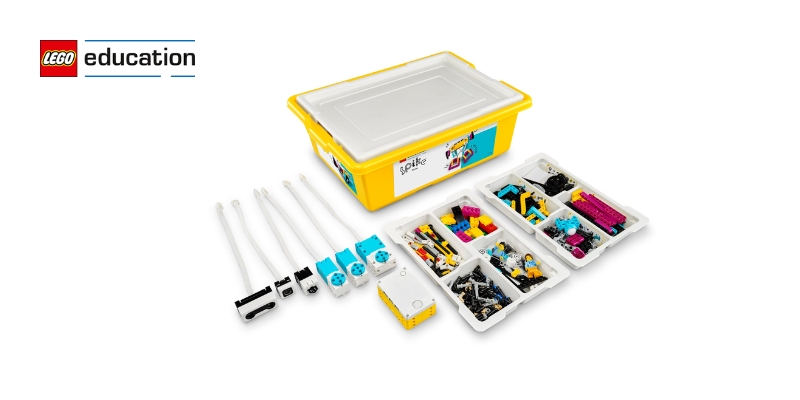
LEGO® Education kits often come with story starters and scenario-based tasks that prompt children to create narratives. This approach is particularly beneficial for developing storytelling and narrative skills. For example, the LEGO® Education STEAM Park set includes various characters, which children can use to create their own stories. They can build scenes from their imagination and then narrate their stories to the class.

This not only enhances their ability to construct coherent narratives but also helps them understand the elements of a story, such as plot, character, and setting. By physically building their stories, children can visualize and better comprehend these narrative components.

Enhancing Vocabulary and Communication Skills

One of the primary ways LEGO® Education aids in building language skills is by enhancing vocabulary and communication. When children are given a task to build something with LEGO bricks, they are often required to describe their creations. This description process helps them learn new words and use them in context. For instance, if a child builds a castle, they might learn words like “turret,” “moat,” and “drawbridge.”

Moreover, working in groups encourages children to communicate with their peers. They have to articulate their ideas, listen to others, and collaborate to achieve a common goal. This interactive process significantly improves their communication skills and builds their confidence in expressing themselves.

Reading Comprehension and Sequencing

Building with LEGO® Education kits requires children to follow instructions and understand sequences. This process is analogous to understanding the sequence of events in a story, which is a critical component of reading comprehension. For example, when children follow step-by-step instructions to build a model, they are practicing the skill of sequencing. They learn that certain steps must be completed before others, much like understanding the beginning, middle, and end of a story.

Additionally, some LEGO® Education products come with accompanying books that provide context and background for the building tasks. Reading these books enhances children’s reading comprehension as they need to understand the text to complete their builds correctly.

The Power of Play in Learning

One of the key advantages of Play-way learning is that this method makes learning feel less like a chore and more like a fun activity. When students are having fun, they’re more likely to retain what they’ve learned. LEGO® Education taps into this potential by using play as a medium to teach complex concepts. Through structured and guided play, children can explore language in a more relaxed and enjoyable environment.

Encouraging Critical Thinking and Problem-Solving

Language learning is not just about vocabulary and grammar; it also involves critical thinking and problem-solving skills. LEGO® Education promotes these skills through its hands-on activities. When children encounter challenges while building they must think critically to find solutions. This problem-solving process often requires them to use descriptive language and specific terminology, thereby enhancing their language skills.

For example, a child building an ‘O-Shaped Track’ using LEGO® Education Coding Express Set might encounter structural issues. To solve these, they must discuss and analyze the problem, brainstorm possible solutions, and implement their ideas. This process involves a lot of communication and descriptive language use, which reinforces their language abilities.

Real-World Applications and Integration

LEGO® Education is not just limited to language arts; it can be integrated across various subjects, providing a comprehensive learning experience. For instance, in science, building a model of the ‘gymnast-powered car’

can help them learn and use scientific terminology such as ‘motion’ and ‘force’.

This cross-disciplinary approach ensures that children are not only learning language skills in isolation but are also applying them in real-world contexts.

LEGO® Education offers a unique and effective way to build language skills among learners. By incorporating play, storytelling, and hands-on activities, it makes learning engaging and enjoyable. As educators and parents, leveraging tools like LEGO® Education can significantly enhance the language learning experience, setting children on a path to academic success and lifelong learning.

Contact us

Fill in your details below or send us an email on info@knowledge-hub.com

The Unique Value of 3D Printing in Education

The Unique Value of 3D Printing in Education

Introduction to 3D Printing

3D printing or additive manufacturing is an innovative process that builds the three-dimensional object layer by layer with the help of a digital model. 3D Printing in Education has revolutionized various fields and holds immense promise for transforming learning experiences for both students and teachers.

Benefits of 3D Printing in Education

  1. Enhanced Engagement and Motivation: 3D printing grabs students’ attention and keeps them interested. By turning abstract ideas into physical models, students can see and grasp complex topics better. 3D printing grabs students’ attention and keeps them interested. By turning abstract ideas into physical models, students can see and grasp complex topics better.
  2. Hands-On Learning: 3D printing in education promotes hands-on learning experiences, allowing students to design, create, and iterate their projects. This practical method helps cement book knowledge and build problem-solving abilities.
  3. Cross-Disciplinary Applications: The versatility of 3D printing makes it applicable across various subjects. In science, students can print models of molecules or fossils; in mathematics, they can create geometric shapes; in history, they can recreate historical artifacts. This cross-disciplinary approach fosters a comprehensive understanding of topics.
  4. Encourages Creativity and Innovation: With 3D printing, students can make their ideas real, which sparks creativity. They learn to think and design fixes to real-world issues getting ready for future jobs in science and tech fields.
  5. Cost-Effective Prototyping: It provides an affordable way for students to prototype their designs. This allows for multiple iterations and experimentation without the high costs associated with traditional manufacturing methods.

Unimat 3D Printer: UNI-PRINT-3D

The Unimat 3D Printer, UNI-PRINT-3D, by Cool Tool Education, is an advanced tool developed from the proven Unimat CNC System. This 3D printer stands out for its exceptional stability, accuracy, and user-friendly features, making it an ideal choice for educational settings.

Key Features and Specifications

  1. High Precision and Stability: The UNI-PRINT-3D boasts a high layer resolution of over 20 microns, ensuring detailed and accurate prints. Its full metal frame and sturdy construction contribute to its stability, allowing for precise and consistent production of models.
  2. Versatile Printing Capabilities: This printer supports all common filaments, including PLA (Polylactic Acid), ABS (Acrylonitrile Butadiene Styrene), Nylon, and Laybrick.
  3. Temperature-Controlled Print Bed: The temperature-controlled aluminum print bed can reach up to 150°C, allowing for better adhesion. This feature ensures high-quality prints every time.
  4. Open Source Software: The UNI-PRINT-3D is made to operate on an open-source software called, Machinekit. This software platform is compatible with Windows, OSX, Linux, and Android. The cross-platform user interface offers flexibility and ease of integration with various devices.
  5. Advanced Connectivity: Connectivity options include USB, Ethernet, and WiFi, making it easy to transfer files and control the printer remotely. Autonomous printing capabilities allow the printer to operate independently once the print job is initiated, freeing up time for educators and students to focus on other tasks.
  6. Enhanced User Experience: The UNI-PRINT-3D which is available in schools across Dubai and the Middle East, is equipped with LEDs for illumination and color-coded signaling. This technology provides clear visual indicators of the printer’s status. These features enhance the user experience and make the printer more accessible to students.

STEM Projects for Different Subjects Using a 3D Printer

Science Projects

3D printing in education opens up numerous possibilities for science. By printing 3D models of molecules, students can visualize and understand complex chemical structures and bonds, enhancing their grasp of chemistry concepts. In biology, detailed models of human organs, bones, and other anatomical structures can be created to facilitate a deeper understanding of human anatomy.

Technology Projects

In technology education, 3D printing is a game-changer. Students can design and print custom parts for building and programming robots, giving them hands-on experience in robotics and engineering. Furthermore, printing holders and organizers for circuit boards and electronic components help students manage their projects more efficiently and learn about the practical applications of technology.

Engineering Projects

3D printing has a big impact on engineering students. It gives them a chance to make small versions of bridges, buildings, and other structures. This helps them learn about engineering ideas. They can also print gears, levers, and other machine parts. With these, they can build working models and machines. This hands-on approach lets them grasp how mechanical systems work.

Mathematics Projects

Mathematics topics can be significantly enriched through 3D printing in education. Students can print various geometric shapes and solids to explore geometry concepts, making abstract ideas more concrete. Creating models of complex mathematical surfaces and functions helps students visualize and better understand higher-level mathematics.

The UNI-PRINT-3D also known as the Unimat 3D Printer, has a big impact on learning. It prints with high accuracy, works for many purposes, and is easy to use making it a great fit for schools and colleges. When teachers bring 3D printing into their lessons, it helps students to think diffrently, come up with new ideas, and better grasp tough topics.

Contact us

Fill in your details below or send us an email on info@knowledge-hub.com

Explore Fascinating STEM at home with databot™

Explore Fascinating STEM at home with databot™

Innovative learning techniques are rapidly evolving, replacing traditional textbook methodologies. Educators and parents are striving to make learning enjoyable and effective for students who are easily exposed to digital media mediums and all forms of entertainment. Whether homeschooling or simply looking to enrich your child’s education with hands-on experiences, databot™ offers a fantastic solution to bring STEM topics to life. Here’s how you can practice STEM at home with databot™ and discover new learning methods.

Easy Setup and Use

One of the best features of databot™ is its simplicity. Setting it up is as simple as it can get, allowing you to initiate the teaching-learning experience without any technical hurdles. The intuitive design ensures that kids and parents can quickly get started, making it an ideal tool to experience STEM at home.

Compact and Portable

The databot™ is impressively compact, ensuring that it is easy to carry and store at home. This small yet powerful device can fit in your pocket, allowing you to take your STEM learning adventures anywhere. Whether you’re heading to the park, visiting family, or just moving from room to room, the databot™ is always ready to go.

Built Tough for Fun Learning

Learning should be fun, and the databot™ is designed to endure the challenges of hands-on, playful education. Its durable build allows you to toss it, launch it, and use it in various creative ways, making science projects engaging and interactive for students. This robustness allows for creative and dynamic learning experiences, transforming everyday activities into exciting educational opportunities that facilitate STEM at home.

Versatile Teaching Tool

databot™’s extensive features make it a versatile tool for teaching a wide range of subjects. From math and earth science to physics, life science, chemistry, environmental science, and programming, databot™ covers it all. Here are some ways to incorporate databot™ into your at-home STEM education:

  • Math: Use databot™ to gather and analyze data, helping children understand concepts like statistics, graphing, and probability.
  • Earth Science: Explore the environment by measuring temperature, humidity, air pressure, and more. databot™ can turn a simple walk in the park into a scientific expedition.
  • Physics: Conduct experiments on motion, acceleration, and force. databot™ can be thrown, dropped, or launched to study real-world physics concepts.
  • Life Science: Investigate the biological aspects of the world around you. databot™ can help track changes in environmental conditions and their effects on plants and animals.
  • Chemistry: Experiment with gases like CO2 and understand chemical reactions. databot™’s sensors can make abstract chemical concepts tangible with easy STEM at-home experiments.
  • Environmental Science: Measure pollution levels, UV light, and other environmental factors to learn about the importance of protecting our planet.
  • Programming: databot™ is fully programmable, offering a gateway to coding and computational thinking. Create custom programs to control databot™ and analyze the data it collects.

Shareable and Accessible

databot™ is designed to be easily shared between families and individuals. All necessary software is free and readily available, making it a cost-effective solution for enhancing STEM education at home. This accessibility ensures that everyone can benefit from the powerful learning opportunities databot™ provides.

Hands-on Projects

The key to effective learning is engagement, and databot™ excels at making STEM subjects exciting. By incorporating hands-on activities and real-world applications, databot™ transforms abstract concepts into tangible experiences. This approach not only makes learning more enjoyable but also helps children retain information and develop a genuine interest in STEM fields.

Databot™ Kit Revealed

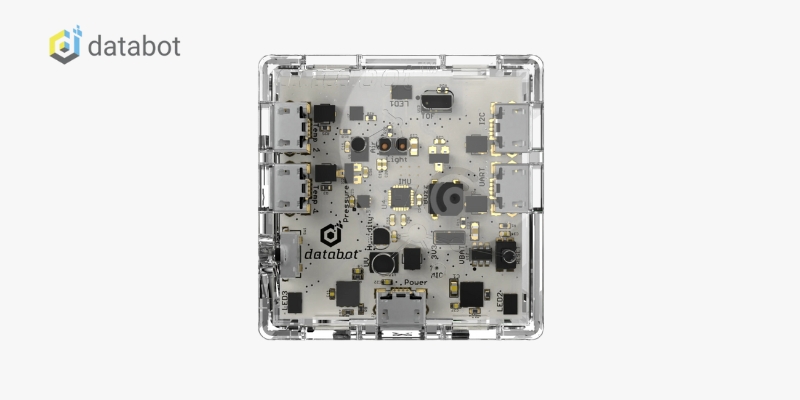
databot™ 2.0 is a compact device, only 1.67″ x 1.67″ and 3/4″ tall, perfect for exploring topics like motion, UV light, and more. It features 16 sensors, programmable LEDs, and a tone generator, supporting projects in AI and machine learning. The Vizeey™ app makes data streaming and analysis simple and intuitive. The kit includes all essentials, such as the Vizeey™ software, charging cable, temperature probe, lanyard, and protective case, for immediate exploration. This makes learning affordable, approachable, and fun!

Incorporating databot™ into your at-home learning routine can revolutionize the way your children engage with STEM and home subjects. Whether you’re a homeschooling parent or looking to supplement your child’s education, databot™ offers endless opportunities to explore, discover, and have fun. It helps students practice concepts taught in school, enhancing retention and learning. Embrace the future of learning with databot™.  

Contact us

Fill in your details below or send us an email on info@knowledge-hub.com

Master Your Spreadsheets: Informative Excel Lessons for Beginners

Master Your Spreadsheets: Informative Excel Lessons for Beginners

Microsoft Excel is a powerful tool for data organization, analysis, and visualization. Did you know that every Excel Worksheet that we use today has around 1,048,576 rows and 16,384 columns? Its versatile formatting features allow users to present data in a clear and visually appealing manner. In this blog, we will explore Excel lessons for beginners and some of the key formatting features of Excel.

Important Formatting Features in Microsoft Excel:

  1. Cell Formatting: Extensive customization is possible in Excel to improve the overall appearance of presenting data systematically. As a student, you can experience various font styles, colors, and sizes or underline important data, as per your requirements. Even the thickness of cell borders can be adjusted in the tabular data format. Excel lessons for beginners are always fun and engaging.
  2. Number Formatting: Numbers in Excel can be formatted in various ways to reflect their purposes, such as currency (e.g.€,¥), percentages, dates (e.g. 03-Jul-2024), or fractions. This feature gives a meaningful context to the data which is represented on the sheet.
  3. Conditional Formatting: Add a professional-level layout to the Excel sheet by opting for Conditional Formatting. This method allows students to automatically apply formatting (like font color, cell fill, and borders) to a cell, provided that certain conditions are fulfilled. For example, you can highlight cells in ‘red color’ with sales below target by using conditional formatting in Excel: “Highlight Cells Rules > Less Than > target value > format low performers (red fill).”
  4. Data Bars: Excel lessons for beginners are incomplete without learning about data bars. These are essentially colored bars within a cell to compare the value of each variable with the other. The graphical representation of colored bars within cells of various lengths makes it eye-catching and saves time in decoding comparable data.
  5. Icon Sets: These assign pre-defined icons (arrows, stars, faces, etc.) to cells based on set conditions. For example, you could use upward arrows for cells exceeding a target value or frowning faces for cells below a certain threshold.
  6. Table Formatting: This feature is apt for converting a range of cells into an Excel table while improving its overall appearance. Tables come with formatting options and features like sorting, filtering, and structured references, making data management more efficient.
  7. Charts and Graphs: Just like a PowerPoint presentation would include various charts (pie & line charts) and graphs (bar & area graphs), an Excel spreadsheet also has this feature. All you have to do is highlight the data you want to represent in chart form and navigate to the “insert tab” which contains icons for various chart types. Select any trendy chart that suits your work style and watch lengthy numeric values transform into diagrams.
  8. Page Layout and Print Options: Formatting in Excel isn’t limited to on-screen data presentation. The Page Layout and Print Options features allow you to control how your spreadsheet looks when printed. Adjust settings like margins, orientation, and print area to ensure your data is presented professionally on paper.

The TechnoSales Lesson Plan:

The TechnoSales project by TechnoKids is designed to teach students the practical application of mathematics and technology through the planning and execution of a bake sale. These Excel lessons for beginners are integral to this project because they provide the skills necessary for students to organize, analyze, and present data effectively. This EdTech platform is available for integration in schools across Dubai and other regions of the world.

Here’s why Organizing data is crucial for the TechnoSales project’s success:

  • Informed Decision Making: By organizing data in spreadsheets, students can analyze survey results, sales trends, and calculations effectively. This empowers them to make informed decisions about the bake sale, selecting popular dessert options, setting realistic goals, and determining the number of items required.
  • Identifying Trends and Patterns: Through proper data organization, students can uncover valuable insights. For instance, comparing dessert preferences between boys and girls through a double-column graph might reveal a clear favorite.
  • Accuracy and Efficiency: Excel lessons for beginners help minimize errors and streamline calculations. For example, well-formatted spreadsheets allow students to use formulas to calculate the total number of desserts needed based on past sales data, ensuring they bake enough to meet their financial goals.
  • Communication and Clarity: It allows students to easily reference data during presentations or discussions, fostering clear communication and collaboration throughout the project.
  • Building Foundational Skills: Data organization is a transferable skill applicable to various subjects and future endeavors. The TechnoSales project instills these skills in students at a young age, preparing them to handle information effectively in diverse settings.

Mastering the formatting features of Excel is essential for beginners, as it enhances data presentation and analysis. Through projects like TechnoSales, students not only learn these skills but also apply them in real-world scenarios, making data organization fun and practical.

Contact us

Fill in your details below or send us an email on info@knowledge-hub.com

Ignite a Love of Reading with Early Reader Books

Ignite a Love of Reading with Early Reader Books

Early reader books carry simple and educative stories designed for young learners. Your little emerging readers (ages 3 to 8 years) can enjoy their favorite tales even if they are simply starting to learn to read. As students venture into independent reading, the chapters are segmented into short stories to build confidence among students. Even the vocabulary is simple, with repetitive language and eye-catching visuals.

Early Reader Books Support Vocabulary

Early reader books serve as invaluable tools in expanding a child’s vocabulary. By introducing new words in a familiar context, these books facilitate gradual language acquisition. For instance, a book about farm animals might introduce words like ‘barnyard,’ ‘haystack,’ and ‘calves,’ while a story about a Christmas might include words like ‘mistletoe,’ ‘carols’ and ‘marzipan.’ Repetition of these words throughout the book reinforces learning, aiding vocabulary retention. Additionally, early reader books often introduce descriptive words that enhance comprehension, such as ‘outstanding,’ ‘zesty,’ or ‘gigantic,’ encouraging children to use more vivid language while conversing with their pals. The complexity of themes, storylines, and language can vary significantly, with word counts ranging from 500 to over 5,000 words.

Characteristics of Early Reader Books

Early reader books include elements that support new readers, such as ample illustrations, easy-to-read fonts, short line breaks, and extra space between paragraphs. These features help children decode words and understand the story better.

Capstone Library‘ offers a treasure trove of early reader books designed to ignite a love of reading in young minds. One shining example is the captivating story called “Yasmin the Vet” aimed at Grade K-2 readers. This delightful story authored by Saadia Faruqi has heartwarming illustrations, of the cat, a girl, and her family.

The Importance of Familiar Characters

Familiar characters in early reader books help children decode language and story meanings more easily. Books with recognizable characters from movies or TV shows, like Batman™ and Superman™, offer an additional layer of familiarity, making it easier for children to focus on reading. The illustrations in these books also play a crucial role in helping children understand new words and concepts.

Inclusivity and Representation

Early reader books also play a significant role in promoting inclusivity and representation. Books that feature diverse characters and cultures, allow children to see themselves in the stories. This leads to children imagining themselves as the character and gradually building confidence. It also inculcates socio-emotional skills, fostering empathy and understanding.

Tips for Choosing Early Reader Books

  1. Match Interests: Let the child choose books that interest them. Whether it’s sports, biographies, or the superhero genre, finding a topic they love will make reading enjoyable.
  2. Explore Different Formats: Graphic novels and comic books can be great for reluctant readers. They offer visual literacy benefits and reduce reading anxiety.
  3. Select Achievable Lengths: Start with shorter books to build confidence. Gradually move to longer books as their reading skills improve.

Early reader books are essential for developing proficient and enthusiastic readers. They offer the right mix of simplicity, engagement, and familiarity, helping children transition from picture books to chapter books. Capstone’s extensive range of early reader books, available in Dubai and other regions, feature popular characters and relatable stories. So, start your child’s reading adventure, one book at a time!

Contact us

Fill in your details below or send us an email on info@knowledge-hub.com