Cool Coding Facts You Need To Know

Cool Coding Facts You Need To Know

Cool Coding Facts You Need To Know

What’s the first thing that comes to your mind when we say ‘coding’? Well, most of us are under the impression that coding is a set of complex sentences that the computer understands, thereby giving us the final input, which could be; an app, a computer application, or a robot. In the past few decades, coding is picking up pace and so much so it has become a part of our school’s regular curriculum, especially in Institutes across Dubai and other developed Middle East regions. Love to code, or have to code by compulsion, whatever the reason is, here are some cool facts that every enthusiastic coder needs to know.

kid-learning-coding

#1 Coding Has Over 700 Languages

Did you know there are about 7100 languages in the world! And if you feel coding is only about Python and Java, think again! Coding has over 700 languages in use today. Woh! The most common ones are very widely used and talked about, but there are languages such as; GO, Kotlin, R, and Swift, which exist, but lesser known & used.

#2 Where did the name Coding Bugs come about?

A ‘bug’ is commonly referred to as an error that causes the computer program to crash or function in a funny manner! Bugs can affect the performance of the codes that were curated and in-turn create havoc in the software. On an average it is normal to have around 15 and 50 bugs per 1000 lines of delivered code. But hey are these bugs actual insects? Where did it get its name from? In 1946, Grace Hoper joined the Harvard Faculty where she worked on Mark II and Mark III systems. One day she traced an error in Mark II due to a ‘moth’ trapped in relay and carefully took it off and stuck it into her log book. Since that day, the term bugs got associated with an error. Very interesting indeed!

#3 The Birth of Java Language

Another amazing fact, Java language was initially termed as ‘Oak’! This is because, James Gosling named it after an ‘oak tree’ that stood outside his office, when he programmed the language in 1989 for Sun Microsystems. Later it was renamed as Java, based on the Java coffee machine in Indonesia. Developers use Java to construct apps in the laptop, gaming consoles, and pack phones with the latest software to make them more efficient. Apps such as Code Monkey, are excellent platforms that support the child’s coding journey and make it interesting. Today, children of age 4 and above are performing wonders, with the CodeMonkey platform.

#4 Computer Virus called Creeper

The Covid-19 virus had us all in a panic and we have seen how it took-over our lives. Similarly, a computer virus spreads by inserting its own faulty code and then spreading from one network to another. If you want to learn more about computer viruses, pick up this book by John von Neumann in 1949 – ‘Theory of Self-Reproducing Automata’. The world’s first replicating computer virus was produced in 1971, but it didn’t have any malicious intentions, though a message popped-up which read as follows; “I’M THE CREEPER; CATCH ME IF YOU CAN”.

#5 Coding played a Role in World War II

Here’s one example where coding was used for the wrong reasons! Early during World War II, the Nazi troops sent secret encoded communications that had devastating effects. Britain collected a team of mathematicians and engineers to develop machines that would crack German codes. It was called; Colossus, an electronic code-breaking computer that remained classified until the 1970s. The person responsible for this was an English computer scientist, Alan Turing, who deciphered Nazis’ code machine ENIGMA with cryptologic and mathematical skills.

#6 World’s First Computer Programmer was Female

Ada Lovelace was born in London in December 10, 1815 and is the daughter of the famous poet Lord Byron. She was an extremely talented mathematician and worked with Charles Babbage to design the earliest mechanical computer. From there on the coding journey started, by writing the first algorithm.

Contact us

Fill in your details below or send us an email on info@knowledge-hub.com

Tips to Make Great Video Ads Using the TechnoCommercial Module by TechnoKids

Tips to Make Great Video Ads Using the TechnoCommercial Module by TechnoKids

Tips to Make Great Video Ads Using the TechnoCommercial Module by TechnoKids

Did you know that around 250 million hours of videos are watched on YouTube every single day? It’s not uncommon to get addicted to streaming video content on your smartphones and tabs all through the day. The more you start consuming digital content, the more it becomes a habit and there is no turning back from there!

The video advertising business has boomed manifold and marketers find it to be a feasible option to invest in digital commercials, rather than go for traditional TV Ads. The simple reason is that digital medium is economical, and the viewership is vast, running into millions of users, as compared to the super expensive TV or radio Ads.

In order to run successful online campaigns, the key ingredient is to be creative. Out-of-the-box ideas have a direct impact on ROI, sales, and the much-talked-about viewer engagement ratio. However, that doesn’t mean brands have to pay a hefty salary to hire video editors and UX designers. Nowadays there are platforms available that make it easy to edit content through numerous ‘video maker’ apps even though you have no formal background in video making. Here are a few tips that can help you get started;

#1 Length of the Video

Every time you watch a video on YouTube there is an Advertisement that pops up compelling you to watch it until viewers are given the option to click on the ‘skip’ button. Most of these videos are long and irrelevant to us, so immediately skipping them is the most viable plan of action. As a brand, it would hurt to not have your audience at least give a good glance to the content. According to research, the ideal length of the Ads should therefore be only 15 to 30 seconds, because short & crisp messaging is in vogue and here to stay

#2 Meaningful Storytelling

Is it really possible to tell a story and get the message across in a mere 30-second video? Well, the answer is yes! There is just about enough time for brands to elicit an emotion from their viewers through intriguing scenes and a thought-provoking storyboard. The idea is to sell the brand proposition or product to a completely new audience while entertaining him. However, remember not to go overboard and make the commercial too complex, or your viewers will miss the key points, and fail to understand the gist. Feel free to experiment with animations, background music, narrations, and frames, to get the best shot out of your commercial.

#3 Use Call To Action

When your beautiful video campaign is about to conclude, don’t just leave your audience empty-handed. There needs to be a call to action (CTA) button which prompts the users to actually take the next step, whether it is visiting a landing page or watching similar videos. The most common CTAs are; book a call, get a product demo, sign-up for our webinar, etc. If the person has clicked on the landing page link, make sure it navigates them to the product/service page that they wish to purchase or avail of. This could lead to a potential immediate sale and create a win-win for both parties.

TechnoCommercial by TechnoKids

TechnoKids as we know is a very interesting computer-based curriculum specially curated for schools that encourage tech literacy. This platform is widely appreciated and accepted by schools in Dubai and also other Middle East regions. Their learning modules are pretty fun to practice and cover a vast range of topics that are relevant to 21st-century learners. Now coming back to video commercials, the TechnoCommercial module is precisely formulated to get Middle School kids acquainted with the process of curating commercial videos. The moderator will encourage students to use Blender, an online computer graphics software tool to teach video production techniques, without the need to purchase any additional fancy video editing software. Imagine your little ones making their very first video commercial using TechnoCommercial and presenting their vision of marketing & advertising strategies to the class. In such a manner, students across UAE and GCC regions are encouraged to become digitally savvy and gain some confidence, even before they enter the real world.

Contact us

Fill in your details below or send us an email on info@knowledge-hub.com

Matching & Sorting – Early Level Activities for Kids

Matching & Sorting – Early Level Activities for Kids

Matching & Sorting – Early Level Activities for Kids

Before students learn about numbers and the order of counting from 1 to 100, they first learn the basics of matching and sorting. These two concepts are the very basic foundation for developing cognitive capabilities in students. As we delve further into the topic, let us know what visual discrimination means.

What Is Visual Discrimination & why Is it important?

Visual discrimination is a term used that gives the child the ability to detect differences in objects, shapes, patterns, and symbols. In everyday life, children are exposed to so many things around them and sometimes these objects are absolutely new to them, as they are seeing them for the very first time. Our eyes see the object and our brain compartmentalizes them and makes meaning out of what the eyes see. It is thus important for children to learn and distinguish objects based on color, shape, appearance, and size so that they can identify & relate to what they are observing around them.

Matching

Matching means describing things that are of the same design, color, shape, etc. Basically, objects that are identical or alike, are said to form a match.

  • Learning matching skills in preschool-grade will help kids to match the real object with the printed image. For example, there are flashcards of fruits lined up and there is a basket of real fruits. So, the child places the real mango on the flashcard that has a mango picture printed. In this way, they learn to form an association and also develop better memory of what a mango looks like.
  • As a part of sensory play, students are often asked to match bottles that make the same sound. For example; there are a set of bottles lined up and each one is filled with different objects like; seeds, stones, grains, sand, etc. The same set of objects is repeated twice in different shakers, and now the student has to shake the bottles, listen to the sound, and match or pair the bottles that sound similar. This improves concentration skills and toddlers feel more confident about themselves.
  • Matching helps students identify letters and numbers, as they go on to pair, A to A and Z to Z, in a more organized fashion. For slightly older students, increase the level of difficulty by giving them words to match, cat, bat, mat, etc.
  • Most schools in Dubai and other Middle East regions rely on phonics, where students need to learn the ‘sounds’ of the letters. Matching games can be played with this concept as well. Show the student the sound /r/ and ask them to match an object which begins with /r/. So, matching ‘rag’, ‘rope’, and ‘rose’ to the/r/ sound is what is expected to be done by the child.

As an adult, you can encourage matching games setting the right environment, and keeping resources easily available around the classroom. Make sure kids choose a quiet spot and are not distracted when they are practicing matching activities. Another tip is to produce clear printouts of objects and letters so that it is easily visible and can be matched seamlessly.

Sorting

Sorting is basically arranging information or objects in a particular fashion, as advised by the teacher. The idea is to make the data more organized so that one can easily analyze it and comprehend the meaning of the input. By practicing this, kids can learn to group objects into different categories and then speak about the similarities of the objects within the category.

  • One of the most basic forms of sorting is, to bifurcate things according to their colors. So, if there are 10 objects some of the red color and some blue color, children need to correctly identify and make two piles with the respective representations. This activity proves that the child is on the right path and can process information available before him or her.
  • For mature learners, sorting can be introduced to arrange numbers in ascending & descending order. For this, one needs to know forward counting & backward counting and be able to arrange the numbers accordingly.
  • Sorting as per textures is another interesting game for preschoolers. Present to children a number of different papers or materials that are; soft, bumpy, smooth, silky, rough, etc., and allow them to match the same type of surfaces together. Along with learning the characteristics of similar objects, notice that your child will also be learning what’s the difference among these. For example, a silky cloth seems very smooth and even slips from your hand, while sandpaper will feed very rough and can hurt your palms.

There are numerous puzzles, worksheets, and even mobile apps that offer sorting games for students to practice.

The Mathseeds platform available in GCC and UAE regions has become a popular Math tool for kids of 3-9 years. Their lesson plans are specially designed by expert educators to target learning in a fun manner and reinforce important Math concepts learned in school. To download the Mathseeds app, simply visit https://knowledge-hub.com/

Contact us

Fill in your details below or send us an email on info@knowledge-hub.com

Coding a Robot is The First Choice For Most, Rather Than Subscribing To App-Based Coding

Coding a Robot is The First Choice For Most, Rather Than Subscribing To App-Based Coding

Coding a Robot is The First Choice For Most, Rather Than Subscribing To App-Based Coding

Coding is now a mandatory subject in most schools, especially in advanced regions of Dubai and other Middle East countries. Just as kids can’t escape from learning English and Geography, computer and coding literacy is a must, with the advent of the STEAM curriculum. So, what exactly is the STEAM approach? To make studies more relevant in today’s fast-paced world, educators focus on imparting knowledge about Science, Technology, Engineering, Math, Arts, and Math, which are the pillars on which the modern-age job market sustains & thrives.

As a parent, it is apparent that you would be concerned about how to get the best out of coding from your child. Should you sign-up for an extra-school coding class? Does self-learning through videos help? Are there any special coaching classes that teach coding? Our phones are loaded with Educative Apps that are easy to download, but they kind of become addictive, thereby compelling the child to spend hours playing games & competing with their peers by participating in virtual competitions. Learning to code via a mobile App is a good idea, as it is inexpensive, and most of these apps are free, allowing kids to consume content in bite-sized pieces. These coding platforms blend entertainment and learning, such that students don’t feel bored and come back for more.

Having said that, coding cannot be learned from an app entirely. There are so many intricacies involved in the way, that more than anything else, one needs to practice programming through hands-on lessons and apply concepts practically. Especially for young kids, it makes more sense to touch and feel the robot, such that one’s senses are engaged, and the matter is retained for longer.

Coding Robots is Fun

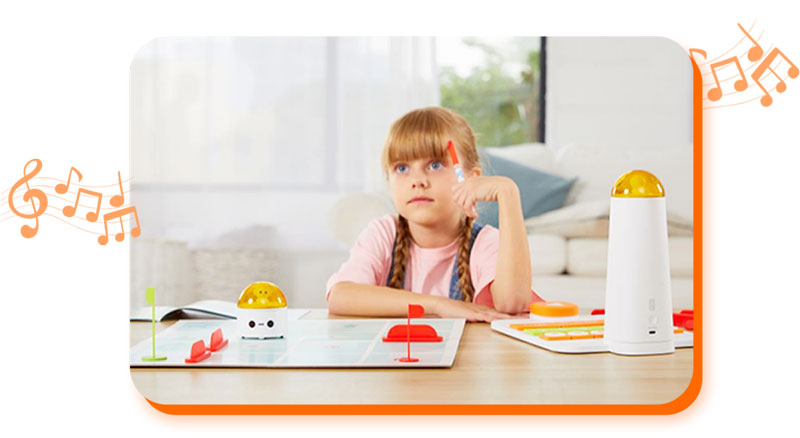
Numerous Robotic kits are available in the market which makes coding a more tangible and enjoyable process. One such popular kit is by Matatalab, available in GCC and other regions, for kids between ages 4 and up. The Matatalab platform provides tiny & attractive Bots that are friendly in nature and help kids learn hands-on programming. This coding toy can be made to travel over a map & navigate itself by simply clicking on the arrow keys. Kids can use direction blocks to give the MetaBot some instructions and perform functions such as; playing music, drawing, and even performing calculations. All this is possible through hands-on practice, without the need for any screen. Simply get your hands on the Matatalab kit and dedicate every Sunday to organizing special play-dates with your kid & his friends.

Creates Unique Experiences

While interacting with the tiny Bots, children develop a kind of strong bond, just as they would develop one with their school friends. After all, a Bot that studies together, stays together! When the Robot accompanies kids on their learning adventures it teaches them about geometric shapes, colors, patterns, and even art & craft, happily engaging kids in educative play. They wait eagerly to “train” their pet Robot to perform unique functions and even learn coding languages such as CoffeeScript and Python. Millions of Code Monkey subscribers in UAE and other regions across the world feel super excited to code & spend time with their MetaBots.

Screenless Play Is Better

Coding a physical Robot when done in a group encourages socialization skills. Every time children gather to work on a Matatalab coding project, there is an opportunity to form beautiful bonds, learn from each other’s mistakes, and solve problems as a team. This amazing camaraderie isn’t possible if the student had to spend alone time on an App and watch DIY coding videos on his tablet. Screenless play is obviously a healthier option, as it reduces stress on the eye and instead focuses more on building everlasting memories between young learners.

Contact us

Fill in your details below or send us an email on info@knowledge-hub.com

Computer Hardware – All That You Need To Know About

Computer Hardware – All That You Need To Know About

Computer Hardware – All That You Need To Know About

The physical components or parts of a computer that makes it function seamlessly are termed computer hardware. There are different categories in which hardware components can be bucketed namely; input device, output device, secondary storage device, and internal components. Therefore, hardware comprises tangible elements that carry the instructions provided by the software and perform the said operations in a systematic manner. It is the school’s prerogative to develop interest amongst students about IT solutions and computer systems because in this tech-savvy world we can’t do much without our devices. Most computer lessons start from grade 3 onwards, whether it is being taught in advanced nations such as Dubai, or any other part of the world. Even before one is introduced to the amazing world of software and its far-fetched possibilities, kids are taught to learn about hardware & understand the basic definition of each component of the system. As a newly informed parent, read through the Blog to simplify the complexities and make it easy for kids to understand some key computer jargons.

Keyboard

A keyboard is a primary input device used by the owner of the computer. There are about 110 to 115 keys on a keyboard which comprises of letters, numbers, and symbols. The number keys are found at the top of the keyboard, as also on the sides. The letter keys are in the center and symbols surround the keyboard at its periphery. The function of ‘space bar’ is to put space between words, the ‘arrow keys’ are used to move the page up or down, and ‘enter’ is used to move the cursor down to the next row. When you need to delete something that is written, just press ‘backspace’ for executing the job. These days there are fancy keyboards available in the market that light-up at night and those that come hands-free, without the need to attach a chord to the computer but work wonders with Bluetooth connectivity.

Mouse

On average, a person makes about 430 clicks a day, using their computer mouse. So as to say, the mouse is of immense importance to us. Thanks to this input device, we are able to ‘click’ on links that resonate with us as a reader and even scroll through lengthy articles. The left click on the mouse is used to select objects & double-click, while the right click is used to open the menu option. Kids nowadays learn to use the mouse simply by observing their work-from-home parents go about their jobs. However, to reinforce the correct technique, simply place the child’s palms on the mouse until they learn to get a good grip and allow them to practice movement on a blank Word document or an online game.

Motherboard

The mother of all connectivity is the ‘motherboard’. Well, essentially, it supplies power to all the hardware devices and ensures they function in tandem. It looks like a printed circuit with tiny wires running in a certain direction. It is a backbone that connects the CPU, RAM, hard drive, and video card to allow the computer to work to its optimal capacity. You can locate the motherboard inside the computer case and it is the biggest circuit board, so it can’t go unnoticed. If you wish to further simplify the explanation, subscribe to TestOut Labsim’s Training Program, where children will learn about hardware through practical hands-on modules. Their comprehensive computer courses are widely available in the Middle East and also across GCC regions.

Hard Drive

A hard drive is a non-volatile data storage device usually installed internally within the computer system. The hard drive is an internal memory that stores applications, data files, pictures, music, and documents upto 250 GB to 1 TB. Many programs create temporary files which are stored on the hard drive. Without a drive, a computer would be unable to operate much and be futile. To protect the drive from crashing it is important to set strong passwords, encrypt the hardware, and choose backup cloud storage if you don’t want to lose your important data.

RAM

RAM or Random Access Memory is best defined as the computer’s short-term memory, where the data that the processor is using is stored. The RAM is located in the memory slots of a motherboard. Thanks to the RAM, the user is able to quickly switch between multiple applications running on the system without the speed getting affected. Ensure that your system has sufficient RAM storage so that the PC doesn’t slow down. It looks like a flat and long ruler and is located inside the CPU. For more trivia on computer hardware and to participate in quiz sessions, get your hands on the TestOut Training modules easily available for everyone in the UAE.

Contact us

Fill in your details below or send us an email on info@knowledge-hub.com

How To Go About Making a Presentation Using Google Slides

How To Go About Making a Presentation Using Google Slides

How To Go About Making a Presentation Using Google Slides

The free web-based Google Docs Editors Suite, offered by Google includes a presentation-making software called Google Slides that is widely used to make attractive and customizable slideshows or presentations in offices not just in metropolises like Dubai but also throughout the GCC, UAE, and the rest of Middle East. It is also a preferred platform the world over alongside the Microsoft Office Suite. The only difference being that Google Slides is an online-only tool part of Google Workspace while Microsoft PowerPoint is an offline, downloadable tool.

Google Slides allows you to collaborate in real-time and make changes from any device. The beauty of the tool is that experts from around the world can come together to work on a project. The interface is also user-friendly and has features such as notes, live captions, and presenter views. It is intertwined with other Google apps making it possible to exchange and share data fluidly over Google platforms. Simply explained, you can directly search the web or Google Drive from Slides or refer and reply via Gmail as well as embed charts and data from Google Sheets.

Google is always looking to provide bigger, better, and faster digital solutions, & with Slides, it flaunts ‘Smart Compose’ mechanism to help you build slides faster and without errors. It automatically saves edits to history-making recalls and undoes changes faster and easier. And in case, you do not have an internet connection, you need not fret as it will still allow you to work on Slides and save your work. With Google Slides you can be productive from anywhere.

Google security measures are one of the most secure and assures the safety of your data as it is also cloud native. Your work is safe, encrypted and at rest with Google Slides. Google Slides is very easy to use. You simply download and install the app and you can get started right away. You also have a myriad of slide templates to choose from. After selection, you can add your text, images, charts, and other data. It allows you a run-through to view your work and make any relevant changes. You can edit data saved earlier and finally present your work or share it with others. It is the go-to app for many schools and offices in the GCC, UAE, and Middle East areas.

school-kids-using-laptop-in-library

Many schools in Dubai use the Technokids training platform. The TechnoKids Computer Curriculum is a set of theme-based technology projects that integrate the use of the computer into learning. Designed for K-12 students, TechnoKids projects can be used to support technology integration, STEM education, and project-based learning. One of the interesting by-products of Technokids and Google is Technomaps. Aimed at grades 6 to 9, Technomaps allows students to create an interactive map that demonstrates how human and physical geography intersect. The map has markers that one can click to learn facts about a location. The map can represent a geographical, historical, cultural, or even environmental topic and so it can be integrated into the subjects taught at school.

Initially, students select an explorative question to examine. They are then guided through creating slides to make a clickable map using Google Slides. Links are created to provide factual information related to the map markers. Finally, the complete interactive map is shared with others using Google Drive, and viewers are invited to comment.

Educators looking for creative ideas should look no further than Google Apps for Education. Along with Technokids, it provides essential curriculum and computer skills with zero cost of software updation. It is the solution to the 21st-century problems of effective learning.

Contact us

Fill in your details below or send us an email on info@knowledge-hub.com