Coding Skills That Boost Brain Development

Coding Skills That Boost Brain Development

Coding Skills That Boost Brain Development

In the next 10 years, almost 50% of jobs worldwide will be automated and we need to equip our children with skills to be able to understand and control this artificial intelligence and make more of their own. Besides professional opportunities, Robotify encourages students to produce original ideas, with the tools and resources as well as boosts creativity, collaboration skills critical thinking, and problem-solving. Many schools in Dubai, UAE have been opting for it as students have access to the latest robots without ever having to purchase real hardware. You simply have to log into your account, choose your topic and start coding on any device that has a good browser and internet connection. With Robotify, coding and robotics is made more affordable and accessible.

Robotify also offers many leagues which you can take part in. These are advanced levels of coding where you can participate in international, virtual robotics competitions. Many schools in GCC & Middle East have been found to register for Roboduel which is one such multiplayer platform. VRAD has teams registered to compete anywhere in the world with any device. Robotify in partnership with The REC Foundation has created the world’s first global multiplayer virtual aerial drone competition.

Robotify_banner

Robotify present real-life challenges in extraordinary virtual environments such as ‘Marine Biology Survery course which uses LIR to take pictures and develop a database of underwater life in the ocean. Under their varied courses, you will find many such scenarios from space adventures to Treasure troves. You learn while you code and play games.

Robotify is just one of the ways you can learn coding in a gamified, accessible and effective manner. Coding is definitely one of the much-needed skills you need to acquire in today’s digital world. Not only that, but coding has been found to boost cognitive thinking, memory as well as problem solving skills. Artificial intelligence and coding have proved to be humanity’s greatest innovation of man and machine partnership.

Studies have shown that software engineers who code on a regular basis have higher movement in parts of the brain related with both math and language. They have more dynamic brains in a few areas with superior cognitive execution and alertness. Practicing such a complex and multifaceted ability like coding, boosts the brains capacity to learn.

Coding initiates different regions within the brain which forges new neural pathways. Repeated use of these newly formed pathways, fortifies and reinforces them akin to how doing a monotonous movement builds muscle memory. Coding improves your brains cognitive aptitudes and memory which then also spills onto your daily applications and jobs.

Visual preparation is a cognitive ability that is vital in learning math and reading. These subjects require quick eye development and integration of approaching data quickly. In the event that this ability is powerless, a child will learn at a slower pace. Coding requires you to quickly assimilate approaching data quickly.

Coding is process of consistent investigating. In the event that you’re stuck, you experiment with unused things repeatedly until it works. The investigating handle in coding hones this skill. Coding requires you to keep in mind what worked and what didn’t and later utilize that lesson at a later time when you’re building a comparable app.

Problem solving is the skill that empowers you to characterize issues, shape arrangements, and choose the most excellent course of activity. Getting bugs in your code is unavoidable. Fortunately, the method of finding and eliminating bugs trains children to be imaginative in tackling these problems.

This article hopefully, has shed some light on the effects of this new learning activity called coding, on children’s cognitive development, memory and problem-solving skills.

Contact us

Fill in your details below or send us an email on info@knowledge-hub.com

Cleaver Ideas to Simplify Lesson Planning

Cleaver Ideas to Simplify Lesson Planning

Cleaver Ideas to Simplify Lesson Planning

One of the most intrinsic parts of achieving a goal is the planning. The same applies to studying successfully. If the day, week, month or even year is chalked out with clearly defined lesson plans for the day along with breaks, it makes it easier to focus on impar ting the information. Many schools in the GCC, UAE and Middle East provide the lesson plan and do not leave it up to the teachers. Alternately, you might need to approach lesson planning in a very simplistic, organized manner which will also help in boosting other teaching duties.

There are many apps available online nowadays that assist with planning, reminders and creating lesson plans in a systematic and orderly fashion. You may need to explore many options before you find the one that suits you best. While you may have a plan loosely designed, making a template would allow you to create a lesson plan quickly. This is a useful tool in case you teach more than one class or want to develop supplemental lessons. A few sources you may want to look at are Hot Chalk Lesson Plan, Common Core App by Mastery Connect and Teacher Planet. These websites will give you free lesson plan templates that you can easily customise to your instructional needs.

Knowing the standard of you grade level will provide a better understanding of where your grade is and where they are expected to be by year end. Many apps provide data where you can compare your grades’ standards to the grades before and after them.

Some teachers prefer the tradition paper planners such as binders where you can plan and plot down to the very hour of everyday, week or semester. Take your lesson planner with you everywhere you go and use any extra time you have in between classes to plan a week or month ahead. Even a large piece of paper will do the trick if you are comfortable with jotting down your ideas this way. Dry-erase calendars to write down lesson ideas in different colours for each subject are also found to be visually appealing and very effective. The visual aid keeps you on track as well.

If you are more of an online person and prefer having it all on your device, the myriad number of apps available will make lesson planning a breeze. Additionally, plans saved on the cloud or even locally on your portable device can be accessed from anywhere, anytime. Apps such as teachers.io, planbookedu and showme interactive whiteboard are very popular in Dubai and widely used.

Mathletics which is the world’s leading online math’s program, uses engaging and gamified learning content. It provides complete support for school and home. It offers simplified lesson planning and saves precious teacher time. You can use their benchmarked assessments and curriculum-aligned activities to quickly devise and deliver a lesson plan appropriate for your grade. Mathletics makes it easy to assign maths activities to classes or individual learners. Using Mathletics data and targeted task assessments, you can positively challenge your students to develop and experience success.

There is no one, right way to creating a lesson plan. It is all a matter of trial and error to finding a plan that works for you the best. It could be a combination of both online and offline too. Schedule your time efficiently setting goals and priorities that work for you too. Use every tool available to you for instruction and planning to facilitate your teaching.

Contact us

Fill in your details below or send us an email on info@knowledge-hub.com

Kids With ADHD (Attention Deficit Hyperactive Disorder) Can Excel at Studies Through Gamified Learning Experiences

Kids With ADHD (Attention Deficit Hyperactive Disorder) Can Excel at Studies Through Gamified Learning Experiences

Kids With ADHD (Attention Deficit Hyperactive Disorder) Can Excel at Studies Through Gamified Learning Experiences

Attention Deficit Hyperactive Disorder (ADHD) is a chronic condition and one of the most common neurodevelopmental disorders of childhood. It is usually detected in the early years and can persist well into adulthood. Children diagnosed with this condition are prone to having a short attention span, impulsivity and hyperactivity. Consequently, they need to always be on the go without an apparent reason. It may contribute to low self-esteem, troubled relationships and difficulty at school. In the sense that they may not be able to focus and may regularly disrupt the class as well.

To meet the needs of ADHD children, schools in the UAE, Middle East and GCC need to offer specialised teaching methods like behavioural classroom management or organizational training. Behavioural classroom management refers to rewarding positive behaviour and discouraging the negative. Organisational training teaches students time management, planning skills, and ways to keep school materials organized in order to optimize learning. To offer these methods the schools in Dubai would require trained teachers, counsellors and psychologists.

Supervisors of these children with ADHD need to recognise the fact that school work is twice as difficult for them as compared to any other child. Albeit, it does not mean that a child with ADHD is unable to learn. It just means that such children learn differently.

ADHD children are prone to distractions and absentmindedness and to counter this, it is necessary to provide a fixed routine. They must be trained to write things down immediately such as submission deadlines or exam dates. Being consistent will develop a habit that they will grow to rely on. Keep in mind that you may need to reiterate this multiple times. You will find a variety of planner and calendar apps online that will assist ADHD students to keep track of homework and submission deadlines. In addition to planning apps there are also learning apps like Reading Eggs which makes learning to read interesting and engaging for kids, with great online reading games and activities. The matter is self-paced, colourful and completely interactive. The variety of lessons provide repetitive learning in new engaging ways. Students especially with ADHD enjoy these games and learn while they play. They are motivated to return with rewards and leaderboards. Parents too can view their childs progress with a detailed report card.

At home, it is imperative that you again stick to a set routine which helps the child remain on track. Consistency is key. It is essential that the environment be conducive to studying with minimal distractions. Keep fixed study times and breaks in between. Parent involvement is a great motivator for them to actively engage in learning. Going through the work done at the end of the day helps reduce chances of forgotten homework or incomplete assignments.

ADHD children find sitting quietly in class listening to the teacher or reading on their own at length, very challenging. They need to channel their energy and interact with their environment to learn better. They can benefit from short breaks, stretching, and experiential learning allowing them to actively participate in the assigned task. Acting out what they have learnt or addressing an audience will build better recall. Students may also find that listening to audio books while reading text allows them to zip through topics faster as well as maintain their attention.

Finally, it is vital that these children live a healthy lifestyle and eat the correct foods. Refined sugars and fats leave the calmest of children climbing walls and hence we should steer clear of them. A healthy balanced diet with the right amount of exercise are best for overall health and learning too. As with all children, excessive screen time is avoidable as is late nights. Sleep is a powerful tool for recall.

In the end we must bear in mind that although ADHD children may have the best of intentions to study and complete tasks in time, they may still struggle to concentrate and retain what they’re studying. Therefore it is important to be consistent, supportive and patient with them.

Contact us

Fill in your details below or send us an email on info@knowledge-hub.com

The Four Important C’s For 21st Century Kids

The Four Important C’s For 21st Century Kids

The Four Important C’s For 21st Century Kids

Matatalab is a technology, education company, established in 2017, that aims to develop children’s abilities and confidence to influence the world in a positive way through innovative learning techniques and entertainment experiences. Matatalab’s coding robots have grown from strength to strength and become a much-sought after tool, for kindergarteners, elementary schools and educational institutions for their ground-breaking STEAM educational solutions. Now they have envisaged becoming the worlds leading educational company based on innovative products and STEAM for kids. Successive tangible coding products cultivate computational thinking skills through coding and perfectly amalgamate education with technology which is the need of the hour and the essence of the future. The Matatalab platform is engaging while also being entertaining as a tool for learning. Its solutions teach art, maths, science, languages along with coding in ways that inspire children to gain more knowledge.

In Dubai, Educators believe that a core set of competencies is crucial as part of skills imparted in the 21st century. These are teachable, learning foundations taught at Matatalab called the Four C’s. They are namely Communication, Collaboration, Critical thinking, and Creativity

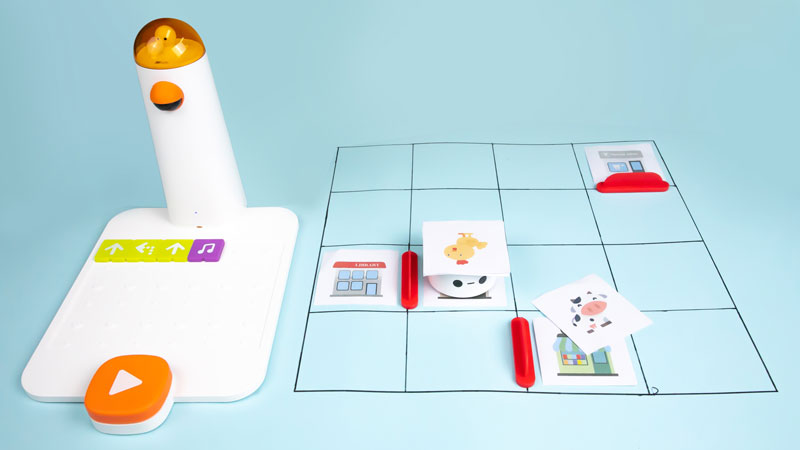
Matatalab uses STEM learning to help students develop these essential skills and social-emotional learning which will only benefit them in the future. Matatalab solutions are a mix of tools that require screen time as well as offline play and screen free coding. The Matatalab Tale-Bot Pro, is a great example of this. It uses only the robot to teach coding along with its accessories, interactive maps and even building blocks and arms that you can add onto the robot. It even has markers so you can make the robot draw. Students love to dive into the activity with the robot sparking creativity and fun using the different materials provided. The Talebot Pro is just one of the robots that inspires creativity and critical thinking amongst the learners. It fosters the development of self-awareness as they learn to code, set goals and problem solve. Learners build relationships as they collaborate with one another to create and exchange ideas.

Children are not innately comfortable working in groups. Using the Matatalab robots, they are encouraged to work in groups to brainstorm and problem solve. They learn how to effectively listen to not only the teacher but also their peers as they collaborate. They are taught to deliver presentations of their work and communicate using digital media. Soon they are comfortable presenting their ideas over varied platforms and diverse environments.

Within the GCC, UAE and Middle East countries, group activities with Matatalab entail working together and building on productivity. Tasks usually have a leader and a speaker etc. Separate roles for each member of the group to provide structure to the working. Students learn leadership skills and responsibility. They also learn how to co-operate with the group as a whole and be flexible and open to constructive feedback.

Matatalab tangible programming language bridges the gap between the virtual and physical world of computer programming. It uses blocks or buttons to create a chain of code which ultimately leads to a program. Children are better able to absorb computer science concepts as they use their hands to build and see how it finally works. It builds a growth mindset for problem solving and refinement. Kids explore their creativity and have the courage to share their ideas openly or innovate. Through this. The students learn how to interpret the feedback and data and implement changes constructively. Piaget’s theory of constructivism believes that people produce knowledge and meaning based upon their experiences. Matatalab challenges students to become critical thinkers and helps to build the students’ 21st Century skills.

Contact us

Fill in your details below or send us an email on info@knowledge-hub.com

Web Development Course By CodeMonkey – Coding For Kids Made Easy

Web Development Course By CodeMonkey – Coding For Kids Made Easy

Web Development Course By CodeMonkey – Coding For Kids Made Easy

The world’s leading software engineers and web developers all showed an interest in programming early on as children and they all believe that it is never too early to start learning how to code. The past thirty years have shown that the digital world is growing by leaps and bounds and it will only increase as time passes. Cities such as Dubai, Singapore etc are highly digitalized. Programming or Coding is predicted to become an integral part of future professions and an inseparable part of everyday working life. Within the GCC, Middle East and UAE coding is one of the most desired skills and has been one of the highest-paying jobs with diversified career opportunities. Through coding, we can make perform a variety of functions such as develop software, websites, applications, video games and so much more.

Digital learning starts as early as fourth grade, enabling children to be stimulated and motivated to create more and more. It is no wonder then that teens create apps that are worth millions of dollars today.

One of the more important skills to acquire is to know how to build a website. There are some website that allow users to design their own web pages using pre-designed templates which can be customised. The web page is under the umbrella of the provider and is usually free. It does not require any technical knowledge and can be done within a couple of hours. You can have you page up and running within minutes of signing up. Additional features are also available for a nominal monthly fee. These websites are Wix, Tilda and WordPress. They are great for small business or informal pages on the internet. Interested kids can start by making a webpage about themselves, their family, friends etc. In this way they will learn how websites work and at the same time develop creative and logical thinking as well as problem solving skills.

With limited access, website builders such as the above may fail to capture interest and engagement over a prolonged period of time. Hence, online coding courses are the next step for a more formalised and structured approach to teaching web development. Depending on what skills your child needs to learn you can opt from an array of resources available online. These platforms help develop coding skills to create games, cartoons, build websites etc. CodeMonkey, Codespark and Scratch are examples of such fun and free platforms.

Advanced Web Development will entail learning the two important technologies of HTML (Hyper Text Markup Language) and CSS (Cascading Style Sheets) for building websites. HTML defines the structure of the page and CSS specifies the layout of the elements on that page. By using these two codes, kids will be able to build simple and complex web interfaces and understand how things work.

In the world of digital transformations, having an online presence is vital for businesses and individuals. Code Monkey recognises this and targets the children of today by using a gamification process of teaching. This ensures that the childs interest is always held onto and they return to complete goals everyday. CodeMonkey has award-winning courses which teach millions of students to learn how to code in real programming languages. It offers an engaging and enjoyable curriculum for schools, after-school clubs and camps as well as self-paced online courses to learn coding at home. It recognises the tremendous need for coding in a child’s future and provides it in a playful and effective way.

Contact us

Fill in your details below or send us an email on info@knowledge-hub.com

Making A OneNote Class Notebook with TechnoKids

Making A OneNote Class Notebook with TechnoKids

Making A OneNote Class Notebook with TechnoKids

Every child’s school bag is incomplete without a notebook. As the name suggests, a notebook will help the student pen down all the topics that were discussed in class by the teacher and make personal points as references for future studies. To keep the book organized, here are some tips to follow; write proper headings, make sure your handwriting is neat, use dividers to form separate sections for new topics, and cover the book with brown paper to preserve it for long.

TechnoKids Class Notebook

A TechnoKids class notebook is a perfect example of an e-notebook that is designed to assimilate resources and keep them organized for the learners. Each child’s journey of studying is different and it only makes sense to personalize work and submit assignments as per the requirements of the school. The TechnoKids app is available for download across the world, including students in UAE & GCC regions. The OneNote Class notebook has the following features that are elaborated hereunder;

Welcome Section

This is like a summary section where the entire classroom dashboard is displayed and the teacher posts messages that need to be conveyed to the children. An overview of all announcements and dates of when the topics are to be covered are all posted here for general reference.

Collaboration Space

‘Alone we can do so little, together we can do so much’ is a famous quote by Helen Keller. Collaborative learning must be encouraged and many IB schools in Dubai across Middle East regions believe that this approach builds a strong foundation that boosts confidence and self-esteem of students. In the TechnoKids ‘collaborate space section’ students share topic ideas with their fellow classmates so that project work can be done seamlessly and brainstorming can happen with ease. Any student can create a Question & Answer section on the platform, but the educator has the decision to restrict access or moderate the student’s activities within this space.

Content Library

In the Library section the teacher shares samples and templates which are in read-only format and students can reference the same or download a copy to complete their assigned homework. Students may view the content but can’t make changes in this section. For best results, each child must create their own personalized dashboard and submit their answers for further evaluation.

#4 Give Some Free-Time

Bogging down children with studies and too much homework isn’t going to help. Students need equal amounts of downtime to absorb what was taught in class. Like an office set-up, IB schools in Dubai & Middle East have break-out spots with indoor games such as carrom & table tennis for children to play and channelize their energy towards destressing. This time can be used by them to pay a visit to the library or even catching up with classmates at the canteen.

Teacher Only

Before every class begins the teacher has to prepare what is going to be taught to complete a certain topic. Teaching aids are tools that facilitate educators to make the teaching-learning process more interesting and relatable for students. Every child’s learning style is different and educators have to accordingly prepare aids to manage the classroom well. The ‘teachers only’ section will allow teachers to draft worksheets, dump images, shortlist educational videos, and support the learning journey in a systematic manner.

Flipped Learning

Set-up the TechnoKids Notebook

There are several steps to create a Notebook and here’s how you can go about.

#1 Give the notebook a name:

Whatever TechnoKids chapter you are on; you can accordingly name the notebook. For example, if you are learning to curate a spreadsheet & learning about word processing skills via the TechnoBudget curriculum, you can name it accordingly.

#2 Notebook Overview

Check this section for regular class notes and keeping a track of the assigned exercises that students need to work on.

#3 Add Another Teacher:

Another amazing feature is that teachers can share their TechnoKids dashboards with another co-teacher, so that everyone is on the same page and easily edits can be made by either of them.

#4 Add student’s name:

Type the name and email ID of students and then click next. Are you ready to transform TechnoKids Project into a Class Notebook?

Contact us

Fill in your details below or send us an email on info@knowledge-hub.com