The Four Important C’s For 21st Century Kids

The Four Important C’s For 21st Century Kids

The Four Important C’s For 21st Century Kids

Matatalab is a technology, education company, established in 2017, that aims to develop children’s abilities and confidence to influence the world in a positive way through innovative learning techniques and entertainment experiences. Matatalab’s coding robots have grown from strength to strength and become a much-sought after tool, for kindergarteners, elementary schools and educational institutions for their ground-breaking STEAM educational solutions. Now they have envisaged becoming the worlds leading educational company based on innovative products and STEAM for kids. Successive tangible coding products cultivate computational thinking skills through coding and perfectly amalgamate education with technology which is the need of the hour and the essence of the future. The Matatalab platform is engaging while also being entertaining as a tool for learning. Its solutions teach art, maths, science, languages along with coding in ways that inspire children to gain more knowledge.

In Dubai, Educators believe that a core set of competencies is crucial as part of skills imparted in the 21st century. These are teachable, learning foundations taught at Matatalab called the Four C’s. They are namely Communication, Collaboration, Critical thinking, and Creativity

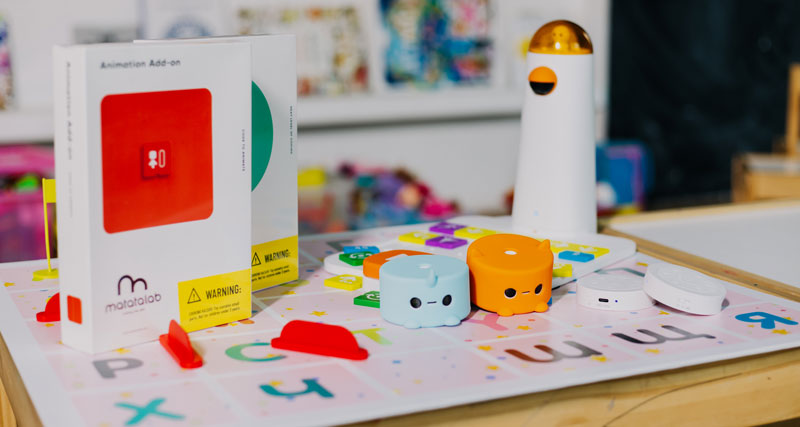
Matatalab uses STEM learning to help students develop these essential skills and social-emotional learning which will only benefit them in the future. Matatalab solutions are a mix of tools that require screen time as well as offline play and screen free coding. The Matatalab Tale-Bot Pro, is a great example of this. It uses only the robot to teach coding along with its accessories, interactive maps and even building blocks and arms that you can add onto the robot. It even has markers so you can make the robot draw. Students love to dive into the activity with the robot sparking creativity and fun using the different materials provided. The Talebot Pro is just one of the robots that inspires creativity and critical thinking amongst the learners. It fosters the development of self-awareness as they learn to code, set goals and problem solve. Learners build relationships as they collaborate with one another to create and exchange ideas.

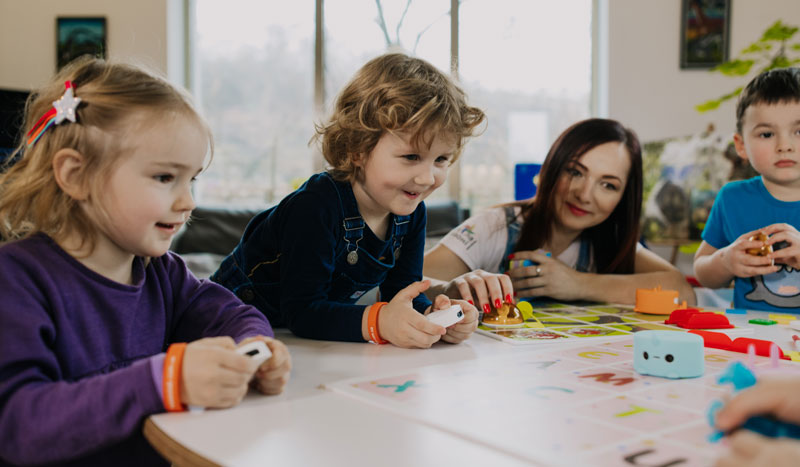
Children are not innately comfortable working in groups. Using the Matatalab robots, they are encouraged to work in groups to brainstorm and problem solve. They learn how to effectively listen to not only the teacher but also their peers as they collaborate. They are taught to deliver presentations of their work and communicate using digital media. Soon they are comfortable presenting their ideas over varied platforms and diverse environments.

Within the GCC, UAE and Middle East countries, group activities with Matatalab entail working together and building on productivity. Tasks usually have a leader and a speaker etc. Separate roles for each member of the group to provide structure to the working. Students learn leadership skills and responsibility. They also learn how to co-operate with the group as a whole and be flexible and open to constructive feedback.

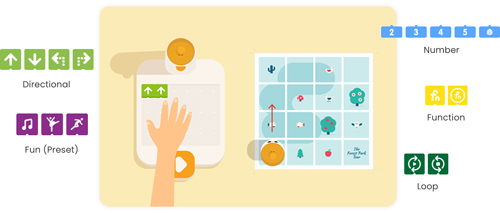
Matatalab tangible programming language bridges the gap between the virtual and physical world of computer programming. It uses blocks or buttons to create a chain of code which ultimately leads to a program. Children are better able to absorb computer science concepts as they use their hands to build and see how it finally works. It builds a growth mindset for problem solving and refinement. Kids explore their creativity and have the courage to share their ideas openly or innovate. Through this. The students learn how to interpret the feedback and data and implement changes constructively. Piaget’s theory of constructivism believes that people produce knowledge and meaning based upon their experiences. Matatalab challenges students to become critical thinkers and helps to build the students’ 21st Century skills.

Contact us

Fill in your details below or send us an email on info@knowledge-hub.com

Web Development Course By CodeMonkey – Coding For Kids Made Easy

Web Development Course By CodeMonkey – Coding For Kids Made Easy

Web Development Course By CodeMonkey – Coding For Kids Made Easy

The world’s leading software engineers and web developers all showed an interest in programming early on as children and they all believe that it is never too early to start learning how to code. The past thirty years have shown that the digital world is growing by leaps and bounds and it will only increase as time passes. Cities such as Dubai, Singapore etc are highly digitalized. Programming or Coding is predicted to become an integral part of future professions and an inseparable part of everyday working life. Within the GCC, Middle East and UAE coding is one of the most desired skills and has been one of the highest-paying jobs with diversified career opportunities. Through coding, we can make perform a variety of functions such as develop software, websites, applications, video games and so much more.

Digital learning starts as early as fourth grade, enabling children to be stimulated and motivated to create more and more. It is no wonder then that teens create apps that are worth millions of dollars today.

One of the more important skills to acquire is to know how to build a website. There are some website that allow users to design their own web pages using pre-designed templates which can be customised. The web page is under the umbrella of the provider and is usually free. It does not require any technical knowledge and can be done within a couple of hours. You can have you page up and running within minutes of signing up. Additional features are also available for a nominal monthly fee. These websites are Wix, Tilda and WordPress. They are great for small business or informal pages on the internet. Interested kids can start by making a webpage about themselves, their family, friends etc. In this way they will learn how websites work and at the same time develop creative and logical thinking as well as problem solving skills.

With limited access, website builders such as the above may fail to capture interest and engagement over a prolonged period of time. Hence, online coding courses are the next step for a more formalised and structured approach to teaching web development. Depending on what skills your child needs to learn you can opt from an array of resources available online. These platforms help develop coding skills to create games, cartoons, build websites etc. CodeMonkey, Codespark and Scratch are examples of such fun and free platforms.

Advanced Web Development will entail learning the two important technologies of HTML (Hyper Text Markup Language) and CSS (Cascading Style Sheets) for building websites. HTML defines the structure of the page and CSS specifies the layout of the elements on that page. By using these two codes, kids will be able to build simple and complex web interfaces and understand how things work.

In the world of digital transformations, having an online presence is vital for businesses and individuals. Code Monkey recognises this and targets the children of today by using a gamification process of teaching. This ensures that the childs interest is always held onto and they return to complete goals everyday. CodeMonkey has award-winning courses which teach millions of students to learn how to code in real programming languages. It offers an engaging and enjoyable curriculum for schools, after-school clubs and camps as well as self-paced online courses to learn coding at home. It recognises the tremendous need for coding in a child’s future and provides it in a playful and effective way.

Contact us

Fill in your details below or send us an email on info@knowledge-hub.com

Making A OneNote Class Notebook with TechnoKids

Making A OneNote Class Notebook with TechnoKids

Making A OneNote Class Notebook with TechnoKids

Every child’s school bag is incomplete without a notebook. As the name suggests, a notebook will help the student pen down all the topics that were discussed in class by the teacher and make personal points as references for future studies. To keep the book organized, here are some tips to follow; write proper headings, make sure your handwriting is neat, use dividers to form separate sections for new topics, and cover the book with brown paper to preserve it for long.

TechnoKids Class Notebook

A TechnoKids class notebook is a perfect example of an e-notebook that is designed to assimilate resources and keep them organized for the learners. Each child’s journey of studying is different and it only makes sense to personalize work and submit assignments as per the requirements of the school. The TechnoKids app is available for download across the world, including students in UAE & GCC regions. The OneNote Class notebook has the following features that are elaborated hereunder;

Welcome Section

This is like a summary section where the entire classroom dashboard is displayed and the teacher posts messages that need to be conveyed to the children. An overview of all announcements and dates of when the topics are to be covered are all posted here for general reference.

Collaboration Space

‘Alone we can do so little, together we can do so much’ is a famous quote by Helen Keller. Collaborative learning must be encouraged and many IB schools in Dubai across Middle East regions believe that this approach builds a strong foundation that boosts confidence and self-esteem of students. In the TechnoKids ‘collaborate space section’ students share topic ideas with their fellow classmates so that project work can be done seamlessly and brainstorming can happen with ease. Any student can create a Question & Answer section on the platform, but the educator has the decision to restrict access or moderate the student’s activities within this space.

Content Library

In the Library section the teacher shares samples and templates which are in read-only format and students can reference the same or download a copy to complete their assigned homework. Students may view the content but can’t make changes in this section. For best results, each child must create their own personalized dashboard and submit their answers for further evaluation.

#4 Give Some Free-Time

Bogging down children with studies and too much homework isn’t going to help. Students need equal amounts of downtime to absorb what was taught in class. Like an office set-up, IB schools in Dubai & Middle East have break-out spots with indoor games such as carrom & table tennis for children to play and channelize their energy towards destressing. This time can be used by them to pay a visit to the library or even catching up with classmates at the canteen.

Teacher Only

Before every class begins the teacher has to prepare what is going to be taught to complete a certain topic. Teaching aids are tools that facilitate educators to make the teaching-learning process more interesting and relatable for students. Every child’s learning style is different and educators have to accordingly prepare aids to manage the classroom well. The ‘teachers only’ section will allow teachers to draft worksheets, dump images, shortlist educational videos, and support the learning journey in a systematic manner.

Flipped Learning

Set-up the TechnoKids Notebook

There are several steps to create a Notebook and here’s how you can go about.

#1 Give the notebook a name:

Whatever TechnoKids chapter you are on; you can accordingly name the notebook. For example, if you are learning to curate a spreadsheet & learning about word processing skills via the TechnoBudget curriculum, you can name it accordingly.

#2 Notebook Overview

Check this section for regular class notes and keeping a track of the assigned exercises that students need to work on.

#3 Add Another Teacher:

Another amazing feature is that teachers can share their TechnoKids dashboards with another co-teacher, so that everyone is on the same page and easily edits can be made by either of them.

#4 Add student’s name:

Type the name and email ID of students and then click next. Are you ready to transform TechnoKids Project into a Class Notebook?

Contact us

Fill in your details below or send us an email on info@knowledge-hub.com

Amazing Classroom Management Ideas To Implement

Amazing Classroom Management Ideas To Implement

Amazing Classroom Management Ideas To Implement

Classrooms are not merely a place where students come to spend their time & return home. Schools help shape minds, build character of students, and create an environment that is comfortable for children to thrive & discover themselves. Albert Einstein once said, ‘Education is the movement from darkness to light’ and IB schools do what it takes to create an enclave where the lamp of learning is ignited in early years and stays with the child forever. In recent times, education and technology is being combined to create fun opportunities for students under the STEM (Science, Technology, Engineering, Mathematics) curriculum which is readily being adopted in the GCC regions and everywhere else.

Here are some classroom management ideas that will make learning fun for everyone and children will come to love attending school each day;

#1 Give Opportunity to Develop Friendships

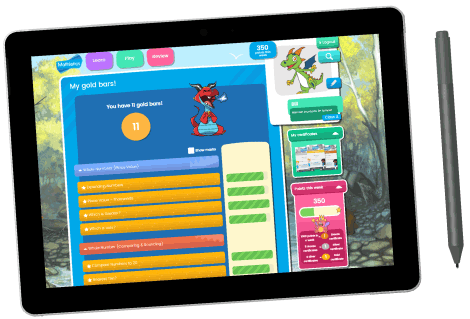
Teachers must give time to students, so that they can interact with each other and develop healthy bonds. Friendships help kids develop emotional well-being such as communication skills and problem-solving abilities. They learn to become more outgoing and come to share their emotions with others. Ones self-confidence and self-worth is boosted thanks to social skills. When students collaborate together on project-work, they start enjoying studies and help each other clear concepts. The Mathletics platform which is widely available in UAE region is a comprehensive online tool that facilitates play-way activities, especially for math subject.

#2 Encourage Circle Time

Circle time is a fun and fascinating activity that engages students in social interactions and gives them the opportunity to build bonds. So, the teacher instructs the class to form a circle and then children move around playing games & competing with one another. Not only this, but they also share stories & experiences with each other and open-up to classmates about their likes & personal lives. Some examples of circle-time activities are; dance & freeze where children dance to music & then freeze when the music stops. Passing the hula-hoop ring through each other is a game that almost all of us must have played at some point in time & makes for an amazing circle time special

#3 Offer Reward & Recognition

It’s not just marks that a student can be judged by, but the overall development must be considered. Studies & activities are given equal focus and schools do what it takes to applaud achievements. Recognize students for being punctual to class, celebrate their extra-curricular success, and cheer them for their good habits. Validation doesn’t necessarily have to be about good grades, but it can be about writing a good remark in the diary, or appreciating the child during a parent-teachers meeting. This keeps the student motivated so they can continue to show improvement.

#4 Give Some Free-Time

Bogging down children with studies and too much homework isn’t going to help. Students need equal amounts of downtime to absorb what was taught in class. Like an office set-up, IB schools in Dubai & Middle East have break-out spots with indoor games such as carrom & table tennis for children to play and channelize their energy towards destressing. This time can be used by them to pay a visit to the library or even catching up with classmates at the canteen.

#5 Practice Role Play Activities

Make a habit of demonstrating positive behaviors and attitudes as an educator, so that children observe & model through. Build a conversation between two children and teach them to speak politely to each other, maintain eye contact, and start a discussion that includes kind words & body language. The idea is to mold them to be more socially acceptable citizens of the world.

Contact us

Fill in your details below or send us an email on info@knowledge-hub.com

Make Your Child Future Ready: Virtual Coding Lessons To Adopt

Make Your Child Future Ready: Virtual Coding Lessons To Adopt

Make Your Child Future Ready: Virtual Coding Lessons To Adopt

In the last few decades everything has become computerized and digitized. There is no task that is performed without the use of a computer or machine. From simply heating water in the microwave to sending rockets into space; everything involves coding.

What is coding? Todays, world considers coding to be one of the most desired skills and has been one of the highest-paying jobs all throughout the GCC, UAE and Middle East. Coding is the basic knowledge required to have diversified career opportunities as well as to create software applications.

There are over 7,000 languages spoken in the world and only 300 programming languages that a computer understands. They are collectively called Programming Languages. The ability to write down instructions in a programming language and manner that a computer can understand is called Coding. Through coding, we can make it perform a variety of functions – in other words, we can develop software, websites, applications, video games and so much more.

There are several reasons why it’s vital to learn how to code, and why it should be taught in schools at a young age. Children are innately curious. It is also easier to teach them to think logically at a young age, because stronger foundations have already been laid. Chances of success are higher the earlier they start learning to code.

There are several reasons why it’s vital to learn how to code, and why it should be taught in schools at a young age. Children are innately curious. It is also easier to teach them to think logically at a young age, because stronger foundations have already been laid. Chances of success are higher the earlier they start learning to code.

With Robotify, coding and robotics is made more affordable and accessible. Many schools in Dubai have been opting for it as students have access to the latest robots without ever having to purchase real hardware. Robotify uses a browser, so there is no need to download any programs or apps. It can be used on any device from laptops, to tablets, and even your smart phone. Just simply log in, choose your topic and get coding.

Robotify also presents many leagues which you can sponsor or take part in. These are usually for advanced levels of coding where you can participate global, virtual robotics competitions.

VRAD has teams registered to compete anywhere in the world with any device. Robotify in partnership with The REC Foundation has created the world’s first global multiplayer virtual aerial drone competition.

Martian Survival – In this NASA-themed challenge, participants will program their drones to operate remotely on Mars and compete to collect resources for their space base. The mission is to explore, retrieve, and manage fuel supply by adapting strategy and drone sensors/algorithms to survive the harsh Martian environment. It allows the participant to engage in programming and the design process just like a real NASA astronaut. There are two teams; the blue and the red which you will be a part of.

And if space exploration does not excite you so much there are many such upcoming leagues that you can be a part of and they will be just as exciting and interesting.

Just sign up with Robotify and you are ready to go.

Contact us

Fill in your details below or send us an email on info@knowledge-hub.com

Designing A Drone Delivery System: The TechnoKids Way

Designing A Drone Delivery System: The TechnoKids Way

Designing A Drone Delivery System: The TechnoKids Way

There have been such vast improvements in the field of technology and the digital world that schools today no longer teach obsolete systems and functions that we learnt once upon a time. Digital learning starts at an early age in schools all through GCC, Middle East and the UAE. Coding is taught as early as the fourth or fifth grade which enables the children to write their own programs and create videos. This keeps them interested, stimulated and motivated to create more and more. It is no wonder then that teens create apps that are worth millions of dollars today.

A very useful tool for this is the Scratch program. Scratch is a free, block-based programming language aimed primarily at children where you can create your own interactive stories, games, and animations. Scratch is used all over the world especially in Dubai to teach students using a block like interface. Technokids also uses Scratch for its collection of technology projects with ready-made lessons which can be used independently or even blended into an existing curriculum unit. Coding facilitators, home-school educators and media specialists can combine technology projects to form a course with the customizable resources. Technokids has over 40 projects which are arranged by grades and include a teacher guide, student workbook, customizable resources and instructional material.

One such project from the vast matrix of Technokids is designing a prototype of a drone delivery system, thereby solving real world problems using the arsenal of artificial intelligence they now have at their disposal. For each programming task, they outline the decision-making process, as well as the possibilities and limitations of the technology. Upon completion students select one of their prototypes and present the AI solution to a group of potential investors or teachers. Technokids uses a hands-on learning technique which is open ended and keeps students engaged and motivated. This allows students to pursue their own interests as they define a problem that the AI can solve. Learners can build a prototype as well as design a test code to refine the program.

They begin by using Scratch to create a simple animation. From here on they will proceed to more complex commands whereby they design the prototype and use artificial intelligence to solve a common problem at school or at home. Then they have to build a simple program that flies a sprite-drone to collect items and then return to its original start point. Fine tuning will finally lead to a refined code to adjust to new delivery settings and object displacement. Upon completion they will reflect upon how drone technology can simplify real-world tasks.

Through this process with Technobot the learner will build a code that uses loops, variables, and operators; apply research strategies to find images to act as sprite-bots and test a program and debug the code. These are valuable aspects of the coding world which are taught engagingly at Technobot.

So, enroll your little genius with Technobot and set him on his way to being the youngest app creator used by millions and worth billions.

Contact us

Fill in your details below or send us an email on info@knowledge-hub.com