Coding a Robot is The First Choice For Most, Rather Than Subscribing To App-Based Coding

Coding a Robot is The First Choice For Most, Rather Than Subscribing To App-Based Coding

Coding a Robot is The First Choice For Most, Rather Than Subscribing To App-Based Coding

Coding is now a mandatory subject in most schools, especially in advanced regions of Dubai and other Middle East countries. Just as kids can’t escape from learning English and Geography, computer and coding literacy is a must, with the advent of the STEAM curriculum. So, what exactly is the STEAM approach? To make studies more relevant in today’s fast-paced world, educators focus on imparting knowledge about Science, Technology, Engineering, Math, Arts, and Math, which are the pillars on which the modern-age job market sustains & thrives.

As a parent, it is apparent that you would be concerned about how to get the best out of coding from your child. Should you sign-up for an extra-school coding class? Does self-learning through videos help? Are there any special coaching classes that teach coding? Our phones are loaded with Educative Apps that are easy to download, but they kind of become addictive, thereby compelling the child to spend hours playing games & competing with their peers by participating in virtual competitions. Learning to code via a mobile App is a good idea, as it is inexpensive, and most of these apps are free, allowing kids to consume content in bite-sized pieces. These coding platforms blend entertainment and learning, such that students don’t feel bored and come back for more.

Having said that, coding cannot be learned from an app entirely. There are so many intricacies involved in the way, that more than anything else, one needs to practice programming through hands-on lessons and apply concepts practically. Especially for young kids, it makes more sense to touch and feel the robot, such that one’s senses are engaged, and the matter is retained for longer.

Coding Robots is Fun

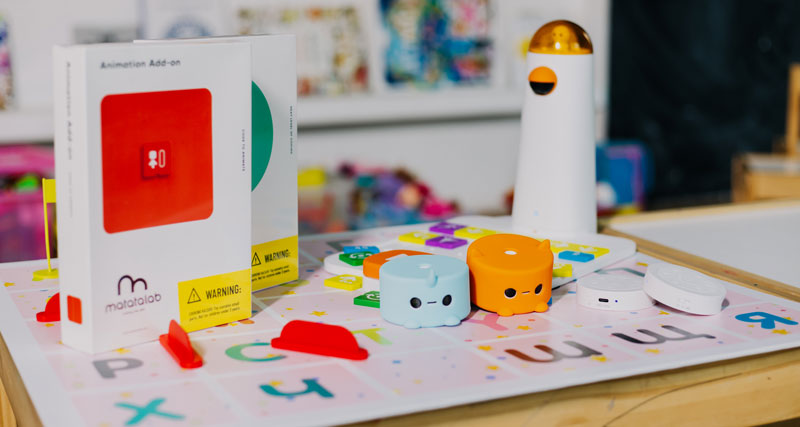
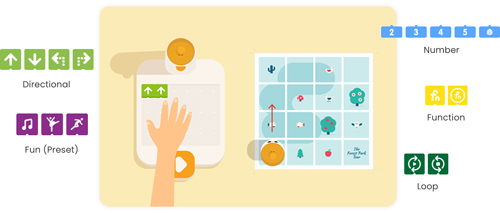
Numerous Robotic kits are available in the market which makes coding a more tangible and enjoyable process. One such popular kit is by Matatalab, available in GCC and other regions, for kids between ages 4 and up. The Matatalab platform provides tiny & attractive Bots that are friendly in nature and help kids learn hands-on programming. This coding toy can be made to travel over a map & navigate itself by simply clicking on the arrow keys. Kids can use direction blocks to give the MetaBot some instructions and perform functions such as; playing music, drawing, and even performing calculations. All this is possible through hands-on practice, without the need for any screen. Simply get your hands on the Matatalab kit and dedicate every Sunday to organizing special play-dates with your kid & his friends.
Creates Unique Experiences

While interacting with the tiny Bots, children develop a kind of strong bond, just as they would develop one with their school friends. After all, a Bot that studies together, stays together! When the Robot accompanies kids on their learning adventures it teaches them about geometric shapes, colors, patterns, and even art & craft, happily engaging kids in educative play. They wait eagerly to “train” their pet Robot to perform unique functions and even learn coding languages such as CoffeeScript and Python. Millions of Code Monkey subscribers in UAE and other regions across the world feel super excited to code & spend time with their MetaBots.

Screenless Play Is Better

Coding a physical Robot when done in a group encourages socialization skills. Every time children gather to work on a Matatalab coding project, there is an opportunity to form beautiful bonds, learn from each other’s mistakes, and solve problems as a team. This amazing camaraderie isn’t possible if the student had to spend alone time on an App and watch DIY coding videos on his tablet. Screenless play is obviously a healthier option, as it reduces stress on the eye and instead focuses more on building everlasting memories between young learners.

Contact us

Fill in your details below or send us an email on info@knowledge-hub.com

Computer Hardware – All That You Need To Know About

Computer Hardware – All That You Need To Know About

Computer Hardware – All That You Need To Know About

The physical components or parts of a computer that makes it function seamlessly are termed computer hardware. There are different categories in which hardware components can be bucketed namely; input device, output device, secondary storage device, and internal components. Therefore, hardware comprises tangible elements that carry the instructions provided by the software and perform the said operations in a systematic manner. It is the school’s prerogative to develop interest amongst students about IT solutions and computer systems because in this tech-savvy world we can’t do much without our devices. Most computer lessons start from grade 3 onwards, whether it is being taught in advanced nations such as Dubai, or any other part of the world. Even before one is introduced to the amazing world of software and its far-fetched possibilities, kids are taught to learn about hardware & understand the basic definition of each component of the system. As a newly informed parent, read through the Blog to simplify the complexities and make it easy for kids to understand some key computer jargons.

Keyboard

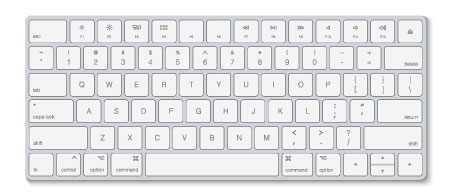
A keyboard is a primary input device used by the owner of the computer. There are about 110 to 115 keys on a keyboard which comprises of letters, numbers, and symbols. The number keys are found at the top of the keyboard, as also on the sides. The letter keys are in the center and symbols surround the keyboard at its periphery. The function of ‘space bar’ is to put space between words, the ‘arrow keys’ are used to move the page up or down, and ‘enter’ is used to move the cursor down to the next row. When you need to delete something that is written, just press ‘backspace’ for executing the job. These days there are fancy keyboards available in the market that light-up at night and those that come hands-free, without the need to attach a chord to the computer but work wonders with Bluetooth connectivity.

Mouse

On average, a person makes about 430 clicks a day, using their computer mouse. So as to say, the mouse is of immense importance to us. Thanks to this input device, we are able to ‘click’ on links that resonate with us as a reader and even scroll through lengthy articles. The left click on the mouse is used to select objects & double-click, while the right click is used to open the menu option. Kids nowadays learn to use the mouse simply by observing their work-from-home parents go about their jobs. However, to reinforce the correct technique, simply place the child’s palms on the mouse until they learn to get a good grip and allow them to practice movement on a blank Word document or an online game.

Motherboard

The mother of all connectivity is the ‘motherboard’. Well, essentially, it supplies power to all the hardware devices and ensures they function in tandem. It looks like a printed circuit with tiny wires running in a certain direction. It is a backbone that connects the CPU, RAM, hard drive, and video card to allow the computer to work to its optimal capacity. You can locate the motherboard inside the computer case and it is the biggest circuit board, so it can’t go unnoticed. If you wish to further simplify the explanation, subscribe to TestOut Labsim’s Training Program, where children will learn about hardware through practical hands-on modules. Their comprehensive computer courses are widely available in the Middle East and also across GCC regions.

Hard Drive

A hard drive is a non-volatile data storage device usually installed internally within the computer system. The hard drive is an internal memory that stores applications, data files, pictures, music, and documents upto 250 GB to 1 TB. Many programs create temporary files which are stored on the hard drive. Without a drive, a computer would be unable to operate much and be futile. To protect the drive from crashing it is important to set strong passwords, encrypt the hardware, and choose backup cloud storage if you don’t want to lose your important data.

RAM

RAM or Random Access Memory is best defined as the computer’s short-term memory, where the data that the processor is using is stored. The RAM is located in the memory slots of a motherboard. Thanks to the RAM, the user is able to quickly switch between multiple applications running on the system without the speed getting affected. Ensure that your system has sufficient RAM storage so that the PC doesn’t slow down. It looks like a flat and long ruler and is located inside the CPU. For more trivia on computer hardware and to participate in quiz sessions, get your hands on the TestOut Training modules easily available for everyone in the UAE.

Contact us

Fill in your details below or send us an email on info@knowledge-hub.com

How To Go About Making a Presentation Using Google Slides

How To Go About Making a Presentation Using Google Slides

How To Go About Making a Presentation Using Google Slides

The free web-based Google Docs Editors Suite, offered by Google includes a presentation-making software called Google Slides that is widely used to make attractive and customizable slideshows or presentations in offices not just in metropolises like Dubai but also throughout the GCC, UAE, and the rest of Middle East. It is also a preferred platform the world over alongside the Microsoft Office Suite. The only difference being that Google Slides is an online-only tool part of Google Workspace while Microsoft PowerPoint is an offline, downloadable tool.

Google Slides allows you to collaborate in real-time and make changes from any device. The beauty of the tool is that experts from around the world can come together to work on a project. The interface is also user-friendly and has features such as notes, live captions, and presenter views. It is intertwined with other Google apps making it possible to exchange and share data fluidly over Google platforms. Simply explained, you can directly search the web or Google Drive from Slides or refer and reply via Gmail as well as embed charts and data from Google Sheets.

Google is always looking to provide bigger, better, and faster digital solutions, & with Slides, it flaunts ‘Smart Compose’ mechanism to help you build slides faster and without errors. It automatically saves edits to history-making recalls and undoes changes faster and easier. And in case, you do not have an internet connection, you need not fret as it will still allow you to work on Slides and save your work. With Google Slides you can be productive from anywhere.

Google security measures are one of the most secure and assures the safety of your data as it is also cloud native. Your work is safe, encrypted and at rest with Google Slides. Google Slides is very easy to use. You simply download and install the app and you can get started right away. You also have a myriad of slide templates to choose from. After selection, you can add your text, images, charts, and other data. It allows you a run-through to view your work and make any relevant changes. You can edit data saved earlier and finally present your work or share it with others. It is the go-to app for many schools and offices in the GCC, UAE, and Middle East areas.

school-kids-using-laptop-in-library

Many schools in Dubai use the Technokids training platform. The TechnoKids Computer Curriculum is a set of theme-based technology projects that integrate the use of the computer into learning. Designed for K-12 students, TechnoKids projects can be used to support technology integration, STEM education, and project-based learning. One of the interesting by-products of Technokids and Google is Technomaps. Aimed at grades 6 to 9, Technomaps allows students to create an interactive map that demonstrates how human and physical geography intersect. The map has markers that one can click to learn facts about a location. The map can represent a geographical, historical, cultural, or even environmental topic and so it can be integrated into the subjects taught at school.

Initially, students select an explorative question to examine. They are then guided through creating slides to make a clickable map using Google Slides. Links are created to provide factual information related to the map markers. Finally, the complete interactive map is shared with others using Google Drive, and viewers are invited to comment.

Educators looking for creative ideas should look no further than Google Apps for Education. Along with Technokids, it provides essential curriculum and computer skills with zero cost of software updation. It is the solution to the 21st-century problems of effective learning.

Contact us

Fill in your details below or send us an email on info@knowledge-hub.com

Coding Skills That Boost Brain Development

Coding Skills That Boost Brain Development

Coding Skills That Boost Brain Development

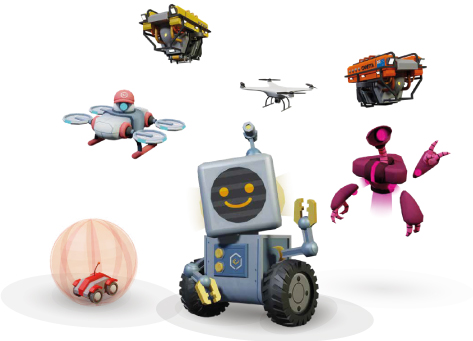
In the next 10 years, almost 50% of jobs worldwide will be automated and we need to equip our children with skills to be able to understand and control this artificial intelligence and make more of their own. Besides professional opportunities, Robotify encourages students to produce original ideas, with the tools and resources as well as boosts creativity, collaboration skills critical thinking, and problem-solving. Many schools in Dubai, UAE have been opting for it as students have access to the latest robots without ever having to purchase real hardware. You simply have to log into your account, choose your topic and start coding on any device that has a good browser and internet connection. With Robotify, coding and robotics is made more affordable and accessible.

Robotify also offers many leagues which you can take part in. These are advanced levels of coding where you can participate in international, virtual robotics competitions. Many schools in GCC & Middle East have been found to register for Roboduel which is one such multiplayer platform. VRAD has teams registered to compete anywhere in the world with any device. Robotify in partnership with The REC Foundation has created the world’s first global multiplayer virtual aerial drone competition.

Robotify_banner

Robotify present real-life challenges in extraordinary virtual environments such as ‘Marine Biology Survery course which uses LIR to take pictures and develop a database of underwater life in the ocean. Under their varied courses, you will find many such scenarios from space adventures to Treasure troves. You learn while you code and play games.

Robotify is just one of the ways you can learn coding in a gamified, accessible and effective manner. Coding is definitely one of the much-needed skills you need to acquire in today’s digital world. Not only that, but coding has been found to boost cognitive thinking, memory as well as problem solving skills. Artificial intelligence and coding have proved to be humanity’s greatest innovation of man and machine partnership.

Studies have shown that software engineers who code on a regular basis have higher movement in parts of the brain related with both math and language. They have more dynamic brains in a few areas with superior cognitive execution and alertness. Practicing such a complex and multifaceted ability like coding, boosts the brains capacity to learn.

Coding initiates different regions within the brain which forges new neural pathways. Repeated use of these newly formed pathways, fortifies and reinforces them akin to how doing a monotonous movement builds muscle memory. Coding improves your brains cognitive aptitudes and memory which then also spills onto your daily applications and jobs.

Visual preparation is a cognitive ability that is vital in learning math and reading. These subjects require quick eye development and integration of approaching data quickly. In the event that this ability is powerless, a child will learn at a slower pace. Coding requires you to quickly assimilate approaching data quickly.

Coding is process of consistent investigating. In the event that you’re stuck, you experiment with unused things repeatedly until it works. The investigating handle in coding hones this skill. Coding requires you to keep in mind what worked and what didn’t and later utilize that lesson at a later time when you’re building a comparable app.

Problem solving is the skill that empowers you to characterize issues, shape arrangements, and choose the most excellent course of activity. Getting bugs in your code is unavoidable. Fortunately, the method of finding and eliminating bugs trains children to be imaginative in tackling these problems.

This article hopefully, has shed some light on the effects of this new learning activity called coding, on children’s cognitive development, memory and problem-solving skills.

Contact us

Fill in your details below or send us an email on info@knowledge-hub.com

Cleaver Ideas to Simplify Lesson Planning

Cleaver Ideas to Simplify Lesson Planning

Cleaver Ideas to Simplify Lesson Planning

One of the most intrinsic parts of achieving a goal is the planning. The same applies to studying successfully. If the day, week, month or even year is chalked out with clearly defined lesson plans for the day along with breaks, it makes it easier to focus on impar ting the information. Many schools in the GCC, UAE and Middle East provide the lesson plan and do not leave it up to the teachers. Alternately, you might need to approach lesson planning in a very simplistic, organized manner which will also help in boosting other teaching duties.

There are many apps available online nowadays that assist with planning, reminders and creating lesson plans in a systematic and orderly fashion. You may need to explore many options before you find the one that suits you best. While you may have a plan loosely designed, making a template would allow you to create a lesson plan quickly. This is a useful tool in case you teach more than one class or want to develop supplemental lessons. A few sources you may want to look at are Hot Chalk Lesson Plan, Common Core App by Mastery Connect and Teacher Planet. These websites will give you free lesson plan templates that you can easily customise to your instructional needs.

Knowing the standard of you grade level will provide a better understanding of where your grade is and where they are expected to be by year end. Many apps provide data where you can compare your grades’ standards to the grades before and after them.

Some teachers prefer the tradition paper planners such as binders where you can plan and plot down to the very hour of everyday, week or semester. Take your lesson planner with you everywhere you go and use any extra time you have in between classes to plan a week or month ahead. Even a large piece of paper will do the trick if you are comfortable with jotting down your ideas this way. Dry-erase calendars to write down lesson ideas in different colours for each subject are also found to be visually appealing and very effective. The visual aid keeps you on track as well.

If you are more of an online person and prefer having it all on your device, the myriad number of apps available will make lesson planning a breeze. Additionally, plans saved on the cloud or even locally on your portable device can be accessed from anywhere, anytime. Apps such as teachers.io, planbookedu and showme interactive whiteboard are very popular in Dubai and widely used.

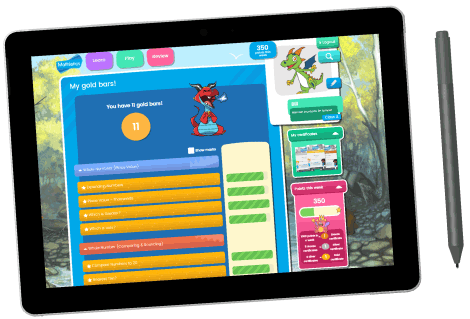
Mathletics which is the world’s leading online math’s program, uses engaging and gamified learning content. It provides complete support for school and home. It offers simplified lesson planning and saves precious teacher time. You can use their benchmarked assessments and curriculum-aligned activities to quickly devise and deliver a lesson plan appropriate for your grade. Mathletics makes it easy to assign maths activities to classes or individual learners. Using Mathletics data and targeted task assessments, you can positively challenge your students to develop and experience success.

There is no one, right way to creating a lesson plan. It is all a matter of trial and error to finding a plan that works for you the best. It could be a combination of both online and offline too. Schedule your time efficiently setting goals and priorities that work for you too. Use every tool available to you for instruction and planning to facilitate your teaching.

Contact us

Fill in your details below or send us an email on info@knowledge-hub.com