Fun Coding Lessons: Playful Farm Animals By Matatalab

Fun Coding Lessons: Playful Farm Animals By Matatalab

Fun Coding Lessons: Playful Farm Animals By Matatalab

Established in 2017, Matatalab is a technology education company that has been growing from strength to strength. It aims to develop children’s abilities and confidence to influence the world in a positive way through innovative learning techniques and entertainment experiences. Matatalab’s coding robots have become a much-sought-after tool, worldwide, for kindergarteners, elementary schools, and educational institutions for their ground-breaking STEAM educational solutions. Now they have envisaged becoming the worlds leading educational company based on innovative products and STEAM for kids.

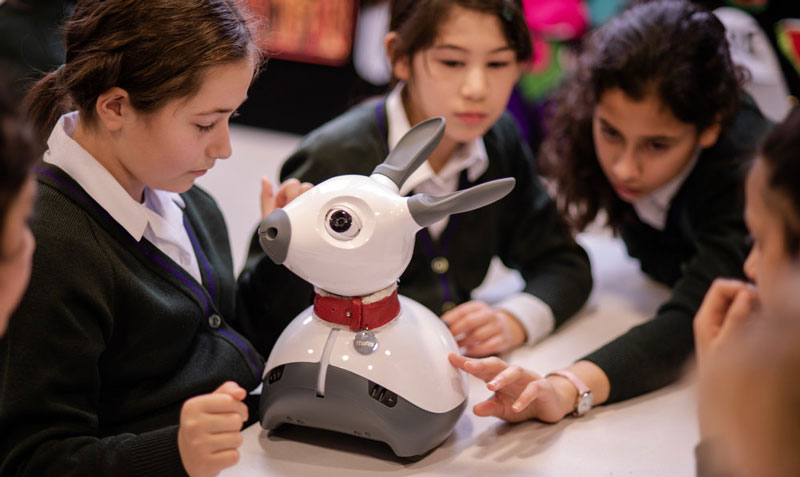
Matatalab has introduced children to MatataBot, a coding robot with whom they can embark on coding adventures and also have fun while learning. One popular coding program learning lesson is the ‘Delivery Animals’ or ‘Playful Farm Animals’ coding set. This lesson is aimed at the 3 to 5 years age bracket and takes around 45minutes to complete. It includes a printable for 4 locations and 4 farm animals.

Let us go through the steps of guiding the children into the lesson and setting it up for them. The purpose of the lesson or let’s say ‘aim of the game’ is to transport the 4 different farm animals to different locations in the community via the MatataBot. After each animal has been dropped at its location, the child needs to come up with a story, explaining why the animal is visiting the place. By completing this task, the child learns tangible coding language and community living.

Initially, you need to review the MatataBot movement on the map using the motion blocks with the child. Then you set up the locations on the map along with the obstacles. This so far would be a guided lesson and going forward would be an independent activity for about 30 minutes. The student needs to choose a starting point for the MatataBot and then put all the animal printables onto it. Using the motion coding blocks they are already familiar with they need to move the MatataBot around the map from one location to the other and drop off each animal at a different location. Each animal drop-off needs to be accompanied by an explanation as to why the animal was visiting the place. For example, why did the cow go to the library? You can also use the preset music block to celebrate a successful drop at a location. Once the activity is completed, there is time for a few questions about the activity and a discussion about the reasons and possibilities.

The Delivery Animals coding lesson teaches children how to use coding blocks to program a path to a destination. It encourages them to figure out different paths to the same destination and also how to go around obstacles in front of them. It sharpens the memory as the student has to remember which animal was dropped off where and enhances their story-telling skills as well.
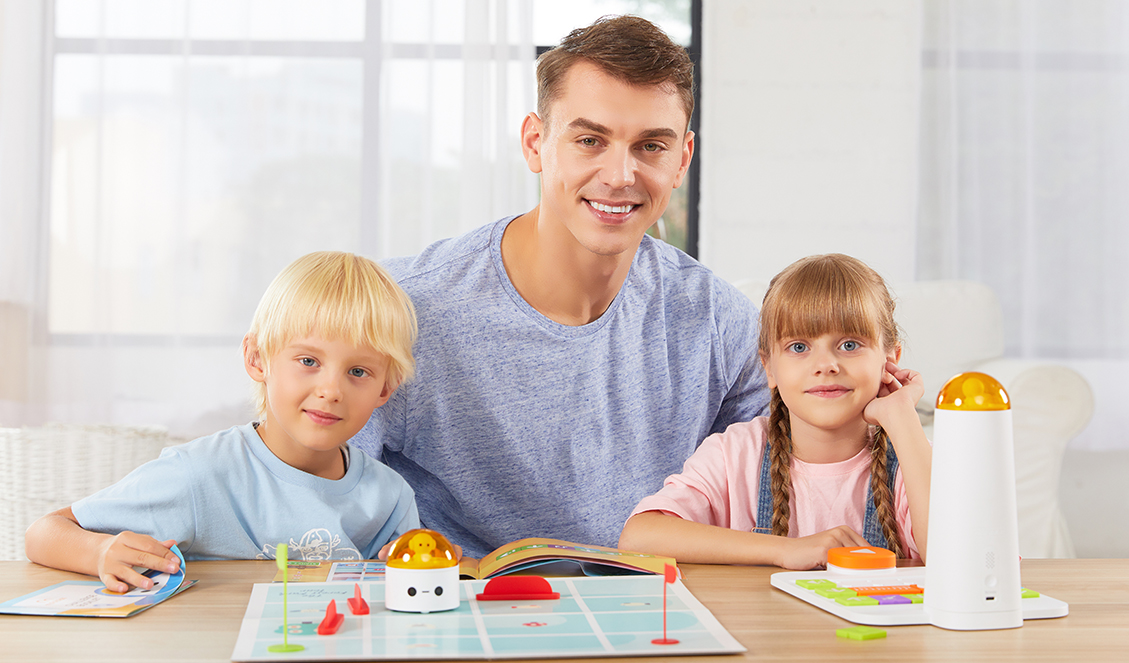
Many such similar programs are available through Matatalab touching on different topics like sports, food, space, etc. They are very popular across the GCC and Middle East. Almost all international schools in Dubai and UAE have now adopted the coding techniques taught here. There is plenty of material available online for home tutoring and add-ons as well so it becomes very easy to gather information and learn. Matatalab programs are very user-friendly and have been designed to be used on Android as well as iOS with regular firmware upgrades.

Coding skills should be taught at an early age as coding has become a cornerstone in today’s fast-growing technological world. Computer skills and coding is a high-demand skill. It is essential for us to encourage the young generations to master coding and bust all myths that it is complicated and requires a lot of knowledge and experience.

Contact us

Fill in your details below or send us an email on info@knowledge-hub.com

Preparing Youngsters For Their Very First School Interview

Preparing Youngsters For Their Very First School Interview

Preparing Youngsters For Their Very First School Interview

Schools have become extremely picky about admitting children into their institutions. In today’s competitive world, the reputation of the school and its ranking are at stake, and the only way to earn a good name is by churning out students who perform exceptionally well in academics and co-curricular domains. Therefore if you wish your child secured a seat in a good school of your choice, especially in a competitive region like the UAE, then you need to really make sure that great efforts are put in to ensure that your child is prepared for any question that might be asked at the interview. This is the very first interview of their lives and undoubtedly there will be some nervousness. However, correct guidance and practice will definitely help the child be more confident.

Through this blog, we will share some generic tips that will be useful in preparing young students to be interview-ready.

#1 Research About the School

Schools have their own modus operandi and the criteria for selection may vary. Hence, it is wise to ask parents who already have children studying in that school for some guidance and prepare accordingly. You can even visit the school’s website to learn about its vision & mission. This would create a lasting impression on the interviewer and convey seriousness about seeking admission there.

#2 Work on the Basics

Even before your children start schooling at around 2 to 2.5 years, they are expected to know some vocab like; names of colors, shapes, and a few fruits/vegetables. It shouldn’t be so that the child goes blank at the time of the interview. So set a daily routine to educate the child by watching videos and hanging picture charts in your child’s bedroom, so that they become thoroughly acquainted with the basics.

#3 Prepare an Introduction

Usually, children are asked to say a few lines about themselves in an interview. Work on a speech whereby the child is well-versed in sharing his name, age, place of residence, and what he/she loves the most. If you want to create a lasting impression, include more details such as; hobbies and interests. It’s impossible for such young kids to speak fluently using a correct sentence structure and that is not what you should aim at either.

#4 Focus on Social Etiquette

Instilling the right attitude and social behaviors in children is an indication of good family background and reflects upon the value system at home. Kids who are well-groomed and mannered, are easily accepted in the school community and fair well for themselves. Therefore, stress on decent clothes and a tidy hairdo, during the interview process. Do a role-play at home, where parents can play the role of a Principal and provide feedback whenever the kid faulters. Not speaking out of turn, being polite, and not to be too fidgety during an interview, are all important points to keep in mind.

#5 Impart Communication Skills

Having good conversation skills doesn’t happen overnight or a week before the interview. Parents must make it a daily practice to interact with kids and speak in English, even while conversing casually at home, though your mother tongue may be Arabic, being a part of the Middle East. When children have the right communicative practice at home, they become comfortable with others in an outside scenario. It becomes their nature to speak proper English in school too.

#6 Overcome Shyness

Every parent wants their child to actively partake in a social setting and not shy away. However, some kids are shy and they get uncomfortable if asked to interact with other strangers. To break this shyness, make sure they interact with relatives and friends in the neighborhood regularly. A school interview should not turn into a scary nightmare for them!

All said and done, while it is important to stress on these helpful pointers, be careful not to put extra pressure on your little ones. After all, they need to enjoy the learning process, and not find it burdensome.

ERP software like The Next Learning is digitalizing the admission process to save time, and reduce error/wastage of resources. So, if you’ve applied for one of the International schools in Dubai or the GCC regions, expect to undertake form filling and fee payment online.

Contact us

Fill in your details below or send us an email on info@knowledge-hub.com

Equipment Needed To Start a Radio Station for Newbies

Equipment Needed To Start a Radio Station for Newbies

Equipment Needed To Start a Radio Station for Newbies

School radio has become a popular extra-curricular avenue for students to showcase their talent and voice their opinions at such a young age. It is seriously a gift to be able to anchor a program and keep the audience engaged for hours together. What radio can achieve, cannot be learned in a classroom set-up during formal school lectures. One gets the opportunity to develop their communication skills, become more confident individuals, and interact with fellow community members in the UAE and other parts of the world, thanks to the School radio cult.

In our previous blogs, we have talked about the efforts that go into making a radio show a success. In this one, let’s learn about the different equipment that is needed to make the back-end magic happen.

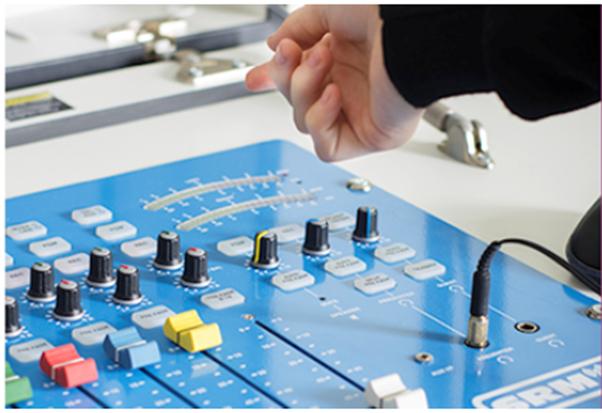
image004 1

#1 Audio Console

The audio console is the heart of the studio and it basically controls all other devices that are connected to it and is responsible for what audiences hear on-air. All the sounds from different sources are mixed on the console before being sent to the transmitter. The radio announcer needs to be well versed in knowing how to handle the console. When you turn on the microphone, the radio console flashes a light to indicate it’s time to ‘go live’.

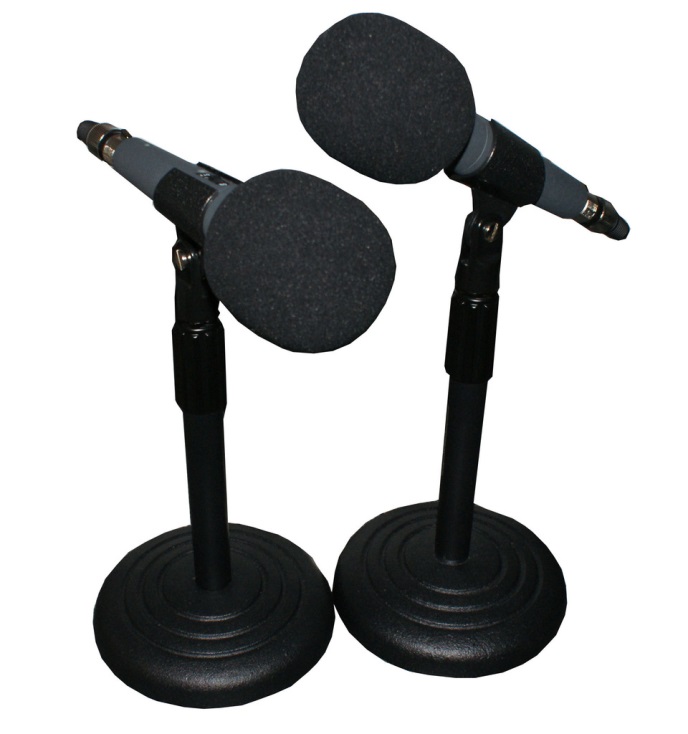
#2 Microphone

A broadcast microphone is one that converts sound into electrical impulses. The microphone is usually mounted on an arm, with adjustable height, so that the announcer is comfortable & at ease while speaking into it.

image021 1

#3 Play Out and Automation Software

Playout covers the broadcasting equipment and software needed to convert and play source media into an on-air environment externally. It has the potential to save a lot of media and play the pre-recordings whenever necessary. The system is controlled by the RJ (radio jockey), but it has the potential to auto-run the music & Ads when the human is not around.

#4 Level Meters

A level meter maintains a proper range for sound in the studio and on-air. It is used by the studio operator to gauge whether the sound is too loud or too soft at any given point in time. There are multiple meters showing levels at different phases. So the phrase ‘Clarity within, leads to clarity without’ is also applicable in this scenario.

#5 Studio Monitor Speakers

Studio Monitor Speakers are huge output devices that enable you to hear what’s going on air, without the need for headphones. They are very high-quality speakers so that there is clarity on the show and distractions are kept to a minimum.

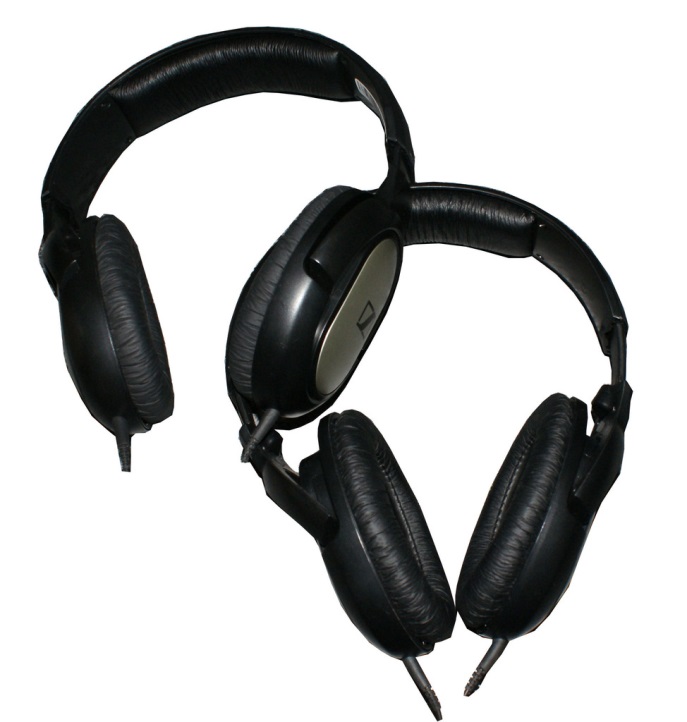
#6 Headphones

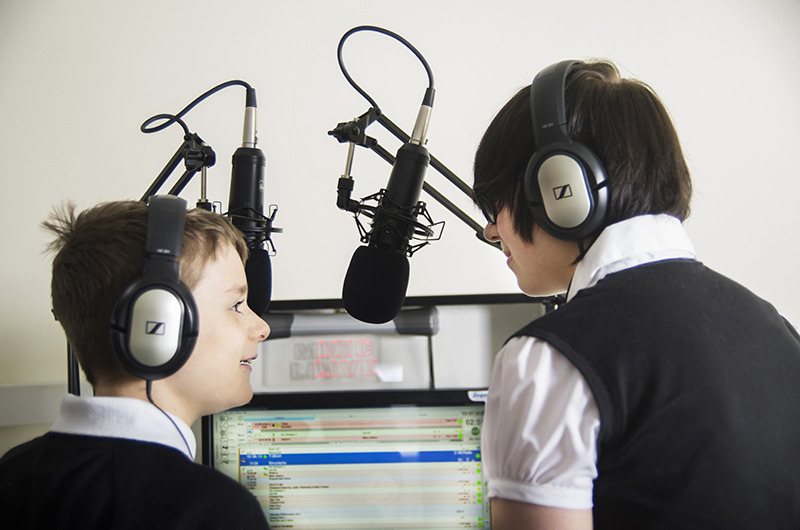
The speaker is going to need a good pair of headphones, to be able to host a 1 – 3 hour show seamlessly. The headphone selection should be such that the RJ can hear what’s airing, minus the background noise from the studio. In order to monitor the audio output as it should sound to the listeners, proper headphones need to be carefully chosen.

image023

#7 Talent Panel

Often guests are invited into the studio and don’t have access to the main audio console. To mute oneself while taking a quick coffee break in the studio, guests are furnished with their own control system which they can turn on/off as per convenience. These panels are mounted in front of each guest’s microphone with an attachment to the headphone jack.

#8 On-Air Sign

Silence please, in-studio recording is work-in-progress! A sign above the recording room clearly states ‘On Air’ when the RJ is conducting a show. Do you know what the secret is? No one turns the sign on or off, it happens automatically! The sign automatically reacts to the functioning of the audio console and turns on/off, in tandem with it.

School Radio provides a platform to educational institutes in Dubai and all over the world, including other regions of the Middle East. They take responsibility for setting up a functional radio studio in the school with all the necessary types of equipment, to facilitate an authentic experience.

Why choose School Radio?

  • Free Demo Provided
  • Customized Packages Available for Broadcasting
  • Offers Installation and Training
  • Handy Resources Available to create Content for shows
  • Connect with a wider community by Broadcasting shows on Websites and Mobile Apps


Contact us

Fill in your details below or send us an email on info@knowledge-hub.com

FAQ Miro-E

FAQ Miro-E

FAQ Miro-E

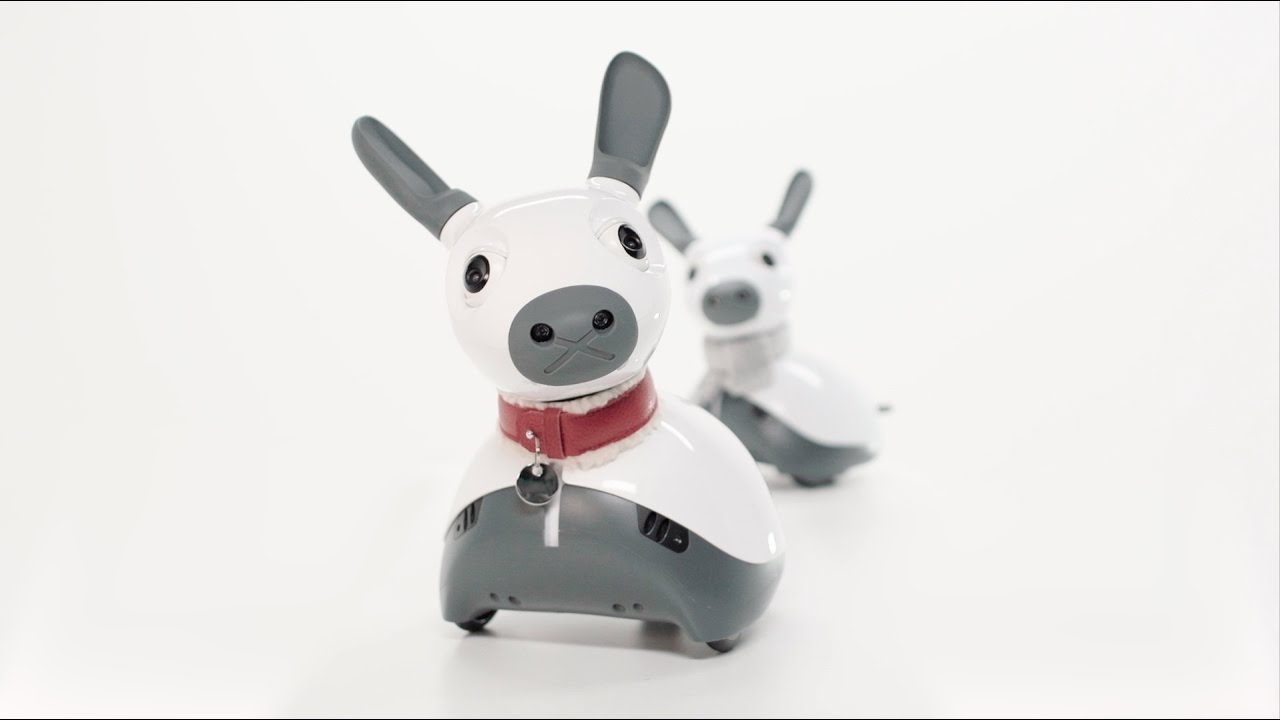
MiRo-E’s appearance and features stand out and appeal to all. Providing a comprehensive and technologically advanced platform for use across different departments. Introduce new students to robotics and computer science, increase the scope of research issues, and serve as a fantastic outreach and public engagement tool.

Miro-E has seen incredible popularity with parents from UAE and the rest of Middle East, specifically in urban setups in Dubai and the rest of GCC.

Here are some frequently asked questions about Moro-E:

Why does my robot sound like a satellite?

The main battery voltage is low, as indicated by this sound. MiRo’s batteries should be recharged.

Why does my robot sound like an airport?

This sound means the system is being updated via the internet. You should strive to be patient, which is tough in today’s fast-paced environment.

Why is the update not working (with error message “git pull failed”)?

Your robot must be linked to the internet in order to update the on-board software. If not, connect your robot to a network by entering network credentials and rebooting it, then verify that it has a valid IP address and that the network to which it is attached is likewise linked to the internet. Now attempt the update once more.

Why is the update not working (with error message “lock could not be acquired”)?

Automatic system updates were conducted automatically in older programme versions on a regular basis. These are now carried out during robot software updates, however you cannot do a robot software update while a system upgrade is in progress. Please wait a few minutes for the update to complete, after which you will be ready to proceed.

To minimise system corruption, it is advised to avoid rebooting in this circumstance and instead wait for the updates to finish. Following the update, system updates will be made only when necessary, eliminating this issue.

Why is the update not working (with error message “server certificate verification failed”)?

This occurs when the on-board computer fails to update its system time, preventing distant certificates from being checked. This can happen if the robot’s network blocks NTP (time server) packets.

You can either contact your system administrator or connect through SSH and manually set the time. Support for setting the time from MiRoapp will be implemented in the near future, providing another solution to this problem.

Why is the update not working (software state is ‘modified’)?

It is strongly advised that you do not make any changes to the MDK directory on-board your robot. If you do, the software’s “State” on the Software manager page will be “changed,” and you won’t be able to update it.

You can revert any modifications to the MDK directory by signing in to your robot. Please save any files you want to keep first, and then follow the steps below.

  • The first step is to restore the MDK repository to its previous state.
  • The second step is to remove any additional files from the MDK directory. You can find them as follows; you should manually delete them.

Why does my robot just sit there wagging its tail with its eyes half-closed?

When you turn on MiRo, the touch sensors self-calibrate. To avoid miscalibration of these sensors after restarting MiRo, please only touch the grey (lower) areas of the case. If this is the case, you can simply re-calibrate the sensors by following the steps below. Perform an Embedded reset by simply touching the grey sections of the casing.

Why can I not reach the on-board ROS master?

You’ll be able to query the ROS master on the robot to see a list of ROS topics broadcast by the robot after your environment is configured appropriately. You might get something like this instead:

ERROR: Cannot communicate with master! $ rostopic list The most likely issue is that the ROS MASTER URI variable is incorrectly set—that is, it does not contain your robot’s address. To learn how to properly set this, go to Off-board.

Contact us

Fill in your details below or send us an email on info@knowledge-hub.com

States of Matter: Different States and Its Properties

States of Matter: Different States and Its Properties

States of Matter: Different States and Its Properties

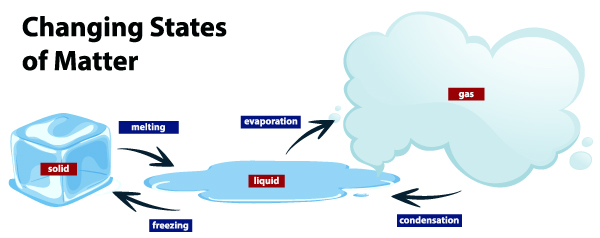
You must have observed that matter changes form which converts water into vapor and ice into water. Why does this happen? Changing states of matter occur when matter absorbs energy or loses energy. The atoms in the substance act upon the external stimuli which compel it to change form. An increase in kinetic energy leads to the atoms moving away from each other and thereby changing the state of matter.

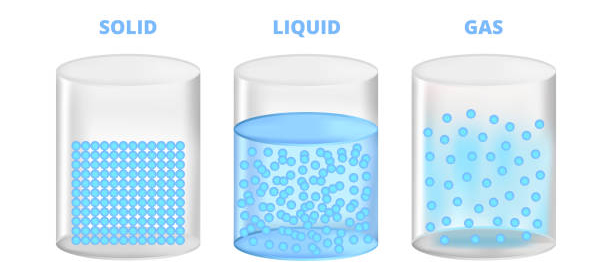
What are the different states of matter? We are aware that there are three states of matter; solid, liquid, and gas. In the solid-state, atom molecules are tightly packed against each other and hence the substance is more compact, having great intermolecular strength. In a liquid state, the atoms are slightly spaced between each other and hence the force of attraction is lesser than that of solid-state. In a gas state, the atoms are far apart and thus have very little force of attraction.

To summarize the above, you can say when there is a change in pressure or temperature of a substance, its state of matter also changes.

Change of state from Liquids to Solids:

How do you convert water into ice cubes? The process is simply by filling the tray with water and then putting it in the freezer. But do you know what magic happens behind cool doors?

When you place the tray in the chiller section, a transfer of heat occurs between the cool air in the fridge and the warm tray. Water in the tray loses its heat due to the cool temperatures within and the molecules become more compact due to the force of attraction. This process continues till the atoms become very compact, leaving no more space and getting fixed in one position. This is when water becomes ice. The temperature at which water gets converted into ice is called the freezing point.

Change of state from Solid to Liquid:

Now if you take the same ice cube and expose it to outside temperature by leaving it on a plate in a warm room, the cube will melt. The warm air is absorbed by the cube and this energy forces the particles to separate from each other, thereby the ice loses its fixed position. In this way, solids change to liquids, and the temperature at which it happens is called the melting point.

Change of state from Liquid to Gas:

Liquids when heated turn into gas. When you boil water in a pot, after a while, you will notice that the amount of water has reduced, because it gets converted into gas and evaporates in the atmosphere. This happens as the particles in liquid water get enough energy to overcome the forces of attraction, and therefore the molecules separate until it becomes gas. The process in which a liquid boils and changes to a gas is called vaporization.

Change of state from Gas to Liquids:

When you close the lid of the vessel in which water is boiling, you will see some water droplets on the lid. This is because vapor came in touch with the cooler lid surface, so it lost its energy and it no more had the strength to overcome the forces of attraction. The process in which gas turns into water is called condensation.

Carolina has been a biology supply company, associated with schools, colleges, & home-tutoring groups. Many K-12 educational institutes in Dubai and GCC regions, trust Carolina for their laboratory set-up and rely on its learning modules, to make Science more fun for students.

Carolina’s module on ‘Properties and States of Matter’ is specially designed for students of Grades 6-12. The learning kit includes a set of visual, digital, and hands-on resources to support teacher instruction and provide students with the skills to master key concepts on properties and states of matter. When kids conduct experimentation themselves, they feel more confident and are able to grasp concepts well. If you reside in the UAE, across the Middle East, simply send us a request and we will arrange for a demo at the earliest:

Contact us

Fill in your details below or send us an email on info@knowledge-hub.com