Announcing Digital Storytelling with MatataStudio

Announcing Digital Storytelling with MatataStudio

Digital storytelling is a modern way for children to express their creativity by combining narratives with technology. Through coding, kids can bring their stories to life by creating interactive animations, games, and life lessons. With tools like MatataStudio and MatataBot, students are exposed to STEM learning methodologies in a fun and hands-on way. Continue reading the Blog to explore how MatataStudio helps children use coding to develop different plots and scenes that culminate into an interesting tale.

What is Digital Storytelling?

Digital storytelling involves using digital tools. Unlike traditional methods, where a story is told through words or pictures, digital storytelling can be conceptualized from scratch – using coding techniques.

How MatataStudio Enables Digital Storytelling

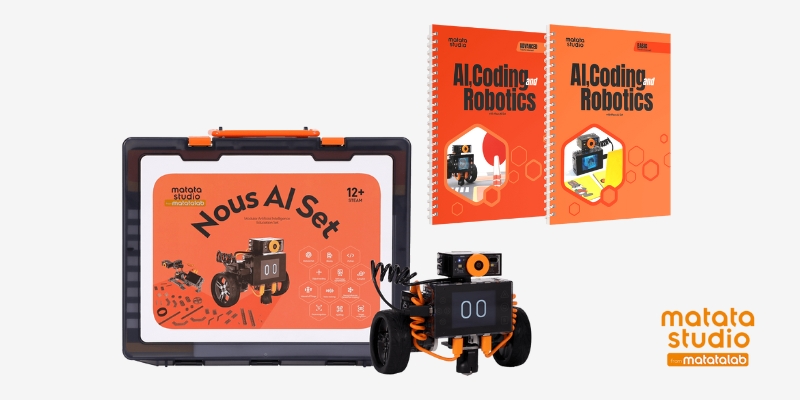
MatataStudio, paired with the friendly MatataBot, provides a playful way for young children to learn the basics of coding while creating their own stories. Designed for little learners – as young as kindergarten age, MatataStudio uses physical Coding Blocks that allow them to program MatataBot. By arranging the blocks, children can control how MatataBot moves, reacts, and interacts, making it a perfect tool for curating digital stories.


Crafting Ideas with MatataBot

  • Imagine a child who wants to tell a story about a journey through a Magical Forest. Using MatataStudio, they can program MatataBot to act as the main character of the story. The child can place coding blocks that direct MatataBot to move forward, turn, or interact with objects on the play mat. For example:
  • Action Blocks: Use these to make MatataBot move through different destinations within the story setting; like crossing a bridge or exploring a cave.
  • Music and Sound Blocks: Adding sounds to different parts of the journey makes the story more immersive. MatataBot can play cheerful tunes when finding treasure or spooky sounds when entering a dark area.
  • Loop and Repeat Commands: Children can create recurring actions in their story like MatataBot repeatedly searching for hidden keys or dancing when it completes a quest.
  • This hands-on way of telling stories lets children use their imagination to guide the plot, make decisions, and create different endings. They learn to think step-by-step as they plan the actions of their character and see how those actions play out.

Examples of Digital Storytelling with MatataStudio

  • The Adventure of MatataBot in Space: Create a space adventure story where MatataBot becomes an astronaut exploring new planets. Using the coding blocks, they can make MatataBot move around the play mat, collect “alien samples,” and play sounds when discovering a new planet. Through this process, kids learn to structure their stories, use coding to program different actions, and add fun elements like sound effects.
  • MatataBot and the Hidden Treasure: In this example, children can tell a story where MatataBot is a treasure hunter searching for a hidden gem on a desert island. By programming the robot to move in specific patterns, avoid “traps,” and unlock “hidden doors,” they practice problem-solving skills and learn how to sequence actions logically. The coding blocks allow kids to introduce elements like loops, making MatataBot search for clues repeatedly until it finds the treasure.
  • The Animal Rescue Story: Children can use MatataBot to tell a story about helping animals find their way home. By coding MatataBot to navigate through different obstacles, children can design paths that lead to each animal. This encourages empathy and creativity, as kids can come up with unique ways to guide the robot while understanding the basics of coding.

Benefits of Digital Storytelling with MatataStudio

  • Develops Logical Thinking: Writing code to create a digital story teaches children to think logically. They must decide which coding blocks to use, in what order, and how each action will affect the overall narrative. This process helps them understand cause and effect, sequence, and logical problem-solving.
  • Promotes Communication: When children work together to create a story, they learn to communicate their ideas, listen to others, and collaborate to solve problems. It becomes a fun team-building activity where kids learn to share and build on each other’s creativity.
  • Encourages Experimentation: One of the best parts of coding with MatataStudio is that it allows children to experiment freely. They can try out different story ideas, change the actions of MatataBot, and see what works best. This trial-and-error approach helps them learn from their mistakes and feel more confident about experimenting with new ideas.

MatataStudio and MatataBot open up a world of possibilities for children to explore digital storytelling through coding. By combining the logic of programming with the creativity of storytelling, children can create interactive stories that are fun, educational, and highly engaging.

Contact us

Fill in your details below or send us an email on info@knowledge-hub.com

Introducing Interactive Learning with the LEGO® Education Coding Express Set

Introducing Interactive Learning with the LEGO® Education Coding Express Set

Welcome to the world of Coding Express, a fun and engaging way for Pre-K and Kindergarten students to explore important concepts like traffic rules and problem-solving. Using interactive learning & play, the Coding Express set, notably in Lesson 7 titled Journey: Trouble on the Road, teaches young learners the fundamentals of coding ideas and helps them comprehend how “traffic signs” operate. In addition to having fun designing tracks, the main goal of this lesson is to teach kids the value of traffic signs and regulations in assisting with potential roadside issues.

This interactive learning unit is designed for students aged 4-6 and typically lasts 30-45 minutes. It is an advanced lesson but is easily adaptable based on the needs of your students. The Coding Express app is key to making this lesson dynamic, but an unplugged version can also be used if you prefer to skip the technology aspect.

Engage – Introducing Traffic Rules

Introduce the lesson by having a discussion about driving rules with the students. Ask open-ended questions such as:

  • Do you know any traffic rules? What are they?
  • Why is it necessary to follow traffic rules?

This conversation will help the students start thinking about the importance of following rules and how traffic signs help us stay safe on the road. Then, introduce the idea that traffic signs are visual reminders of these rules, guiding drivers to avoid danger and make the roads safer for everyone.

For added fun, turn the classroom into a mini driving arena! Using the four traffic signs included in the Coding Express set (stop, animal ahead, construction work ahead, & railway crossing), have students guess what each sign means. You can place the signs around the classroom and ask the students to pretend they’re driving high-speed trains. When they approach a sign, they must ‘slow down’ or ‘stop’ based on the rules they’ve just learned. This playful activity gets them moving and thinking about how traffic signs function.

Building and Problem-Solving with LEGO® Education 

Now it’s time for the students to get hands-on with interactive learning! In this phase, students will form small groups to build a Y-shaped track using the Coding Express set by LEGO® Education. Once the track is built, they can place their models, representing buildings or stations, around the track. This adds a layer of imagination and storytelling to the lesson, as students start envisioning a real-world journey.

Randomly place action bricks along the track. These bricks introduce specific actions or problems for the train, such as stopping, changing direction, or slowing down. Using the Coding Express app by LEGO® Education, students will take turns driving their train on the track, using different buttons to see what happens when the train passes each action brick.

This part of the lesson encourages experimentation. As students explore the various functions of the app, they will encounter problems like traffic jams or wrong turns, giving them the opportunity to solve these issues using traffic signs they’ve already learned about.

Finding Solutions

Now that the students have seen how their trains move and respond to different situations, it’s time to reflect on what they’ve learned. Engage into a discussion by asking:

  • What happened when the train passed each action brick?
  • Which traffic sign would help solve the problem you faced?

Encourage the students to think critically about the scenarios they’ve encountered during the interactive learning phase. This step helps solidify the connection between traffic signs and solving real-life traffic problems.

Elaborate – Creating and Playing with Traffic Signs

Invite them to invent their own traffic signs or models, imagining new ways to keep drivers safe. These creations can be placed around the track, and students can explain why they made each sign and how it contributes to road safety.

This is also an opportunity to discuss other traffic safety measures. Ask questions like:

  • Can you think of any other important things to keep in mind when driving?
  • What are other ways people stay safe on the road?

Evaluate – Observing Student Progress

The final phase is all about evaluation. As students work through the lesson, teachers can observe their progress using an observation checklist:

  • Did the students successfully create the Y-shaped track?
  • Were they able to describe the journey their train took?
  • Did they demonstrate an understanding of the sequence of events on their trip?

Encourage students to explain their thinking and decision-making processes throughout the interactive learning activity. This gives insight into their understanding of traffic signs, road safety, and basic coding concepts.

Contact us

Fill in your details below or send us an email on info@knowledge-hub.com

Vocational Training for Kids: Hands-On Tools That Inspire Learning

Vocational Training for Kids: Hands-On Tools That Inspire Learning

Introducing students to hands-on woodworking tools fosters creativity and learning. In vocational training sessions, especially in schools, hand drills offer a great entry point into understanding basic mechanics, woodworking, and craft skills. When used correctly, these tools are not only safe but also fun for children to work with, sparking curiosity and providing a hands-on experience that complements theoretical learning. In this blog, we will explore the benefits, safety tips, and practical applications of hand drills in school as a part of vocational training for kids.

Benefits of Using Hand Drills for Kids

Hand drills, particularly manual ones, are versatile tools that children can use safely under supervision. They can help kids develop fine motor skills, hand-eye coordination, and problem-solving abilities. Here’s how:

  • Skill Development: A hand drill encourages learners to engage their mind and body, enhancing dexterity and hand-eye coordination. Drilling also helps them understand the mechanics of tools and materials, fostering technical literacy from an early age.
  • Creative Exploration: Projects involving hand drills often include woodworking, crafts, and even basic engineering concepts. This gives kids the freedom to create tangible items like small wooden toys or other small constructions, promoting creativity.
  • Hands-On Learning: The act of physically using a tool offers an educational experience that complements classroom learning. Special sessions focusing on vocational training for kids teach children about measurements, materials, and construction more interactively and engagingly.

Safety Tips for Using Hand Drills with Kids

While hand drills can be safe for children, especially when designed for young users, it is essential to follow some safety guidelines to ensure a positive experience. Whether used at home, in vocational training, or in school projects, these tips can help:

  1. Proper Supervision: Children should always be supervised while using a hand drill during vocational training classes for kids. Supervisors can guide them through proper handling and ensure they understand how to use the tool safely.
  2. Sharp Drill Bits: Make sure to use sharp drill bits, as they require less force and reduce the risk of the tool slipping. Dull bits can be dangerous because they force kids to push harder, leading to potential accidents.
  3. Secure the Workpiece: Always use a clamp to secure the material that is being drilled. By doing this, the material is prevented from slipping and misaligning the drill, which could cause harm to the operator.
  4. Correct Posture and Technique: Ensure that kids maintain a comfortable posture while using the drill. They should not lean into the tool or apply excessive force, as this can cause accidents or reduce the precision of their work.
  5. Avoid Contact with Drill Bits: When the drill bit is rotating, never touch it. This may result in severe harm. Make sure children know how important it is to keep their fingers away from moving parts.
  6. Wear Safety Gear: You must always wear safety glasses. They protect the eyes from flying debris, especially when working with wood.
  7. Wearing the Right Clothes: Make sure kids aren’t sporting jewelry, baggy clothes, or anything else that might catch in the drill.
  8. Precautions against Overheating: Quit the drill right away and let it cool if it begins to overheat. The instrument may become damaged or stop working due to overheating.

The Unimat ML Design & Technology Kit

For schools and vocational training centers, one of the best tools available is the Unimat ML Design & Technology Kit by Cool Tool Education. Designed with children in mind, this kit includes several child-safe machines such as a jigsaw, sander, and hand drill. Each machine is easy to use and has been tested for safety, making it a great addition to any classroom or science center.

Key Features of the Unimat ML Kit

  • Hand Drill with Vibration: The Unimat hand drill ensures child safety by using a drill bit that vibrates rather than rotates rapidly. This design helps kids drill small holes in wood or soft materials without the risk of injury. It also enables children to gain confidence while performing real, hands-on tasks.
  • Jigsaw with Safety Blade: The short stroke of the jigsaw blade means it won’t injure fingers. The metal guide with a steel tappet ensures clean, precise cuts. This allows kids to work on projects like cutting plywood, soft metals, or plastic sheets with ease.
  • Woodturning Machines: The kit includes a 3-jaw chuck for simple woodturning projects. It’s perfect for making items like salt shakers, wooden pens, or egg cups, all of which can be created as part of classroom projects.
  • Lesson Plans and Projects: The Unimat ML Kit comes with well-documented lesson plans that include both theory and practical exercises. These projects introduce students to basic concepts of design, engineering, and technology in a fun and interactive way.

Incorporating Hand Drills in School and Vocational Training

Hand drills are excellent tools for vocational training sessions for kids. Teachers can create various projects, such as:

  • Woodworking Projects: From making simple shelves to crafting small wooden toys, hand drills are perfect for wood-based activities.
  • Craft Projects: Children can use hand drills to assemble small crafts that involve drilling holes in materials like cardboard or foam.
  • STEM Applications: By incorporating hand drills in technology lessons, educators can teach basic engineering principles such as force, torque, and mechanics.

Hand drills provide a safe and engaging way for kids to develop practical skills while having fun. When used under proper supervision and with tools designed for young users, such as the Unimat ML Design & Technology Kit, children can safely explore the world of drilling, woodworking, and craft making.

Contact us

Fill in your details below or send us an email on info@knowledge-hub.com

The Value of Read-Aloud Books for Kids on Early Literacy Development

The Value of Read-Aloud Books for Kids on Early Literacy Development

Read-aloud books for kids are very effective in encouraging a love of reading in young children. They act as a fun transitional link between a child’s early language development and eventual independence in reading. Let’s examine how children’s read-aloud books impact their early literacy development and foster a love of reading that lasts a lifetime.

Building Essential Literacy Skills

  • Auditory Processing: Read-aloud stories aid children in their recognition of linguistic patterns, such as speech rhythm and sentence structure. This helps them transition to being independent readers later on in their journeys.
  • Phonological Awareness: One needs to learn to hear and distinguish between the different sounds that make up words. Read-aloud children’s books aid in the development of their understanding of these sounds and serve as a solid foundation for phonics.
  • Attention span: Learners who often hear stories might develop their capacity for sustained focus. Their increased attention span is advantageous for their general learning and concentration abilities in addition to helping with literacy development.

Expanding Vocabulary in a Natural Way

Youngsters’ minds are like sponges; they take up new information really quickly. Children who listen to books aloud are exposed to a broad vocabulary that is frequently more sophisticated than what they would hear in everyday conversation.

  • Diverse Language Use: Read-aloud books for kids frequently use eloquent, descriptive language that isn’t always used in normal conversation. The exposure to a variety of narrative techniques, such as dialogue-driven scenes and poetic prose, enhances children’s comprehension of language and expression.
  • Building Strong Comprehension Skills
  • Following along with a story is a workout for a child’s comprehension muscles. They learn to track the sequence of events, make predictions, and identify relationships between characters and situations.
  • Creating Personal Connections: Children frequently draw parallels between the story and their own experiences. A youngster is more inclined to consider their ideas, emotions, and behaviors when they learn about the experiences and feelings of a fictional character.

Choosing the Right Read-Aloud Books for Kids

Selecting the Best Children’s Audio Books should include:

  • Age-appropriate content to make sure that the book’s themes, language, and length are appropriate for the developmental stage and age of the kid.
  • Whether your kids enjoy nonfiction, fairy tales, or action stories, providing books that suit their interests will enhance the reading experience.
  • If you listen to audiobooks, try to find ones with expert narrators so that the experience will be more thrilling and dramatic.

Including Read-Aloud Books in Everyday Activities

It can be simple and enjoyable to incorporate read-aloud sessions into your child’s everyday routine:

  • Shared Reading: Assist youngsters in following along by matching an audiobook with a printed book. This strengthens the connection between written and spoken language.
  • Independent Listening: Encourage kids to use headphones to listen to read-aloud books during quiet time or on long car rides.
  • Choose Capstone Library: Sites such as Capstone Library provide a vast array of books narrated by professionals, offering instructors, parents, and students excellent support. It’s simple to include read-aloud experiences into everyday routines by using digital libraries and encouraging individual listening. In general, read-aloud audiobooks encourage a passion for reading and are popular in education institutes across Dubai.

So, whether you’re reading to your child or letting them enjoy an audiobook, you’re giving them a strong start on their journey toward lifelong learning and a passion for books.

Contact us

Fill in your details below or send us an email on info@knowledge-hub.com

How To Manage Storage with the MatataStudio VinciBot Classroom Set?

How To Manage Storage with the MatataStudio VinciBot Classroom Set?

One important factor that is frequently missed when introducing robotics into the classroom is the importance of appropriate storage. When students use kits like the MatataStudio VinciBot Classroom Set, there are so many components in the box, that keeping everything organized becomes important. Proper storage can go a long way in preserving the equipment’s lifespan and maintaining efficiency. Let’s delve into why storage is important for a successful classroom experience to maximize learning potential.

Organized Learning Environment

A well-organized classroom allows students and teachers to focus on learning rather than managing clutter. The MatataStudio VinciBot Classroom Set must be stored in an organized manner because it includes a number of different parts, including robots, sensors, accessories, and code cards. These little parts can easily get lost without a designated storage spot. We recommend labeling items correctly and placing them in bins, shelves, or trays, to maintain seamless learning.  

Protecting Equipment from Damage

The VinciBot is a sophisticated kit designed to teach students coding, problem-solving, and robotics skills in schools across Dubai. However, these robots and their accessories can be delicate, if not handled properly. Storing them in protective cases or dedicated storage units helps safeguard the equipment from damage due to accidental drops, water exposure, or mishandling.

Efficiency in Classroom Management

Classroom time is precious, and every minute counts. Without efficient storage solutions, transitioning between lessons, particularly hands-on activities like coding with the VinciBot, can become chaotic. When items are neatly organized and stored, it’s simple for students to retrieve what they need and return it to its proper place at the end of the lesson. This level of efficiency leads to an enhanced focus on play-time learning.

Encouraging Responsibility in Students

By keeping all components neatly organized, students develop a sense of responsibility and learn to be more accountable for their study material. Respecting classroom resources promotes a positive experience and builds character.

Promoting Teamwork and Collaboration

During a group project, an organized toy-supply space works best, because it allows teammates to quickly collect items needed & get started. This prevents any scope for confusion and rivalry over learning resources, as everything is properly accounted for.

Flexibility for Future Growth

Adding new kits and tools to the classroom is inevitable as the number of students grows. When new toys are added, other than the MatataStudio VinciBot Classroom Set, the existing placement of materials under the current setup stays uninterrupted- thanks to the well-organized discipline practice, followed in school. A good storage plan will have room for growth, enabling you to integrate additional robotics kits or other learning tools seamlessly. It’s time to future-proof your classroom and make room for new technology.

Supporting Teacher Well-being

Finally, let’s not forget the role storage plays in supporting teachers. Juggling student’s needs, lesson plans, and classroom management can be overwhelming. A clean, well-organized space provides mental clarity and reduces stress. Knowing everything is in place allows teachers to focus more on their instruction and less on logistical challenges. An efficient storage system makes the day-to-day experience in the classroom more manageable.

The MatataStudio VinciBot Classroom Set’s compatibility with your teaching setting depends majorly on storage. Proper storage can have a big impact on the classroom’s long-term management as well as the immediate learning process by protecting equipment, fostering efficiency, and encouraging accountability. It is possible to make the most of robotics education for students and teachers by investing in a dependable storage solution, which removes unnecessary barriers to learning and spurs creativity.

Contact us

Fill in your details below or send us an email on info@knowledge-hub.com
Captcha validation failed. If you are not a robot then please try again.