Early Years AR Learning: A Smarter Way to Build Literacy and Number Sense

Early Years AR Learning: A Smarter Way to Build Literacy and Number Sense

Across schools, early years leaders are looking for one thing: stronger foundations in literacy and numeracy—without increasing teacher workload or turning learning into worksheets. 

A fast-growing approach is multisensory, 3D learning supported by augmented reality (AR). Done right, it’s not “more screen time.” It’s better learning time—short, purposeful, teacher-led moments that make concepts easier to understand and remember. 

Recent classroom evidence from an early years implementation shows how consistent multisensory routines can drive measurable improvements in letter recognition, letter sounds, number recognition, and shapes over a short period.  


Why This Matters for GCC Schools 

Early years classrooms in the UAE, Saudi Arabia, Qatar, Oman, Bahrain, and Kuwait are often diverse and multilingual. Children enter KG with different readiness levels, language backgrounds, and learning needs. That’s why schools need approaches that are: 

  • Visual + hands-on (supports EAL/ESL learners) 
  • Routine-based (supports consistency and behavior expectations) 
  • Engaging (supports attention and motivation) 
  • Outcome-driven (supports measurable progress) 


What Is Multisensory AR Learning in Early Years? 

Multisensory AR learning combines: 

  • Teacher-led instruction 
  • 3D visuals / AR experiences to make ideas “real” 
  • Mnemonics (memory cues) that help children retain sounds and concepts 
  • Hands-on practice that reinforces learning through doing 

This model supports evidence-informed literacy instruction often aligned with Science of Reading principles, especially around sound–letter connections 

What the Classroom Data Showed (in 90 Days)
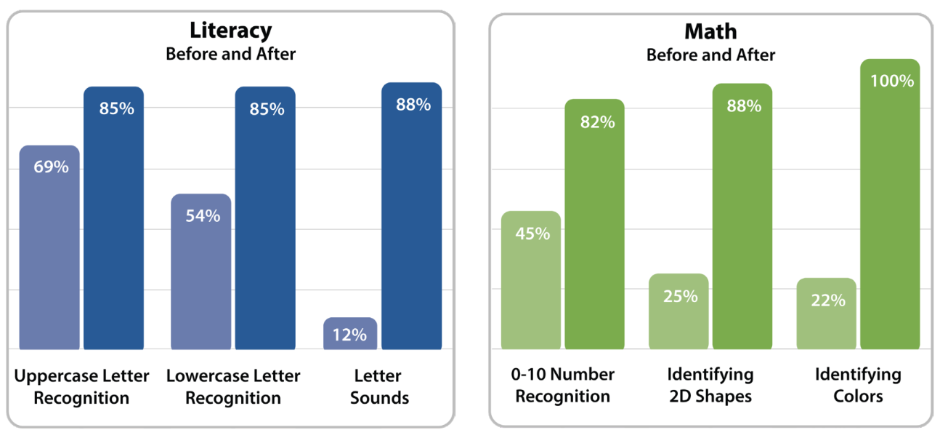
In one pre-K implementation, progress was tracked using classroom assessment data across a 90-day period. The results showed strong gains in core readiness skills:  

Literacy gains included: 

  • Uppercase letter recognition improved (69% → 85%) 
  • Lowercase letter recognition improved (54% → 85%) 
  • Letter sounds improved significantly (12% → 88%) 

Math gains included: 

  • 0–10 number recognition (45% → 82%) 
  • 2D shapes (25% → 88%) 
  • Colors (22% → 100%) 

For KG leaders, these are exactly the skills that impact Grade 1 success. 

 Beyond Academics: Confidence, Engagement, and SEL 

What’s equally important for schools: multisensory learning is designed to keep learning joyful. 

The implementation also highlighted improvements in: 

  • student engagement and motivation 
  • confidence and communication 
  • peer interaction and participation 
  • home connection through take-home activities  

What This Looks Like in a  KG Classroom 

A strong implementation usually includes: 

  1. Short daily instruction blocks (whole group + small groups) 
  1. Teacher-friendly routines that reduce prep time 
  1. Visual + hands-on reinforcement, especially for multilingual learners 
  1. A practical classroom setup (for example, using an interactive display as a shared teaching hub) 

The key is not the “technology.” It’s the instructional structure that makes learning consistent, memorable, and measurable. 

 How Knowledge Hub Dubai Supports Early Years Classrooms 

At Knowledge Hub we help schools implement modern early years learning experiences that strengthen literacy and numeracy foundations—while keeping teacher workload realistic. 

Schools typically look for support in: 

  • onboarding and classroom implementation planning 
  • teacher training and routine mapping 
  • aligning outcomes to school frameworks (British, American, IB, MOE) 
  • sustained support so adoption sticks beyond the first few weeks 
 

LEGO® Education Computer Science & AI Kits: Hands-On Coding + Safe AI Learning for K–8

LEGO® Education Computer Science & AI Kits: Hands-On Coding + Safe AI Learning for K–8

AI is everywhere—yet many students still experience “computer science” as worksheets, isolated screen time, or abstract theory. LEGO® Education is changing that with a new hands-on Computer Science & AI learning solution designed for classrooms, built around collaboration, creativity, and age-appropriate AI literacy.  

At Knowledge Hub, we support schools with classroom-ready learning solutions—and we’re proud to represent LEGO® Education as an authorized partner. In this blog, we’ll break down what’s new, how it works, and why these kits are a powerful fit for educators, schools, and parents searching for LEGO® Education solutions. 

What’s new: LEGO® Education Computer Science & AI

LEGO® Education Computer Science & AI kits provide a hands-on, student-centered way to teach core coding concepts while building AI literacy through meaningful classroom experiences.  

A few highlights educators will appreciate: 

  • 30 inquiry-based, curriculum-aligned lessons in a structured scope and sequence  
  • Designed for collaboration (typically teams of four) rather than isolated screen work  
  • free online Teacher Portal with lessons, presentations, and facilitation notes  
  • Safe AI learning with AI-based computer vision features, built with student privacy in mind  
  • No student logins and projects saved locally  

Why schools are prioritizing Computer Science + AI literacy

Schools are increasingly expected to build future-ready competencies: computational thinking, problem-solving, creativity, collaboration, and responsible technology use. The challenge is implementing this in a way that works for every learner and doesn’t overwhelm teachers. 

LEGO® Education’s approach is practical: students build physical models, code interactions, and explore AI concepts in an age-appropriate way—so AI becomes something students can question, test, and understand, not a “magic box.”  

How the solution works in real classrooms

LEGO® Education Computer Science & AI combines: 

1) Hands-on building + classroom collaboration 

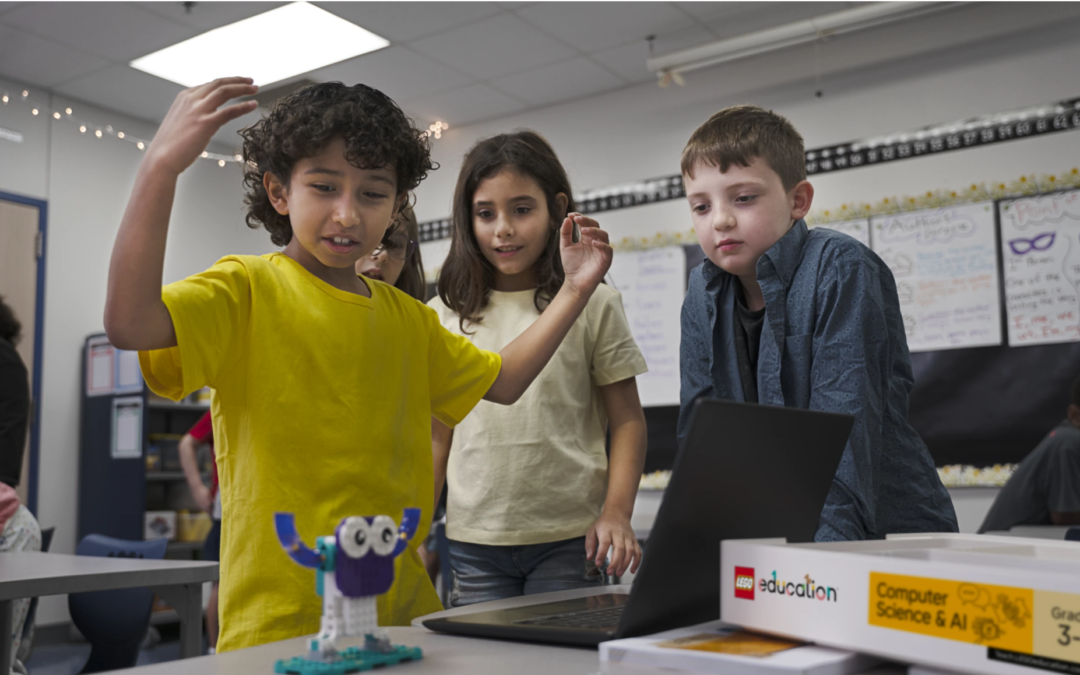
Students work together to build models, test ideas, and iterate—keeping engagement high and making learning more social and inclusive.  

2) Coding Canvas (web + iOS) with word or icon-based blocks 

The Coding Canvas is accessible via web browser or iOS app, using word or icon-based block coding so students can progress confidently across age levels.  

3) Teacher Portal resources that reduce prep 

Teachers get ready-to-use lessons and classroom materials designed to fit typical class periods (LEGO® Education references 45-minute, standards-aligned lessons).  

4) Privacy-first classroom experience 

Students access lessons via PINs, with no student accounts, and projects saved locally
For AI lessons that use camera/vision concepts, LEGO® Education emphasizes local-only handling (no student data sharing).  

Which kit is the right one for your school?

LEGO® Education offers three grade-banded kits so schools can implement a consistent progression across K–8. 

1) LEGO® Education Computer Science & AI Kit K–2 (45520) 

Best for: early years + primary foundations (intro to sequences, loops, events, and basic AI/data concepts) 

What’s included (single kit): 

  • 276 LEGO® bricks 
  • Interactive hardware: 1 single motor, 1 color sensor 
  • Connection card + USB charging cable + storage box  

Teacher Portal units include: Basics, Hardware, Events, Sequences, Loops, AI & Data 

Student benefit (subtle use cases): 
Young learners can build simple models that respond to “events” (like sensor input), then explore how data can be used to make decisions—an early, age-appropriate foundation for AI literacy.  


2) LEGO® Education Computer Science & AI Kit 3–5 (45521) 

Best for: upper primary (stronger logic + early abstraction, including conditionals and variables) 

What’s included (single kit): 

  • 321 LEGO® bricks 
  • Interactive hardware: 1 double motor, 1 color sensor 
  • Connection card + USB charging cable + storage box  

Teacher Portal units include: Basics, Events, Loops, Conditionals, Variables, AI & Data 

Student benefit (subtle use cases): 
Students can move from “what happens next?” to “what happens if…?”—a key step toward real-world programming logic and data-driven thinking. 


3) LEGO® Education Computer Science & AI Kit 6–8 (45522) 

Best for: middle school readiness (functions + deeper problem solving + AI/data exploration) 

What’s included (single kit): 

  • 379 LEGO® bricks 
  • Interactive hardware: 1 double motor, 1 single motor, 1 color sensor, 1 controller 
  • 2 connection cards, USB charging cable + storage box  

Teacher Portal units include: Basics, Loops, Conditionals, Variables, Functions, AI & Data 

Student benefit (subtle use cases): 
Middle school students can explore how AI systems “see” patterns using computer vision concepts—and connect learning to authentic applications (for example, analyzing motion in sports-like scenarios).  


Here are simple ways schools and educators can integrate these kits without overhauling their timetable:

ICT / Computing lessons (core implementation)

  • Build coding fluency through sequences → loops → conditionals → variables → functions (age-banded)  
  • Practice debugging, decomposition, and step-by-step logic in a tactile way 

STEM & Design Thinking integration 

  • Prototype interactive models, test constraints, iterate designs, and document outcomes (perfect for project-based learning) 

AI literacy without “chatbot dependence” 

LEGO® Education’s goal is not “use AI tools,” but understand how AI works responsibly—including its possibilities and limitations—through safe, classroom-designed activities.  

Why educators and parents like this approach

For students: 

  • Builds computational thinking and problem-solving through hands-on challenges 
  • Develops AI literacy in an age-appropriate way (not just “prompting a chatbot”)  
  • Encourages collaboration, communication, and creativity  

For teachers and schools: 

  • Less prep with structured lessons and ready classroom presentations  
  • Easier classroom management: PIN access, no student accounts, local saving  
  • Clear progression across K–8 with grade-banded kits and consistent pedagogy  

Looking for LEGO® Education options?

If your school is exploring LEGO® Education solutions for Computer Science & AI, Knowledge Hub Dubai can support you with: 

  • Selecting the right kit(s) for your grade bands 
  • Implementation planning (devices, grouping, storage, rollout) 
  • Demo and training pathways aligned to your school’s needs  

You can explore our overview page here:
LEGO® Education Computer Science & AI Kits (Grades K–8)  

FAQ

Is LEGO® Education Computer Science & AI available for schools? 

LEGO® Education has announced the Computer Science & AI solution recently, with shipping beginning April 2026. For GCC schools, Knowledge Hub supports demos and implementation planning.  

Do students need accounts? 

No—lessons can be accessed with PINsno student logins, and projects are saved locally.  

What devices are required? 

The coding canvas is accessible via web browser or iOS app, and schools typically use one device per group for coding-based lessons (some lessons are screen-free).  

How is privacy handled for AI activities? 

LEGO® Education describes safe AI learning designed for classrooms, with local handling and no student logins/data sharing as part of the experience.