How To Enhance Coding Skills by Engaging in Non-Coding Activities

How To Enhance Coding Skills by Engaging in Non-Coding Activities

Enhance Coding Skills by Engaging in Non-Coding Activities

The key to becoming proficient in programming is undoubtedly practice. However, an exclusive focus on coding day in and day out might not be the most effective approach for novice coders aiming to master complex programming languages. Interestingly, students who are learning to code can enhance coding skills by striking a balance between writing codes and engaging in non-coding activities. This well-rounded approach allows for essential rest and brain consolidation while fostering creativity, problem-solving abilities, and interdisciplinary learning.

Here are some non-coding activity ideas to try out.

#1 Playing Video Games

Playing video games has been found to have positive effects on the brain, contributing to increased sharpness and cognitive abilities. Video games often require players to engage in complex problem-solving, strategic thinking, and rapid decision-making, which stimulate various regions of the brain. Additionally, video games can enhance hand-eye coordination and fine motor skills. The interactive and immersive nature of gaming also promotes a state of flow where players become fully engaged and deeply focused. However, it is crucial to strike a balance and avoid excessive gaming to maintain overall well-being.

#2 Gamified Coding Apps

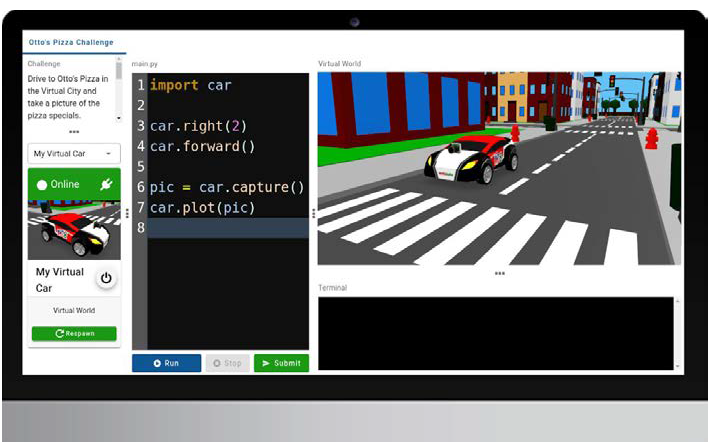
Robotify and similar gamified coding apps can significantly enhance coding skills and offer immense value for learners seeking to explore new concepts. By providing an enjoyable and competitive environment through its 3D simulator, Robotify motivates students to continue engaging with challenges. Unlike traditional theoretical reading, Robotify offers hands-on experiences that nurture creativity and imagination. With modules like Marine Biology Survey, Axel’s Mars Adventure, and Drone Park, learners can explore exciting and practical gaming, making the process fun and educational.

#3 Tech Conferences

Tech conferences offer a refreshing rest from computer screens, enabling interaction with like-minded coders. Through expert-led talks, workshops, and hackathons, participants gain insights into advanced coding techniques, latest technologies, and best practices. Understanding industry trends aligns coding skills with market demands, while soft skills like communication also develop.

#4 Solving Puzzles

When tackling puzzles, coders practice breaking down complex problems into smaller, manageable components, a skill essential for writing efficient code. Puzzles challenge programmers to devise creative and optimized solutions, enhancing their ability to design elegant algorithms. Additionally, puzzle-solving nurtures perseverance and attention to detail, which are crucial for debugging and refining code. As coders regularly engage in puzzle-solving exercises, they develop a deeper understanding of patterns, data structures, and computational thinking, ultimately translating into improved coding proficiency and performance.

In conclusion, integrating non-coding activities into your schedule can invite a fresh perspective, foster a broader outlook, and help children become more well-rounded and effective programmers.

In the following manner, students can work on a hands-on newsletter for a specific target audience, enabling them to gain valuable experience while enjoying the process. The project enriches their skills and allows for a fun and engaging learning experience.

Contact us

Fill in your details below or send us an email on info@knowledge-hub.com

Design a Promising Fan Club Newsletter with TechnoNewsletter Module

Design a Promising Fan Club Newsletter with TechnoNewsletter Module

Design a Promising Fan Club Newsletter with TechnoNewsletter Module

A newsletter is a regular publication that provides updates, information, and news about a specific topic. It is used to engage and communicate with a targeted audience, keeping them informed and connected. Some common types of newsletters include company newsletters, industry newsletters, educational newsletters, and nonprofit newsletters.

The TechnoNewsletter module by TechnoKids can be a valuable resource for teachers seeking to coach students about professionally looking newsletters. It provides ready-to-use workbooks, guidebooks, customizable resources, and assessment tools to help develop the necessary skills in effective communication, design principles, and digital literacy. By using effective teaching aids, teachers can provide a structured and comprehensive learning experience that prepares students with essential computer literacy skills by elaborating on word processing skills alongside the integration of History, Language Arts, Science, and Social Studies.

Word processing skills for Middle and high school students

Initiating Project Work:

Objective: Middle and high school students can significantly benefit from learning how to create a fan club newsletter using Google Docs or Microsoft Word to practice their word processing skills. The versatility allows them to explore various topics of interest, such as their favorite travel destinations, beloved rock bands, a renowned historian they admire, or the most-liked football teams, amongst other such intriguing themes.

Assignment 1: Studying samples of newsletters can be a great way to inspire students and spark their creative ideas. By examining existing newsletters, students can gain insights into layout designs, content organization, writing styles, and visual elements. They can observe how effective communication and visual appeal are achieved in practice.

Assignment 2: Teachers can utilize this session to have an open discussion and delve deeper into topics that are integrated with the curriculum’s objective, such as; environmental issues around us and ways to combat global warming, World War II and its historical significance, or even some of the generic topics mentioned earlier above in the Blog.

Assignments 3 & 4: Students will now be asked to demonstrate their design skills by creating an appealing cover for a fan club newsletter. A catchy cover page serves the purpose of immediately grabbing the reader’s attention and piquing their curiosity. Instruct students to select proper fonts for titles using prior knowledge of word processing skills, align bulleted lists correctly, enhance the cover with a picture, and insert a hyperlink. They must also lay the content aptly to fit on a single page.


Assignment 5: To cater to readers’ preferences, it is essential to carefully select the pointers in the newsletter. These pointers should provide a concise overview of the subject and immediately grab readers’ attention. By listing the text one below the other, the content becomes more visually appealing and facilitates quick and easy readability at a glance.

Assignments 6 & 7: Children can utilize their research skills by browsing the internet to compile a list of commonly used words and terminologies related to the topic. They can then create a captivating Word Search puzzle to enhance the engagement of the newsletter. This involves strategically filling a table with letters to hide the words and providing an answer key for the Word Search puzzle.

Assignments 8 & 9: Ask students to justify the arguments included in the newsletter with evidence. They also need to add a footnote section – usually placed at the bottom of an academic article. Siting viewpoints in the form of a quote in this section is a good idea.

Assignments 10 & 11s: The final stage includes organizing and making the content worthy of publication. Add page numbers, headers, and footers, to the newsletter to give it a presentable look. Finally, hit the send button to distribute it via email to a set of fans or publish a print version and distribute the newsletter class.

In the following manner, students can work on a hands-on newsletter for a specific target audience, enabling them to gain valuable experience while enjoying the process. The project enriches their skills and allows for a fun and engaging learning experience.

Contact us

Fill in your details below or send us an email on info@knowledge-hub.com

Learning To Code Made Exciting with Robotify’s Virtual Learning Platform

Learning To Code Made Exciting with Robotify’s Virtual Learning Platform

Learning To Code Made Exciting with Robotify’s Virtual Learning Platform

Programming fundamentals is a valuable skill that can benefit everyone regardless of the specific programming language you choose. Learning to code at a young age can be a rewarding experience for kids. It helps develop critical thinking, problem-solving, creativity, and logical reasoning skills. Visual programming languages like Scratch and Blockly are excellent for beginners, especially for kids just starting their coding journey. These platforms provide a visual and intuitive way to learn programming concepts without the need to write traditional code syntax.

Learning to Code With Robotify

Robotify is an online platform that offers interactive coding courses explicitly designed for kids. It provides a user-friendly and engaging environment for children to learn coding concepts and develop their programming skills. Its thoughtful curriculum aligns with the Computer Science Teachers Association (CSTA) standards, ensuring a comprehensive learning experience, even if one doesn’t have any prior coding knowledge.

Their comprehensive curriculum includes the following;

Hands-on coding and learning by doing is an effective approach, and Robotify incorporates this methodology into its virtual coding environment. The platform provides a gradual progression, starting with visual coding languages and later advancing to Python. This step-by-step approach is designed to support students with little to no coding knowledge, guiding them through the learning process.

Robotify’s progressive approach aims to build confidence in students, allowing them to feel comfortable and supported as they learn to code. This approach helps them gain a solid foundation in coding fundamentals while gradually expanding their skills.

Once students have a strong understanding of the fundamentals, the possibilities for creativity and exploration are endless. They can apply their coding skills to bring their ideas to life and test their projects.

The virtual coding dashboard Robotify provides is a blank slate for young coders to explore and experiment with coding concepts freely. By providing a safe and supportive space, students can make mistakes and learn from them. They can improve on their code, optimize it, and observe the results in real time.

By using algorithms to solve mazes available on the Robotify platform, students can participate in healthy competition with other co-coders in their batch. Competing against each other is helpful in comparing codes, discussing different strategies, and learning from each other’s approaches.


Robotify even provides a virtual guide feature that assists kids when they encounter difficulties with their code. This real-time guidance helps students overcome challenges and find solutions effectively. The virtual guide adapts to the individual student’s needs, providing personalized support based on their progress and the challenges they encounter.

The best part of subscribing to Robotify is that there is no dull moment! New day, new Robots! Students encounter a variety of robots which sparks their curiosity even further. Through the course, they understand the functionalities, components, and programming techniques specific to each robot and also have the freedom to create a ‘unique’ Robot by themselves.

With Robotify, students can dive deep into the ocean and simulate underwater exploration. They can learn about marine ecosystems, underwater robotics, and the challenges involved in oceanic research. Through virtual simulations, they can navigate the aquatic environments, collect data, and solve challenges related to ocean exploration. Within the modules of Marine Biology Survey, GBR Tag and Track, and Underwater Treasure Hunt, students will solve challenges and puzzles while learning to code.

Children with a fascination for space and the universe will enjoy joining Axel on an adventurous journey to Mars. As they accompany Axel, they will work towards the thrilling mission of defending against aliens and ultimately accomplishing their goal.

In conclusion, Robotify’s virtual coding program provides a dynamic and engaging environment that encourages students to explore the breadth of coding possibilities without investing in any additional hardware or software device. Within this program, students have the opportunity to interact with robots and unlock their creativity by applying problem-solving techniques. We are thrilled with anticipation as we look forward to witnessing the incredible coding projects that our young coders will create in future.

Contact us

Fill in your details below or send us an email on info@knowledge-hub.com

Reading Newspaper Together With Your Little Ones Is Beneficial

Reading Newspaper Together With Your Little Ones Is Beneficial

Reading Newspaper Together With Your Little Ones Is Beneficial

Reading is a life skill that you can help your child inculcate from a young age. It is the biggest gift you can give them. The advantages are tremendous. It sharpens their language, grammar, & vocabulary, widens their knowledge, and overall grooms them to be the finest communicators by making them very confident. Whether it is reading books, another form of text, or a newspaper, any form of reading must be encouraged. Being in the UAE, your kids will learn the local languages of the Middle East, but you must also motivate them to master English which is globally used, and they could even attempt picking up a different foreign language out of the GCC region. It would all broaden their horizon as they grow up to achieve amazing things in life. The foundation to learning so much is reading or making kids acquainted with various alphabets or texts and learning one or more languages. Apart from books, a physical or an e-newspaper would be effective to do so. A simple activity of reading a newspaper together would be extremely beneficial. These are the crucial yet joyful moments you can spend with your little one and the gains received will go a long way.

Never try to impose on the children to mandatorily sit with you and read a newspaper. Set aside some time every day or on certain weekdays or weekends for this activity. It could be for 15 to 30 minutes or could even go up to an hour depending on the interest the child gradually takes. This reading time should be when your child is feeling very fresh and not when they are already tired of studying school subjects. Again, you can choose a local language paper or a foreign newspaper in physical or e-paper form. You may either do this before school or later after they are back home. Try and choose an easy genre to read. Perhaps you can avoid any political, religious, or crime news-related pages and skip to the general or light-hearted coverage. Sports, entertainment, and youth-related news pages should be easy to start with. As they grow older, they will absorb the difficult content and process it accordingly. Patience is key.

Let them choose which article they want to read on a particular page if they find the headline catchy. The idea is to also select articles that have pictures supporting the story which will attract the child’s attention. Once the information has been read from a single piece, ask them in simple ways if they understood the matter and tell them to give you three things that they can remember from what they just read. You can highlight the difficult words and do a spelling quiz with them too. Let them ask you questions about the news story. Give them some bonus fun time and jump to pages that have Sudoku or Crossword puzzles in the newspaper. These games will strengthen their concentration levels. All in all, picking up and reading a newspaper will never be a boring activity for them and in fact they will look up to it.

From few to far-ranging topics, a newspaper will open up the minds of your children. They will themselves begin to understand what kind of genres they gravitate towards and others that don’t suit their interest. In later years of school and college, it will help them to choose the ideal career path. This knowledge gained will aid them in any competitive exams they may take later. Needless to say, reading a newspaper almost every day is going to definitely sharpen your kids’ general knowledge. From a very young age, they will learn to be abreast with the latest happenings around them in Dubai and the world at large.

If there is any news related to the current global warming issue, they will start understanding the power of saving water and electricity, growing more plants and trees, and cutting down plastic usage. Once they will know the problems faced by citizens across the world due to several issues, they will learn the virtue of humanity and kindness and will automatically be empathetic towards other individuals. Your child will organically pick up these attributes and that is the power of the simplest activity of reading a newspaper. Of course, the bond they will develop with you while reading will be priceless and they will truly be grateful for the same.

Reading Eggs” makes learning to read interesting and engaging for kids, with great online reading games and activities. It is fun, interactive, and highly rewarding for ages 2-13 and it’s based on solid scientific research. “Reading Eggs” provides your child with an educationally sound and highly enjoyable learn-to-read program that is not only fun and effective but also easy to integrate into your daily routine. Children love the games, songs, golden eggs, and other rewards which, along with feeling proud of their reading, really motivate children to keep exploring and learning.

Contact us

Fill in your details below or send us an email on info@knowledge-hub.com

Different Kinds of Graphs To Visualize Trends Easily

Different Kinds of Graphs To Visualize Trends Easily

Different Kinds of Graphs To Visualize Trends Easily

Many of us are visual thinkers and so we can grasp information more easily when it is presented graphically. When data is illustrated visually on the graph its interpretation becomes easier and there is a greater chance of recollecting the figures & facts mentioned therewith. Graphs were invented by William Playfair in around 1786, who was a Scottish Engineer and Political Economist. It came into existence to solve some real-world problems that involved relationship and correspondence between entities. Ever since then, graphs have proved to be a mighty tool to represent data and analyze it for various findings.

Different Types of Graphs

Different types of Graphs are used for various purposes depending on the number of criteria you want to represent and the level of experience of your audiences. Let us highlight some of the most common graphs taught in K-12 schools across Dubai and other Middle East regions.

Bar Graph

This is the most commonly used Graph type to compare data across parameters. The rectangular shaped bars are usually arranged vertically and each bar is equidistant from the other. The width of every bar on the graph is the same in measurement, however, the heights vary depending on the quantitative aspect of information. The general thumb rule for most Bar Graphs is that the categories that are to be compared are represented on the horizontal axis, while the numeric values are represented on the vertical axis.

Area Chart

As we can see from the above example of the Bar Graph chart, in the first quarter, students who attended Dance class are as follows.

January – 40 students

February – 50 students

March – 60 students

Line Graph

The line graph or line chart computes data recorded over a period of time. It is represented by a series of dots joining each other to show the ups and downs in the trend. The independent variables such as (months, days, and, years) are represented on the horizontal axis, while the dependent variables or number values such as (score, percentage, and currency) are represented on the vertical axis. Each position of a point on the graph denotes the change in the independent variable with respect to the dependent variable. If this may sound confusing, let us illustrate with the help of an example.

Line Graph

As we can see from the above reading that in June month, Dubai, receives 12 hours of sunshine vs. 8 hours in December, January, and February months. From the trend, we found out that during winter months the sun shines for lesser hours, than in summer months. Line charts are commonly used by economists, data scientists, analysts, and financial advisors, to effectively decode trends in a precise and accurate manner.

Pie Chart

We are well aware that the pie chart is circular in shape and each slice of the pie shows the respective data size, from the whole unit. Pie charts can be used to depict percentages of variables, from the whole (100%). When you have the chance to glance at a pie chart, you can quickly tell which criteria occupies the largest proportion of the share and which one has minuscule significance. This breakdown helps to consume information visually, rather than reading through lengthy paragraphs from a document or a report. Pie charts can be found in school textbooks, in newspapers, and even on social media (especially LinkedIn) to draw attention towards important subject matters.

Pie Chart

A balance in carbohydrates, fats and protein, leads to a healthy diet plan. The above example suggests to the reader, that to live an active lifestyle with ample energy, one needs to consume 45% of carbohydrates, 30% of fats 25% of proteins throughout the day, across various meals. See how simple it is!

Area Chart

Similar to the line graph, the area chart also shows the series of movements across points. The area under the line is colored and reveals to us the volume of data. A stacked chart has the area value stacked on top of each other, across the X-axis and Y-axis.

Area Chart

Try to analyze this chart mentally and write down the pointers on a notepad. If it matched the below findings, then you are on the right track.

  • Product 2 has the highest sales in Q1 across the UAE.
  • Q2 sales for products dip lower and lower
  • Q4 shows gradual increase in sales.

Mathseeds is a platform developed to fulfill the thrust of knowledge amongst eager Math learners. The lessons are structured in a one-on-one fashion, such that special attention is paid to each child which improves their preparedness. Learning graphs can now be discovered under one of their modules which is designed in a way that is easy to understand and practice. Parents and teachers in the GCC regions, highly promote Mathseeds amongst kids of 3 to 9 years of age.

Contact us

Fill in your details below or send us an email on info@knowledge-hub.com

Coding Storybooks for Kids: The Magic Behind Java and Python

Coding Storybooks for Kids: The Magic Behind Java and Python

Coding Storybooks for Kids: The Magic Behind Java and Python

Students love to dive into the magical world of stories and fantasies. Imagination is all-powerful, it is more important than knowledge because it sparks creativity and curiosity amongst our little ones. Technology and computer science are about factual understanding, how then can it be made interesting for kids? Parents find it hard to convince young learners about the benefits of coding and therefore many of them do away with not opting for coding classes. As we know, the STEM (Science, Technology, Engineering, Math) curriculum is picking up pace and is mandatory in schools across Dubai and other Middle East regions. So, rather than feeling that computer science is one more burdened subject to learn, children need to be introduced to the fun aspect of it first. Through this Blog, we present some books of literature that can be narrated to children at bedtime to get them excited about the various aspects of coding, right from the age of 4 years.

How to Code a Sandcastle | by Josh Funk (Author), Sara Palacios (Illustrator) (Age 4+ years)

Summer vacation is not yet over and Pearl is set on a mission to build a sandcastle before resuming school. Pearl and her robot friend Pascal seem to love relaxing on the beach and building sandcastles. But every time they plan to construct one, either a dog walk all over it, or a Frisbee disc slams into the sandcastle, ruining the chances of getting the beautiful castle in place. But as we know it, where there seems to be a problem, there has to be a solution. So, Pearl and Pascal try a different method instead! They resort to coding and use concepts like sequencing and looping to break down the sandcastle construction problem into easy steps. Will this plan work? Read the book to find out, and onboard the humorous journey of Pearl & Pascal.

Who Says Women Can’t Be Computer Programmers? The Story of Ada Lovelace | by Tanya Lee Stone (Author), Marjorie Priceman (Illustrator) (Age 6+ years)

Why should men do all the programming, when women are equally competent? Whoever said coding is a man’s job, will get a reality check after reading this book. To all the young women who aspire to make it big in tech fields, must definitely grab a copy of this book. It is a biography of Ada Byron who was a young and talented girl, the daughter of the nineteenth-century poet Lord Byron. Ada loved to study math and science and later worked with Charles Baggage, the inventor of the first mechanical computer. Ada’s contribution includes writing the world’s first machine algorithms for Babbage’s Analytical Engine, 100s of years even before computers existed. Her life is an illustrious example of how women can outshine in the computer science field and prove all stereotypes wrong. You can also check out its Kindle edition access for e-reading across the UAE.

A Coding Mission (Adventures in Makerspace) | by Blake Hoena (Author), Shannon McClintock Miller (Author), Alan Brown (Illustrator) (Age 8+ years)

Rated 4.1 on Amazon reads, this book is fancied by students who appreciate visual graphics. A whole lot of adventure awaits you, as you flip through the pages of this book. Codie and her friends join Ms. Gillian, on a thrilling adventure in Makerspace. They are walking around in circles, stuck in a maze, and can’t seem to find a way out. In all this hush-hush a terrible-looking monster approaches them. Will the monster attack before they find a way to quickly code their way out? Join Codie on her mission and learn more. Students can log-in to the Capstone 4D app and listen to the foot-tapping theme song and watch the author’s interview. How cool it is to fuse Augmented Reality to enhance your reading experience.

Steve Jobs: A Kid’s Book About Changing the World (Mini Movers and Shakers) | by Mary Nhin (Author), Grow Grit Press (Author), Yuliia Zolotova (Illustrator) (Age 4+ years)

Who doesn’t know Steve Jobs and his famous Apple legacy that he left behind? Mini Movers and Shakers is a series of stories that capture snippets of people who have succeeded in life, but also failed many times to reach there. In this book about Steve Jobs, it is said that before he could change the world, he had to face many difficulties and challenges, but never thought of giving up! Little did we know that Steve was an adopted child, but his endeavor to modernize technology was a dream that he rightfully fulfilled. Alongside fun illustrations and interesting characters, this book has a message for all ‘Hard work always pays’. It is indeed a motivational read and a must-have on your bookshelf.

The above are only a few stories that evoke a sense of inquisitiveness among children to explore coding and sign up for it seriously. There are other good books available in the market such as; Women Who Launched the Computer Age by Laurie Calkhoven, Hedy Lamar’s Double Life: Hollywood Legend & Brilliant Inventor by Laurie Wallmark, If I Were a Wizard by Paul Hamilton, and so on.

To prepare NextGen learners to embrace Robotics and programming, Robotify is an affordable and fully accessible virtual Robotics platform, where children learn to code in a fun and engaging manner. All you need is internet access and a laptop, to get started with coding, and no additional software or hardware is required. So, children in GCC can simply log in to Robotify and try their hands at coding by undertaking over 800 gamified challenges in a 3-D virtual environment. We urge you to be a part of Robotify’s growing community of 15,000+ active users.

Contact us

Fill in your details below or send us an email on info@knowledge-hub.com