Unlearning the Most Popular Data Science Misconceptions

Unlearning the Most Popular Data Science Misconceptions

Unlearning the Most Popular Data Science Misconceptions

Even though data science has been generating a lot of attention lately, many individuals are still hesitant to pursue a career in this field. Due to the often-demanding technical prerequisites for roles in Data Science, learning this field can present greater challenges than other domains within the technology sector. A Data Science expert must be proficient and thoroughly grounded in mathematics, statistics, and computer programming. Nevertheless, data science presents an enriching career path with abundant opportunities for continuous learning and growth.

There are several common misconceptions about data science. Here are a few of them:

1. Data Science is All About Programming: While programming is a crucial skill for data scientists, data science is more than just writing code. It involves domain knowledge, statistical analysis, data manipulation, and communication skills. It’s about extracting meaningful insights from data to make informed decisions.

2. Data Science is Only for “Big” Data: Data science is not solely about working with massive datasets. It’s about extracting value from data, whether it’s big or small. Even small datasets can provide essential insights; only some problems need vast data.

3. Data Science is Just Analytics: While data science involves analyzing data, it goes beyond traditional analytics. Data science encompasses various stages, including data cleaning, feature engineering, model training, and deployment. It’s a more comprehensive process that involves creating predictive and prescriptive models, not just descriptive ones.

4. Data Science Solves All Problems: Data science can be incredibly powerful, but it’s not a one-size-fits-all solution. Not all problems can be effectively solved using data science techniques.

5. Data Science is Objective and Unbiased: Data can carry biases, and the data science process can propagate these biases. Data scientists must be mindful of potential data collection, preprocessing, and model training biases.

6. Data Science is a Shortcut to Instant Insights: Extracting meaningful insights from data is a complex process that often requires thorough exploration and experimentation. Data scientists spend considerable time on data cleaning, preprocessing, and feature engineering before even building models. It’s not a guaranteed shortcut to immediate insights.

7. Data Science Replaces Domain Expertise: While data science skills are essential, they are most effective when combined with domain expertise. Understanding the context and nuances of a specific industry or field helps data scientists ask the right questions, interpret results accurately, and create models that align with real-world requirements.

8. Data Science is a Linear Process: Data science is often presented as a cycle, moving from data collection to model deployment. However, in practice, it’s rarely a linear process. Data scientists frequently iterate, revisit, and revise their approaches as they gain more insights and encounter challenges.

9. Data Science is Reserved for Highly Technical Individuals: While technical skills are important, effective data science also involves communication, collaboration, and the ability to explain complex concepts to non-technical stakeholders. Data scientists need a balance of technical and soft skills.

10. Machine Learning and Data Science are the Same: While machine learning is a significant component of data science, it’s not synonymous with it. Data science covers a broader spectrum, including data cleaning, exploration, statistical analysis, and business understanding. Machine learning is just one subset of techniques used in data science.

Delve into the potential of data science through the use of LEGO® Education SPIKE™ Prime. This platform provides immersive lessons for students to venture into data science. They are introduced to essential principles within data science and learn about intricate connections between variables. Categorizing and labeling data points is also presented. LEGO® Education SPIKE™ Prime empowers children to navigate the fascinating world of data science.

Understanding these misconceptions mentioned above can help individuals have a more realistic perspective on data science and make informed decisions when working with data and data scientists.

Contact us

Fill in your details below or send us an email on info@knowledge-hub.com

Learn to Code and Teach Coding with Top 13 Simple Tips

Learn to Code and Teach Coding with Top 13 Simple Tips

Learn to Code and Teach Coding with Top 13 Simple Tips

The impact of computer coding on contemporary society is so far-reaching that its significance often remains unnoticed. Behind every smartphone app lies a sophisticated arrangement of directives, commands, and protocols meticulously composed in a specific coding language. These instructions form the bedrock that ensures the flawless operation of our digital instruments. Despite the rapid advancement of Artificial Intelligence, the irreplaceable human touch remains intrinsic to the coding process, as AI cannot replicate the intricate thinking and deliberation of a human coder. Hence, it’s imperative to acquire coding skills, given the imminent digital future. So are you ready to learn to code and prepare for the upcoming digital era?

For students, the introduction to coding within the school environment can be a transformative journey, a pivotal moment when their interest in the subject sparks to life. This experience equips them with a treasure trove of skills, including the cultivation of creativity, the sharpening of problem-solving faculties, the nurturing of resilience, the fostering of self-assurance, and more. As an educator, recognize that even if you didn’t necessarily learn to code or identify as “tech-savvy,” numerous avenues still exist.

Here are some steps you can take to teach coding even if you’re not an expert coder:

1. Learn to Code & Start with Basics:
Begin with fundamental concepts and basic programming languages. Scratch, for instance, is a visual programming language designed for beginners. It allows you to create simple games and animations without writing actual code.

2. Use Online Resources:
Leverage online platforms and resources specifically designed for beginners. Websites like Codecademy and freeCodeCamp offer interactive learn to code lessons with step-by-step instructions.

3. Learn Alongside Your Students:
Stay ahead of your students by learning alongside them. You don’t need to be an expert, but a general understanding of teaching techniques will help you guide them effectively.

4. Focus on Problem-Solving:
Emphasize problem-solving skills over intricate coding knowledge. Teach students how to break down problems, analyze them, and develop strategies to solve them using code.

5. Encourage Self-Learning:
Encourage students to explore and learn independently. Provide them with resources, point them in the right direction, and let them discover solutions independently.

6. Invite Guest Instructors:
Invite experienced coders as guest instructors or speakers. They can provide insights, share their knowledge, and demonstrate real-world applications of coding.

7. Utilize easy-to-use Virtual Coding platforms:
If you are eager to learn to code, Robotify is the perfect immersive virtual coding platform designed to engage learners of all ages. It offers hands-on activities in programming and robotics through interactive lessons and simulations. Students can participate in virtual gamified adventures such as; Treasure Hunt, Drone Park, and Marine Biology survey to practice Blockly or Python.

8. Use Visual Aids:
Utilize diagrams, flowcharts, and other visual aids to explain programming concepts. Visual representations help students grasp abstract ideas more easily.

9. Project-Based Learning:
Incorporate project-based learning. Assign coding projects requiring students to apply their knowledge to real-world scenarios. This hands-on approach can enhance their understanding and skills.

10. Encourage Collaboration:
Foster a collaborative learning environment where students can help and learn to code from each other. Group activities and coding challenges can encourage peer-to-peer teaching.

11. Feedback and Iteration:
Provide constructive feedback on students’ efforts and projects. Encourage them to improve their solutions through iterations, reinforcing the importance of constant learning and improvement.

12. Stay Curious:
Approach teaching coding with curiosity and a willingness to learn to code. If a student asks a question you don’t know the answer to, use it as an opportunity to research together and find the solution.

13. Set Realistic Expectations:
Make it clear to your students that you’re learning along with them and might not have some answers. This can create a supportive and empathetic learning environment.

Remember, teaching coding doesn’t necessarily mean you have to be a genius programmer. Your role is to facilitate learning, provide guidance, and inspire a passion for coding in your students.

Contact us

Fill in your details below or send us an email on info@knowledge-hub.com

Learning Python and AI by Subscribing to Auto Auto’s Remarkable Project-Based Module

Learning Python and AI by Subscribing to Auto Auto’s Remarkable Project-Based Module

Learning Python and AI by Subscribing to Auto Auto’s Remarkable Project-Based Module

An autonomous car, also known as a self-driving car or driverless car, is a vehicle equipped with advanced sensors, computer systems, and artificial intelligence algorithms that enable it to operate without human intervention. These vehicles are designed to navigate and interact with their environment, just like a human driver would, but without the need for physical control from a person behind the steering wheel. Learning Python and AI is beneficial for programmers as they utilize their advanced coding skills to develop smart cars.

History of Autonomous Cars

In 1939, General Motors showcased a futuristic vision at an exhibition in New York, which included the concept of an automated highway system for self-driving cars. Norman Bel Geddes, a visionary designer at General Motors, created an early prototype of a self-driving electric vehicle guided by radio-controlled electromagnetic fields. By 1958, General Motors demonstrated a functional self-driving car based on Geddes’ work, but the level of autonomy was limited compared to today’s advanced autonomous vehicles.

Levels of Automation in Cars

Significant technological advancements have been made in the latest versions of autonomous cars, enhancing their safety features for passengers and pedestrians on the road. Continuous improvements and ongoing research are being conducted to achieve even higher levels of reliability.

Level 1: “Driver Assistance” provides partial support for acceleration, braking, and steering, but the driver remains responsible for most of the navigation and monitoring of the safety system.

Level 2: Many modern autonomous vehicles have “Advanced Driving Assistance Systems (ADAS)” that continuously assist with necessary driving mechanisms. The driver remains fully attentive but can hand over control of combined longitudinal and lateral functions to the system.

Level 3: A more advanced stage of automation offers conditional driving automation. The autonomy can be fully passed on to the car, but the driver must be present and ready to intervene when needed.

Level 4: The car handles malfunctions without the driver’s help. While the driver may opt to still take control at his own will. These vehicles are restricted to specific places with low-speed limits, making them suitable for taxi services.

Level 5: The vehicle achieves the highest level of automation and does not require any human intervention, including emergency manual control. They lack pedals and a steering wheel, allowing passengers to engage in other activities without concerning themselves with driving.

Computer Science and AI Lessons in School

STEAM curriculum has recognized the significance of integrating computer science and artificial intelligence into school curricula. Given the prominence of technology in today’s world, preparing students from an early age with knowledge and skills in these areas is essential.

Learning made engaging with AutoAuto

AutoAuto is an interactive browser-based module designed to provide students with hands-on projects to practice and master learning Python and AI. The course delves into the process of coding an ordinary automobile and transforming it into an autonomous vehicle over a comprehensive duration of 180+ hours. Students will have the opportunity to explore real-world applications of self-driving cars by working with either the physical AutoAuto cars or their simulated counterparts. This engaging experience of learning Python and AI offers a practical and exciting way to develop programming skills and delve into the world of autonomous vehicles.

Subscribing to AutoAuto is a win-win for educational institutes with tailor-made learning plans that align with their academic needs and capabilities. This comprehensive platform offers lessons designed for beginners to advanced learners, accommodating different educational stages, including Elementary Grade (3rd to 5th), Middle Grade (6th to 8th), High Grade (9th to 12th), and even College level.

One of the most valuable features of AutoAuto is its auto-grading capability, which makes it seamless for teachers to monitor and track students’ progress. This time-saving feature automatically assesses students’ work, providing immediate feedback and insights into their performance.

In conclusion, AutoAuto makes learning Python & AI enjoyable. Needless to mention, the fascination of creating an autonomous car sparks a sense of pride among young learners, given the universal appeal for cars.

Contact us

Fill in your details below or send us an email on info@knowledge-hub.com

DIY Woodworking Projects for Kids: Unleashing Creativity with Cool Tool Education

DIY Woodworking Projects for Kids: Unleashing Creativity with Cool Tool Education

DIY Woodworking Projects for Kids: Unleashing Creativity with Cool Tool Education

Looking for fun and engaging DIY project ideas for kids? DIY woodworking projects provide an excellent opportunity for young minds to explore their creativity and develop essential skills. Cool Tool Education offers a range of sets specifically designed to introduce kindergarten students to the world of woodworking. In this article, we will explore these exciting kits and inspire young learners with fantastic woodworking project ideas.

Cool Tool Edu’s Woodworking Kits for Kindergarten Students:

Cool Tool Edu understands the importance of firsthand learning for young children. Their woodworking kits are thoughtfully curated to be safe, age-appropriate, and enjoyable for kindergarten students. Each kit comes with child-friendly tools and materials, fostering a safe and positive experience in the world of DIY wood projects.

1. Junior Builder Set:

The Junior Builder Set is an ideal starting point for young woodworking enthusiasts. It includes basic tools such as a child-sized hammer, safety goggles, and wooden blocks. With this set, kindergartners can build simple structures like wooden houses, birdhouses, and small sculptures. The Junior Builder Set fosters fine motor skills, and hand-eye coordination, and introduces children to the joy of crafting with wood.

2. Woodworking Tool Set:

The Woodworking Tool Set is designed to be the next step in a child’s woodworking journey. This set includes a child-friendly saw, sandpaper, and a variety of wooden pieces to work with. With the Woodworking Tool Set, kindergartners can create more complex projects such as wooden picture frames, nameplates, and even small toy cars. The set encourages problem-solving and creativity, providing a sense of accomplishment for young learners.

3. Crafty Creations Master Set:

For those ready to take on bigger challenges, the Crafty Creations Master Set is the perfect DIY project idea for kids. This set offers a wider range of tools, including a child-safe drill and clamps. With this kit, kindergarten students can delve into more intricate projects like wooden puzzles, mini bookshelves, and personalized wooden keepsakes. The Crafty Creations Master Set nurtures critical thinking and boosts self-confidence in children as they tackle more complex tasks.

Exciting Woodworking Project Ideas for Kindergarten Students:

1. Colorful Wooden Puzzle:

Using the Junior Builder Set, children can craft colourful wooden puzzles with different shapes and sizes. They can paint each piece in vibrant colours and challenge their friends to solve the puzzle.

2. Nature-inspired Picture Frames:

With the Woodworking Tool Set, kindergartners can create picture frames adorned with natural elements like twigs, leaves, and colourful pebbles. These frames add a touch of nature to their cherished memories.

3. Mini Wooden Planter:

Using the Crafty Creations Master Set, kids can design and construct mini wooden planters. They can then plant seeds and watch their greenery grow with pride.

4. Personalized Nameplate:

With the help of the Woodworking Tool Set, children can create wooden nameplates for their bedroom doors. They can decorate the nameplates with their favourite colours and stickers.

Cool Tool Education provides an excellent platform for kindergarten students to embark on an exciting journey of creativity and artisanry. The carefully curated woodworking kits empower young learners to explore their imagination, critical thinking skills, and artistic abilities. From simple wooden structures to intricate masterpieces, these DIY project ideas for kids foster a sense of accomplishment and pride in children.

Woodworking projects not only introduce kids to the world of craftsmanship but also encourage patience, perseverance, and the joy of creating something with their own hands. As young minds shape wood into beautiful creations, they develop essential skills that will serve them well throughout their lives. So, why wait? Let your kindergarten students unleash their creativity with Cool Tool Edu’s DIY projects. Inspire the next generation of young builders and watch as they craft their way to a brighter, more imaginative future.

Contact us

Fill in your details below or send us an email on info@knowledge-hub.com

Auto Auto: Empowering Project-Based Learning – FAQs and More

Auto Auto: Empowering Project-Based Learning – FAQs and More

Empowering Project-Based Learning

Project-based learning (PBL) has emerged as a powerful educational approach that fosters creativity, critical thinking, and problem-solving skills among students. AutoAuto, an innovative educational platform, embraces the essence of PBL to transform the way children learn and engage with technology. This blog post delves into what AutoAuto is, its target audience, the benefits it offers to children, and how it supports teachers in delivering an enriching learning experience.

What is AutoAuto?

AutoAuto is an interactive project-based learning platform designed to introduce young minds to the fascinating world of robotics and coding. It provides students with the tools and resources to build and program their robots, making learning a fun and hands-on experience. Through practical application, AutoAuto aims to nurture children’s curiosity, problem-solving abilities, and teamwork skills, all while they have a blast exploring the world of robotics.

Who is the Target Audience?

AutoAuto caters to primary to early high school students and educators looking to enhance their classrooms with engaging technology. Parents seeking to boost their children’s STEM skills can also benefit from AutoAuto’s dynamic learning environment.

How will AutoAuto benefit children?

AutoAuto’s project-based approach benefits diverse learners with hands-on building, user-friendly coding, and collaborative opportunities. It nurtures creativity and computational thinking, creating a holistic learning experience.

How it Helps the Teachers?

AutoAuto empowers teachers by providing them with a comprehensive curriculum and user-friendly tools to facilitate PBL in the classroom. The platform equips educators with step-by-step instructions, lesson plans, and assessment materials, making it easier for them to integrate robotics and coding into their teaching. With AutoAuto, teachers can inspire their students to embrace technology while fostering a love for learning and exploration.

Some insightful FAQ

Q: How can I get started with AutoAuto?

A: To begin your robotics journey with AutoAuto, visit their website (autoauto.ai) and explore the available kits. Choose the one that suits your needs, and you will have access to all the necessary resources to start building and coding your robot.

Q: Is prior coding experience necessary?

A: No, AutoAuto is designed for beginners. The platform provides a user-friendly interface, and the curriculum gradually introduces coding concepts. Whether you are a beginner or an experienced coder, AutoAuto welcomes all skill levels.

Q: Can AutoAuto be used in a classroom setting?

A: Absolutely! Auto Auto’s project-based learning approach aligns perfectly with classroom environments. Teachers can integrate it into their STEM curriculum, offering students a hands-on and collaborative learning experience.

Q: What type of support does AutoAuto offer?

A: AutoAuto provides excellent customer support to ensure a seamless learning experience. They offer online tutorials, live chat assistance, and a helpful community forum where users can exchange ideas and troubleshooting tips.

AutoAuto is indeed a trailblazer in the world of project-based learning, offering a unique platform that fosters creativity, problem-solving skills, and technological literacy among students. By providing an accessible and engaging environment for robotics and coding exploration, AutoAuto empowers young learners to embrace technology with confidence. Teachers and parents alike can leverage this innovative tool to cultivate a new generation of forward-thinking and skilled individuals, ready to shape the future through their creative minds and hands-on abilities. With AutoAuto, the possibilities are endless, as young minds embark on an exciting journey of discovery, problem-solving, and collaboration, all while honing the critical skills needed for success in the digital age. So why wait? Join the AutoAuto revolution today and unleash the potential of project-based learning for a brighter tomorrow.

Contact us

Fill in your details below or send us an email on info@knowledge-hub.com

Remarkable DIY Technical Sets for Kids by Cool Tools Education

Remarkable DIY Technical Sets for Kids by Cool Tools Education

Remarkable DIY Technical Sets for Kids by Cool Tools Education

Learning about technology and materials can be made even more engaging and enjoyable for children by allowing them to actively participate in the process. Instead of solely relying on stories or flashcards to understand the tools and techniques used in constructing objects, children can experience the role of a technician themselves and create wonderful things with wood using DIY technical sets.

In today’s day & age, coding and digital literacy are often emphasized in STEM curricula, while there is sometimes a lack of emphasis on teaching children vocational and technical skills. To address this gap and provide a comprehensive STEM learning experience, Cooltool Education offers child-safe DIY technical sets specifically designed for young DIY enthusiasts.

By making available child-safe tools and materials, Cool Tools Education ensures that children can experiment and create in a safe environment. This approach not only promotes skill development but also encourages creativity, problem-solving, and critical thinking.

Kindergarten schools can empower children to become confident builders and makers, nurturing their passion for creating tangible objects and sparking their interest in technical fields.

PLAYmake 4in1 Kindergarten Set

Introducing the PLAYmake 4in1 Kindergarten Workshop! This comprehensive DIY technical set is designed to offer young learners with a wide range of woodworking experiences which include the following;

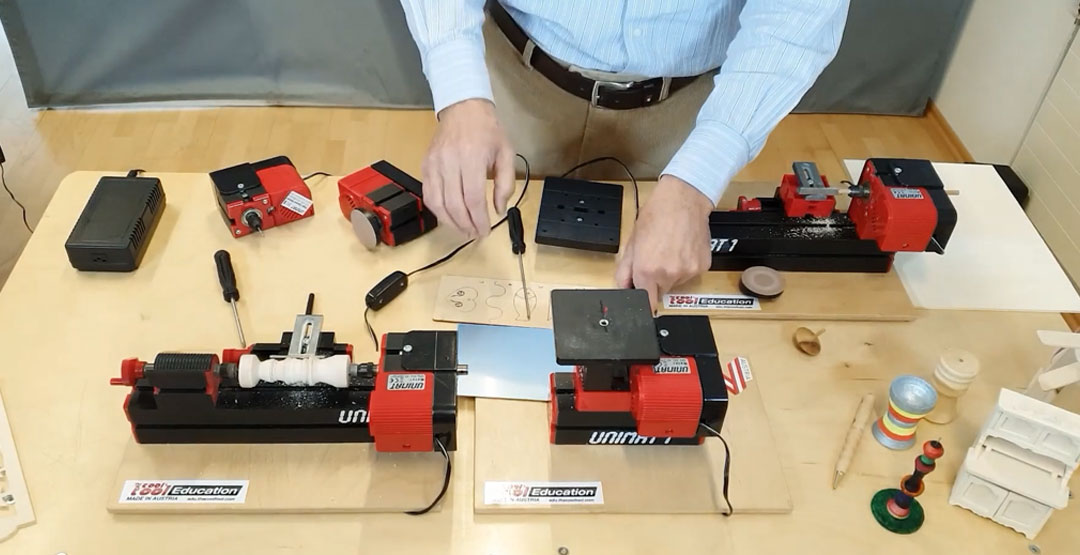
1. Assembled PLAYmake Jig-Saw/Sanding Machine: This versatile tool allows children to explore the art of cutting and shaping wood. With safety features in place, they can safely create various shapes and designs using the jig-saw function. The machine also doubles as a sanding tool, allowing children to refine their creations to perfection.

2. Assembled PLAYmake Woodlathe: The woodlathe unleashes an exciting opportunity for children to learn about woodturning. They can shape and transform pieces of wood into unique objects such as spinning tops or small vases. With the assembled woodlathe, children can delve into the world of craftsmanship and experience the thrill of creating their own turned wooden creations.

3. PLAYmake Handdrill: The handdrill introduces children to the concept of drilling holes in wood. With the safe and easy-to-use PLAYmake handdrill, they can practice precision and learn how to work with different drill bit sizes. This tool enhances their fine motor skills and coordination while fostering their understanding of woodworking techniques.

4. Poplar-Plywood Sheets A4: The DIY technical set includes four A4-sized poplar-plywood sheets, to facilitate sturdy and versatile material for children to work with. They can cut, shape, and assemble the plywood to create their own imaginative projects.

5. Basswood Dowels: There are 24 basswood dowels, with 17 pieces measuring 20mm and 7 pieces measuring 30mm. These dowels can be used in various woodworking projects, such as constructing small structures, connecting parts, or creating sculptures.

6. PLAYmake Serviceset: The PLAYmake Serviceset includes additional tools and accessories that support the woodworking activities. These tools enhance the overall workshop experience and provide children with a comprehensive set of resources to unleash their creativity.

7. Construction Booklets: The workshop includes two construction booklets that guide children through various projects and techniques. These booklets offer step-by-step instructions, inspiring project ideas, and tips for successful woodworking.

8. Safety Goggles: Safety goggles are included to ensure the well-being of young DIYers. It’s important for children to protect their eyes during woodworking activities, and the included goggles help create an accident-free environment.

All these components are neatly packed in a handy storage box, making it convenient to keep the workshop organized and accessible for future use.

Our young learners can now embark on an exciting journey of exploration and discovery in the world of woodworking.

Contact us

Fill in your details below or send us an email on info@knowledge-hub.com